7 Open-Source Tools I Deploy in Every Client Marketing Stack
I run client marketing campaigns on 7 open-source tools that replace $2,000/month in SaaS subscriptions. Here is the exact stack and what each tool does.

Edward Chalupa
Founder, Whtnxt · Dallas, TX

I run client marketing campaigns on seven open-source tools. Combined, they replace roughly $2,100 per month in SaaS subscriptions. I know because I track every dollar of infrastructure cost across my own stack and compare it against the SaaS alternatives I used before.
When a client comes to me and says their current stack costs them $3,000 to $5,000 per month in software licenses, I show them this list. Every tool here is deployed in production for real client campaigns right now. None of them require a developer to maintain.
This is not a theoretical roundup. It is the actual stack I deploy when I onboard a new client.
Why I Stopped Pitching SaaS-Heavy Stacks
Before 2024, I built client marketing stacks on HubSpot, Mailchimp, Salesforce, and Calendly. The tools worked. The monthly bills did not.
A typical mid-size client was spending:
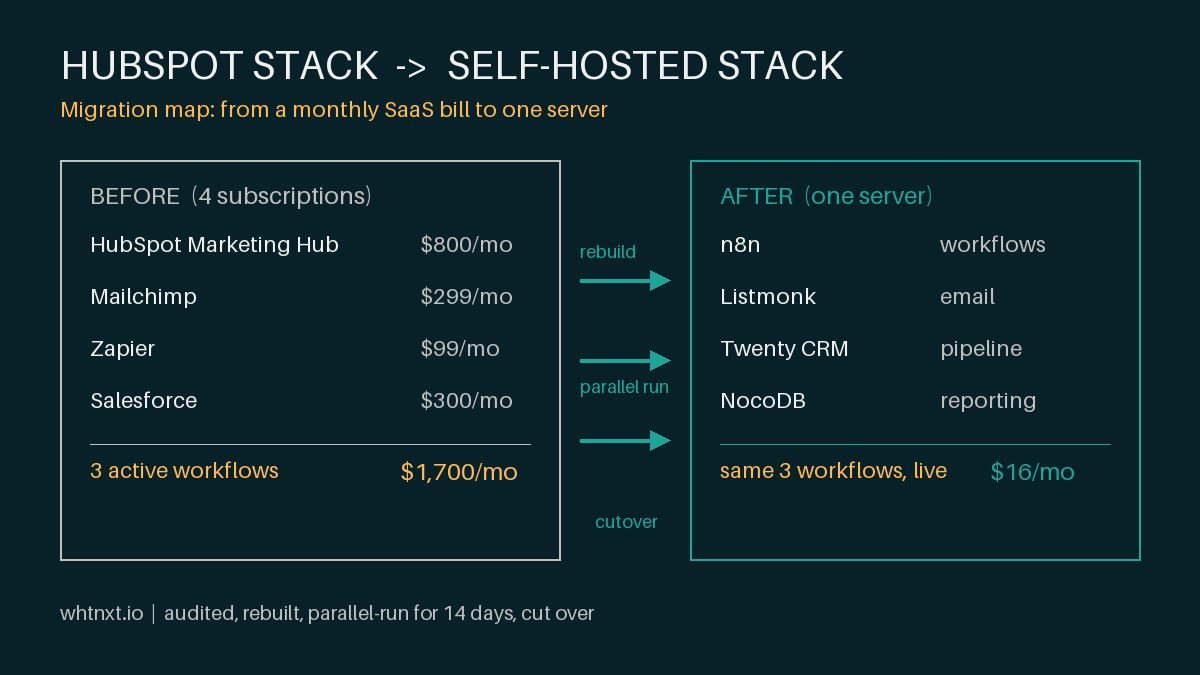
- HubSpot Marketing Hub: $800/month
- Salesforce CRM (2 seats): $300/month
- Mailchimp (25k contacts): $299/month
- Calendly (Teams): $16/month
- DocuSign (business): $45/month
- Google Analytics 360 or equivalent: $150/month
- Zapier (for connections): $99/month
- Total: ~$1,709/month
That is over $20,000 per year before any ad spend or agency fees. And the tools did not talk to each other without Zapier. Data lived in seven different places. Reporting was a manual copy-paste exercise.
When I walk a client through this exact migration from HubSpot to the stack below, I use the step-by-step playbook I wrote up in how I cut a client’s HubSpot bill 98%, including the parallel-run cutover that keeps deliverability intact.
When clients ask me to cut their tech spend, I do not negotiate with SaaS vendors. I replace the stack entirely.
Tool 1: n8n for Workflow Automation (Replaces Zapier + HubSpot Workflows)
n8n is the backbone of every stack I build. It is an open-source workflow automation platform that runs on a single Docker container. I self-host it on a Mac Mini in my office, and it connects everything else in this list.
What it replaces: I used to layer Zapier on top of HubSpot workflows for multi-step automation. That meant paying for two automation layers. n8n handles both in one tool.
Real numbers: My n8n instance runs 47 active workflows that handle client onboarding, lead routing, content scheduling, reporting, and billing. The total infrastructure cost is $0 in software — just the electricity for the Mac Mini and Cloudflare tunnel.
I cover the full setup in the n8n marketing automation engine guide, but the key point is that n8n’s native connectors handle HTTP requests, database queries, AI agent calls, and email directly. You do not need a separate integration layer.
Cost comparison: Zapier Professional for 20 active tasks: $99/month. n8n self-hosted: $0/month.
Tool 2: Twenty CRM for Client Relationship Management (Replaces Salesforce + HubSpot CRM)
Twenty is the open-source CRM I switched to after years of Salesforce and HubSpot. It handles contacts, companies, deals, tasks, and notes with a clean interface that my clients actually use without training.
What it replaces: I run Twenty for my own pipeline and for client CRM setups. It replaces the Salesforce Essentials or HubSpot CRM tier that most small agencies pay for.
Why it works in an agency stack: Twenty offers a REST API and GraphQL endpoint that n8n calls directly. When a lead fills out a form on a client site, n8n creates the contact in Twenty, logs the deal, and sends a notification — all without a human touching the keyboard.
I detailed the migration process in I Replaced My CRM with Self-Hosted Twenty. The biggest surprise was that my clients preferred Twenty’s interface over HubSpot because it had fewer distractions.
Cost comparison: Salesforce Essentials (2 users): $300/month. Twenty self-hosted: $0/month.
Tool 3: NocoDB for Flexible Data Backend (Replaces Airtable + Google Sheets for Complex Workflows)
NocoDB is an open-source database platform that gives you a spreadsheet-like interface on top of a real database. I use it for content calendars, job tracking, inventory systems, and any structured data that needs to be shared between tools.
What it replaces: I stopped using Airtable when the team plan hit $40 per seat and the record limits started blocking our workflows. NocoDB has no record limits at the self-hosted tier.
Real use case in client stacks: Every content campaign I run goes through a NocoDB base. The table has rows for each content piece with status, assigned writer, publish date, keywords, and link targets. n8n reads this base every morning and sends task reminders. When a piece goes live, n8n updates the status automatically.
I wrote about the full comparison in Self-Hosting NocoDB vs Airtable. The short version: NocoDB handles every Airtable use case I have thrown at it, and the Docker setup takes 15 minutes.
Cost comparison: Airtable Team plan (3 editors): $120/month. NocoDB self-hosted: $0/month.
Tool 4: Listmonk for Email Newsletters (Replaces Mailchimp + ConvertKit)
Listmonk is a self-hosted email newsletter platform that handles subscriber management, campaign creation, and list segmentation. I run it on a Synology NAS behind a Docker compose file.
What it replaces: I had a Mailchimp account that cost $299 per month for a 25,000-contact list. Listmonk handles the same volume on my own hardware with no per-contact pricing.
Real workflow: Every post published on whtnxt.io triggers an n8n workflow that creates a Listmonk campaign, populates it with the post content, and sends it to the relevant subscriber segment. The process is fully automated. I do not log into Mailchimp’s interface anymore.
Listmonk also supports custom SMTP, so I route through a transactional email provider that costs pennies per thousand sends instead of Mailchimp’s per-contact premiums.
Cost comparison: Mailchimp Standard (25k contacts): $299/month. Listmonk self-hosted: $0/month (plus SMTP costs at roughly $5 to $10 per month for send volume).
Tool 5: Documenso for Document Signing (Replaces DocuSign + HelloSign)
Documenso is an open-source document signing platform that handles NDAs, service agreements, proposals, and contracts. I use it for every client engagement.
What it replaces: I was paying $45 per month for DocuSign Business for client contracts. Documenso does the same thing — send a document, collect signatures, track status — without the recurring fee.
Real integration: When a deal moves to “Closed Won” in Twenty CRM, n8n triggers a Documenso signing request using the client’s contact details from the CRM. The signed document comes back, n8n stores the link in the deal record, and the onboarding workflow starts. This pipeline is what I describe in the client onboarding automation guide.
Documenso also supports API-triggered signing, so you can embed signature requests into any workflow without manual document uploads. The self-hosted instance connects through the same Cloudflare tunnel that routes n8n and NocoDB.
Cost comparison: DocuSign Business: $45/month. Documenso self-hosted: $0/month.
Tool 6: Cal.com for Scheduling Infrastructure (Replaces Calendly)
Cal.com is an open-source scheduling platform that handles booking, availability management, and calendar sync. It replaced Calendly in my stack about 14 months ago.
What it replaces: Calendly Teams was $16 per month and limited me to basic round-robin routing. Cal.com gives me the same scheduling workflows with custom availability rules, team booking, and webhook triggers for every event type.
Real workflow: When a lead submits a contact form on a client site, n8n creates a Cal.com booking link that is sent via the lead routing workflow. The prospect books a time, Cal.com fires a webhook back to n8n, and n8n creates the contact in Twenty CRM, logs a task for the sales rep, and sends a confirmation. This is covered in detail in the lead routing automation tutorial.
Cal.com also connects directly to Google Calendar for availability without needing a separate sync tool.
Cost comparison: Calendly Teams: $16/month. Cal.com self-hosted: $0/month.
Tool 7: Outline for Knowledge Base and Documentation (Replaces Confluence + Notion Team Plan)
Outline is an open-source documentation platform that I use for client playbooks, internal SOPs, and campaign documentation. Every client engagement gets its own Outline collection with the runbook for their stack.
What it replaces: I was using Notion on a team plan at $18 per seat per month. Outline gives me the same collaborative editing, document hierarchy, and search without the per-seat pricing or vendor lock-in.
Why it matters in a marketing stack: When I hand off a campaign to a client, they get an Outline collection that documents every workflow, every n8n trigger, every NocoDB view, and every Listmonk segmentation rule. They do not need to ask me how something works because it is all documented in one place.
Outline connects to Slack and has a search API, so team members can query the knowledge base from the tools they already use. My own Outline instance in the Whtnxt stack holds over 50 documents covering automation runbooks, client SOPs, and deployment guides.
Cost comparison: Notion Team (5 editors): $90/month. Outline self-hosted: $0/month.
What This Stack Costs Per Month
Here is the exact math for the stack I described:
| Tool | Self-Hosted Cost | SaaS Alternative | SaaS Cost |
|---|---|---|---|
| n8n | $0 | Zapier Pro + HubSpot Workflows | $99 + $800 |
| Twenty CRM | $0 | Salesforce Essentials | $300 |
| NocoDB | $0 | Airtable Team | $120 |
| Listmonk | $0 (plus ~$8 SMTP) | Mailchimp Standard | $299 |
| Documenso | $0 | DocuSign Business | $45 |
| Cal.com | $0 | Calendly Teams | $16 |
| Outline | $0 | Notion Team | $90 |
| Total | ~$8/month (SMTP) | SaaS total | ~$1,769/month |
The SMTP cost is the only recurring line item. I use a transactional email provider that charges per thousand emails sent, not per-contact. For a typical client sending 10,000 to 20,000 marketing emails per month, the cost runs between $5 and $10.
Infrastructure is not included in this comparison because you need a server to self-host regardless. But the hardware I use (a Mac Mini and a Synology NAS) runs the entire stack for multiple clients simultaneously. The hardware cost, spread across clients, comes out to roughly $25 to $50 per client per month depending on how many clients are on the instance.
Even adding the hardware cost, the total is under $60 per month compared to $1,769 in SaaS alternatives. That is a 97 percent reduction in tooling cost.
When This Stack Does Not Work
I want to be honest about the trade-offs because the open-source path is not always the right call.
If your team has zero technical comfort with Docker, Linux, or basic server administration, the self-hosted stack will create friction. You need someone who can restart a container, read a log file, and update an environment variable. That does not need to be a full-time DevOps engineer, but it does need to be someone on the team who can follow a runbook.
If you need certified SOC 2 compliance or HIPAA BAAs from your software vendor, self-hosted tools put that responsibility on you. I handle this by running the stack on isolated Docker networks with Cloudflare access policies, but it requires configuration that a SaaS tool would handle out of the box.
For my agency clients in Dallas, Fort Worth, and across Texas, these caveats have not been blockers. Most marketing teams have at least one person who can manage Docker containers, or they outsource the infrastructure to me as part of the engagement. The 97 percent cost reduction more than justifies the occasional SSH session.
Building Your Own Stack
If you want to replicate this stack for your agency or client campaigns, here is the order I recommend:
- Start with n8n — it is the connective tissue for everything else. Deploy Docker on a Linux VM or Mac Mini and install n8n from the official image.
- Add NocoDB next — you need a data layer for content calendars, lead tracking, and campaign logs before you add CRM or email.
- Deploy Twenty CRM once your lead volume justifies a structured pipeline. Twenty connects to n8n in about 15 minutes through the REST API.
- Add Listmonk when you start sending regular campaigns. The n8n-to-Listmonk integration takes one HTTP node.
- Layer in Documenso, Cal.com, and Outline as your client onboarding volume grows.
Each tool in this stack has a dedicated setup guide on this site. I linked to the relevant ones throughout this post. If you want a walkthrough of the full deployment, the n8n marketing automation engine guide covers the infrastructure setup, and the client onboarding automation pipeline shows how the tools work together end to end.
The most common question I get from agency owners is whether the self-hosted stack requires too much maintenance. My answer is that I spend less time maintaining this stack than I did managing vendor renewals, seat limits, and data migration between SaaS tools. Seven vendors became one server. That trade has been worth it every quarter for the last year and a half.
If you are still deciding whether to build your own stack or buy an all-in-one AI platform, I wrote a breakdown of why most AI marketing automation fails small businesses. The short version: the open-source stack I described here wins for any business under 20 employees.
For teams evaluating specific platforms rather than tool bundles, I also broke down the seven questions no vendor will answer about marketing automation platform selection. The short version: the self-hosted stack wins for any business under 10 service clients, period.