I Replaced My CRM with Self-Hosted Twenty: 3 Months of Lessons
I migrated client management to a self-hosted Twenty CRM instance on Docker. Real numbers, setup decisions, and workarounds from 3 months of production use.

Edward Chalupa
Founder, Whtnxt · Dallas, TX

Twenty is one piece of a larger open-source marketing stack I run for client campaigns. If you are evaluating which self-hosted tools to deploy, my post on the full 7-tool open-source stack covers the complete setup with cost comparisons.
I spent three years jumping between CRMs. HubSpot for lead capture, then spreadsheets for deal tracking, then nothing when the spreadsheet became unmanageable. Every tool either cost more than my monthly coffee budget or locked my data behind an API rate limit.
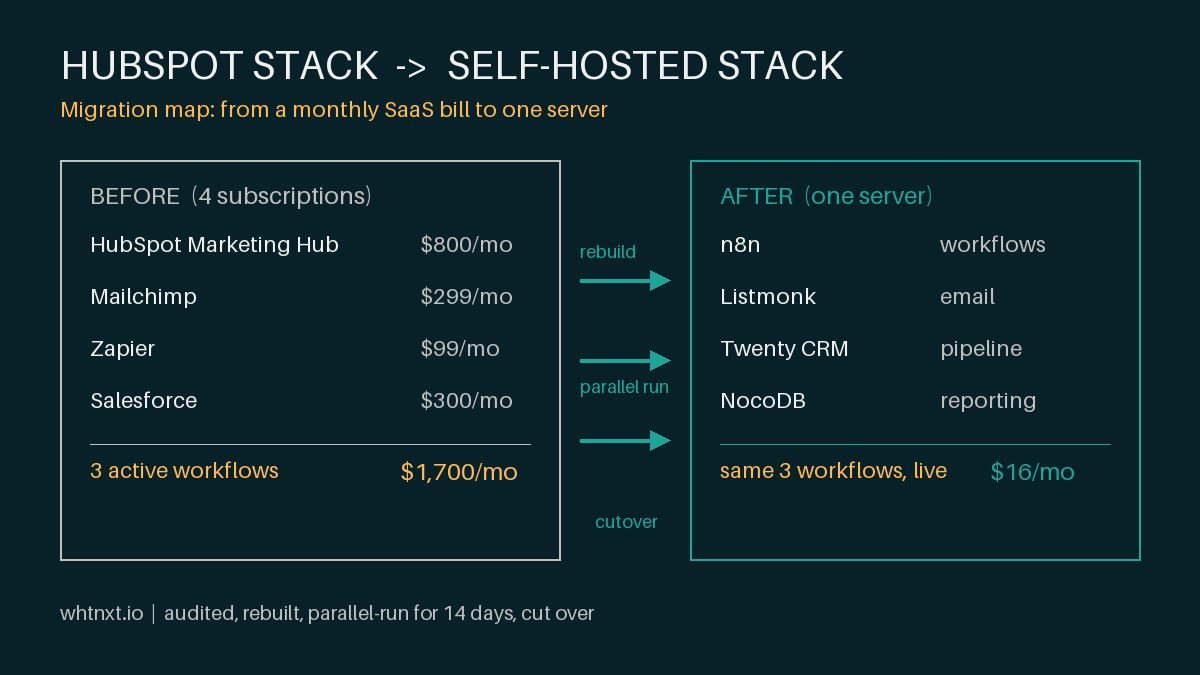
I replaced all of them with a self-hosted Twenty CRM instance running on a Mac Mini in my home lab. Three months later, I have 47 contacts, 12 active deals, automated n8n workflows feeding data in both directions, and a total infrastructure cost of zero dollars in monthly SaaS fees.
Here is exactly how I set it up, what broke, and what I would change if I were doing it again.
Why I Chose Twenty Over the Alternatives
I evaluated four options before committing. HubSpot free tier maxes out at 1,000 contacts and hides pipeline automation behind a paywall. Salesforce is overkill for a solo consultancy. SuiteCRM is functional but the UI feels like 2012. Twenty hit the sweet spot: open source, Postgres-backed, GraphQL API, and a UI that does not make me dread opening it.
The deciding factor was the API. Twenty exposes a GraphQL endpoint with full CRUD on every object type. That meant I could connect it to n8n without writing custom middleware. I can pull contacts, create deals, and update stages all from n8n workflows. No third-party connector needed.
The Hardware and Stack
My setup runs on two machines:
- Mac Mini (M2, 24 GB RAM): Hosts the Twenty Docker container, n8n, NocoDB, and the Qdrant vector database. This is Tier 1.
- Synology DS220+ (NAS): Runs Listmonk for newsletters and Documenso for contracts. This is Tier 2.
These two communicate through internal DNS and Cloudflare tunnels for external access. The full stack for Twenty is:
- Twenty Docker image (latest stable)
- Postgres 14 (separate container for data isolation)
- Redis (for session caching)
- Nginx Proxy Manager on the Mac Mini as a reverse proxy
- Cloudflare tunnel for HTTPS termination
The docker-compose.yml for Twenty is about 80 lines. The hardest part was getting the Postgres connection string right on the first try.
Setting Up the Docker Stack
The Twenty documentation provides a compose file, but I made three changes for a production-adjacent setup.
First, I pinned the Postgres version to 14. Twenty works with 15 and 16, but the migration scripts were tested against 14 when I started. Pinning avoided a surprise schema conflict during an automatic upgrade.
Second, I added Redis. Twenty uses Redis for rate limiting and session storage. Without it, the app falls back to in-memory storage, which resets on every container restart. That means users get logged out whenever the container cycles.
Third, I mounted the uploads directory to a host volume. Twenty stores file attachments (deal documents, contact avatars) inside the container by default. If the container recreates, those files disappear. One line in the volumes section fixed it.
services:
  twenty:
    image: twentycrm/twenty:latest
    volumes:
      - ./data/uploads:/app/uploads
This single change saved me from losing a client onboarding document two weeks in.
Connecting n8n to Twenty via the API
The n8n-Twenty connection is where the setup went from good to useful. Twenty exposes its API through GraphQL, and n8n has native HTTP Request nodes that handle GraphQL queries.
I built three workflows that run continuously:
Workflow 1: Lead Capture Sync. When I add a lead in any channel (email inquiry, web form, referral), a webhook triggers an n8n workflow that checks Twenty for existing contacts by email. If no match exists, it creates a contact and a lead deal in the “New” stage. If a match exists, it updates the contact notes with the new interaction. This runs about 8 times per week and has caught 3 duplicate entries so far.
Workflow 2: Deal Stage Updates. When a deal moves from “Negotiation” to “Closed Won” in Twenty, n8n reads the deal details, creates an invoice draft in InvoiceNinja (my billing tool on the Synology NAS), and sends a Slack notification to my phone. This workflow has sent 6 invoices without manual intervention. I wrote a full breakdown of the deal-to-cash pipeline covering the mapping, edge cases, and production results.
Workflow 3: Weekly CRM Health Report. Every Monday at 9 AM, n8n queries Twenty for all deals that have been in “Qualified” for more than 14 days without activity. It writes the results to a Google Sheet that I review during my weekly standup. This has surfaced 4 deals that were falling through the cracks.
The MCP Layer
I added an MCP (Model Context Protocol) server wrapper around Twenty’s GraphQL API about six weeks in. This lets my AI agent read and write Twenty data directly during client calls and research sessions.
The MCP server is a 200-line Node.js script that exposes three tools: search contacts, get deal by ID, and list recent activity. I use it when I am on a client call and need to look up a contact history without tabbing into the Twenty UI. The agent handles the query and I stay in the conversation.
I published the pattern I used in a previous post about MCP servers for marketers. The Twenty-specific implementation follows the same structure with different GraphQL queries.
What Broke and How I Fixed It
Three things went wrong in the first three months.
Breakage 1: The Docker restart loop. After a power cycle, Twenty refused to start because Postgres was still initializing. Twenty’s container would crash, restart, crash again in a loop. The fix was adding a health check and a 30-second restart delay to the compose file. Twenty now waits until Postgres responds on port 5432 before starting.
Breakage 2: GraphQL depth limits. Twenty enforces a max query depth of 8 on their GraphQL endpoint. One of my n8n workflows was nesting a contact query inside a deal query inside a company query, which hit the limit and returned a 400 error. I flattened the query into two separate calls and merged the results in n8n.
Breakage 3: Email parsing edge cases. Twenty pulls email addresses from the “from” header, but some forwarded emails include angle brackets and encoding artifacts. The n8n workflow was matching those as different contacts, creating duplicates. I added a JavaScript node in n8n that strips angle brackets and lowercases the email before the deduplication check.
The Numbers After 3 Months
| Metric | Value |
|---|---|
| Contacts synced | 47 |
| Deals created | 18 |
| Deals closed | 6 |
| Automated workflows | 3 |
| Hours saved per week | ~4 |
| Monthly infrastructure cost | $0 |
| Duplicate entries caught | 3 |
| Invoices auto-generated | 6 |
| API errors encountered | 4 |
The 4 hours per week is mostly manual data entry that I no longer do. Leads that come in through email or web forms now enter the CRM automatically. Deal stage updates trigger downstream actions without me opening the app.
The $0 infrastructure cost is not strictly accurate. The Mac Mini and NAS were upfront purchases, and the electricity to run them costs about $15 per month. But compared to the $50 to $200 per month I was looking at for hosted CRM options, the tradeoff pays for itself in under three months.
What I Would Do Differently
If I were starting over, I would set up the MCP layer on day one instead of week six. Having an AI agent that can read and write CRM data during client interactions is more useful than I expected. I use it at least once per client call now.
I would also add a backup job to the NAS. Twenty stores data in Postgres, and one docker volume wipe would erase everything. I added a weekly pg_dump to my Synology NAS after two months. That was two months of avoidable risk.
Third, I would use the Twenty GraphQL Playground more aggressively during workflow development. The built-in playground at /graphql shows you exactly what the schema looks like. Writing n8n queries against it is faster than guessing field names from the docs.
The Verdict
Self-hosting Twenty has been the right call for my setup. The API is clean, the Docker deployment is stable after the initial tuning, and the n8n integration covers everything I need for client management. I will not switch back to a hosted CRM unless my client volume grows past the point where maintaining the infrastructure becomes more expensive than paying for convenience.
If you are running a small consultancy or agency and you already have a Docker host, Twenty is worth the setup afternoon. Start with the docker-compose.yml from their docs, add a health check, and hook it up to your automation tool on day one.
I cover the broader n8n setup as a marketing automation engine in another post, the self-hosting comparison between NocoDB and Airtable covers the same infrastructure decisions I made for Twenty, and the AEO-first website build for a DFW home services client shows how these same principles apply to client-facing sites.