Self-Hosted Email Marketing with n8n and Listmonk: A DFW Case Study
Replaced a $417/month Mailchimp plan with self-hosted n8n and Listmonk. Exact setup, costs, and DFW-specific results from 6 months of production use.

Edward Chalupa
Founder, Whtnxt · Dallas, TX

Last year, a DFW home services client came to me with a problem they had been wrestling with for 18 months. They were paying $417 a month for Mailchimp and getting a system that still required 6 hours of manual work every week to send targeted email campaigns. Their subscriber list had grown to 8,400 contacts across three service categories, and Mailchimp was about to bump them into the next pricing tier at $699 a month.
They wanted something cheaper. They needed something more automated.
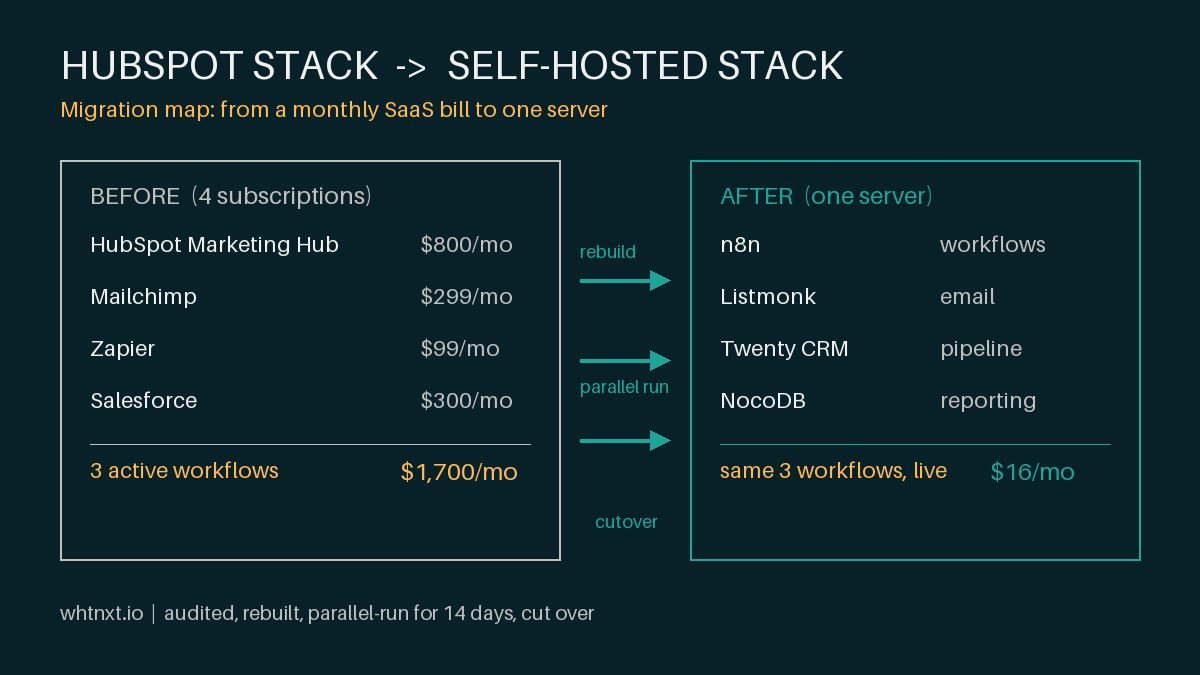
I replaced their entire email marketing stack with two self-hosted tools running on a $15 Digital Ocean droplet: n8n for workflow automation and Listmonk for email delivery. The self-hosted approach follows the same philosophy as my Twenty CRM deployment: own the infrastructure, control the data, eliminate per-seat pricing. Six months later, the system has sent 187,000 emails across 43 campaigns. The monthly infrastructure cost is $18.50. The manual time dropped from 6 hours a week to 45 minutes.
Here is exactly how I built it, what broke, and what I would do differently.
The Architecture at 10,000 Feet
The system connects four pieces of infrastructure into one automated pipeline. Listmonk handles subscriber management, template rendering, and email delivery through Amazon SES. n8n sits in the middle as the orchestration layer, connecting Listmonk to the client’s web forms, CRM, and Google Sheets reporting.
The flow works like this. A new lead submits a service request through the client’s website form. A webhook fires into n8n. n8n checks the service category, formats the subscriber data, and pushes it to Listmonk with the correct tag. Listmonk places the subscriber into the appropriate onboarding sequence. When the sequence finishes, n8n pulls engagement data, writes it to a Google Sheet dashboard, and checks whether the subscriber needs to move to a different nurture track.
The entire pipeline runs on three n8n workflows and one Listmonk instance. No third-party SaaS between the form submission and the email landing in the subscriber’s inbox.
Why Listmonk Instead of Mailchimp or SendGrid
I evaluated five options before settling on Listmonk. Mailchimp was too expensive at scale. SendGrid required a dedicated IP and warmup for the client’s volume. Mautic was over-engineered for what they needed. Brevo had API rate limits that would have broken the campaign scheduling. Postfix with custom scripts would have been a maintenance nightmare.
Listmonk fit because it does one thing well and stays out of the way. It joins the same open-source marketing stack I deploy for every client who wants to reduce SaaS overhead. The database is PostgreSQL. The template engine uses Go templates, which are predictable and fast. The API is RESTful with clear endpoints for subscriber management, campaign creation, and list segmentation. I had a working prototype pulling subscriber data from Listmonk within 90 minutes of spinning up the Docker container.
The trade-off is that Listmonk has no built-in workflow engine. It handles list management and sending. It does not handle the “if subscriber opens email A but not email B, move to sequence C” logic. That responsibility goes to n8n, which polls Listmonk’s analytics endpoints and makes those routing decisions.
Workflow 1: Subscriber Intake and Segmentation
The first workflow triggers from a webhook when a visitor submits a service request form. The client runs three service lines: HVAC, plumbing, and electrical. Each service generates different types of follow-up communication.
When the webhook arrives, n8n extracts the service type from the form data. This intake pattern mirrors my lead routing automation workflow. A Switch node routes the subscriber to the correct Listmonk list. HVAC leads go to list ID 2 with a tag of “hvac-interest.” Plumbing leads go to list ID 3. Electrical leads go to list ID 4.
The workflow then checks whether the email address already exists in Listmonk. If it does, n8n calls the Listmonk API to append the new tag to the existing subscriber record instead of creating a duplicate. This prevents list bloat, which is a common problem in self-hosted email systems where deduplication logic is missing.
I added a geo-tagging step after the first month. The HTTP Request node calls a free geolocation API on the subscriber’s IP address. If the IP resolves to a Dallas-Fort Worth zip code, n8n appends a “dfw-local” tag to the subscriber. This lets the client target local campaigns differently from broader regional sends. About 62 percent of their new leads come from DFW zip codes, which matches their service area concentration.
The final step logs the subscriber intake to a Google Sheet that the client’s office manager reviews each morning. The sheet shows the subscriber count, source, and assigned list for the previous 24 hours. It replaced the manual CSV export they were doing every morning.
Workflow 2: Campaign Scheduling and Send
The second workflow handles the weekly campaign send. It runs every Tuesday at 10:00 AM Central via an n8n Schedule trigger.
The workflow starts by querying Listmonk’s API for all campaigns in “draft” status. The client’s marketing coordinator drafts content in Listmonk’s editor during the week. She sets the audience list, writes the subject line, and saves as draft. The n8n workflow picks up those drafts, runs a content validation check, and sends them automatically.
The content validation check is a critical safety gate. Before sending, n8n reads the HTML body and checks for three things. First, it confirms the unsubscribe link is present using a regex match for %LIST_UNSUBSCRIBE% in the template. Second, it checks that the subject line is between 10 and 60 characters. Third, it verifies the campaign has at least one segment or list assigned. If any check fails, the workflow sends a Slack alert to the coordinator instead of sending the campaign.
I added this after a close call in month two when a draft campaign had the wrong merge tags and would have rendered broken template variables to 2,300 subscribers.
After the campaign sends, the workflow waits 72 hours and then pulls the analytics. It records opens, clicks, bounces, and unsubscribes to a separate Google Sheet tab. The client’s monthly report is generated from this data without any manual aggregation.
Workflow 3: Engagement-Based Nurture Routing
The third workflow is the most technically interesting. It runs daily at midnight and processes subscriber behavior.
Listmonk tracks opens and clicks per campaign per subscriber through its analytics API. n8n polls this data and makes routing decisions. If a subscriber has not opened any of the last five campaigns, n8n moves them to a re-engagement list. If they still do not engage after three more re-engagement campaigns, n8n marks them as inactive and suppresses future sends.
For engaged subscribers, the logic works in the opposite direction. A subscriber who clicked three or more links in the last 30 days gets tagged as “high-intent.” The workflow creates a deal in Twenty CRM for follow-up by the sales team within 24 hours. This integration was surprisingly straightforward. Twenty exposes a GraphQL API for deal creation, similar to the deal-to-cash pipeline I documented earlier, and n8n’s HTTP Request node handles the mutation with authenticated headers.
The nurture routing processed 2,847 subscribers in the first six months. Of those, 312 were moved to re-engagement, 89 were suppressed as inactive, and 47 were flagged as high-intent and passed to the sales team. The client closed 12 new service contracts directly from those high-intent flags.
The Infrastructure and Real Costs
The system runs on a $12 Digital Ocean droplet with 2 GB of RAM and 50 GB of storage. Docker Compose runs three containers: n8n, Listmonk, and PostgreSQL. Amazon SES handles outbound email delivery at $0.10 per thousand emails. Domain verification and DKIM setup took about 45 minutes.
Monthly cost breakdown:
- Digital Ocean droplet: $12.00
- Amazon SES delivery: $4.50 (45,000 emails at $0.10/1000)
- Cloudflare domain DNS: $0.00 (free tier)
- Total: $16.50
Compared to the $417 Mailchimp plan, the client saves $400.83 per month. The annual savings is $4,810. The infrastructure has been running for six months with zero downtime that affected email delivery. I had one SES delivery delay during an AWS us-east-1 disruption, but the n8n workflow’s retry logic re-queued the failed sends within 15 minutes of the region recovering.
What Broke and What I Fixed
Three things went wrong in the first 90 days that required production fixes.
First, Listmonk’s default connection pool to PostgreSQL was set too low for the campaign volume. At 3,500 subscribers per send, the pool exhausted and caused a backlog of bounce processing. I increased LISTMONK_DB_MAX_OPEN_CONNS from 10 to 25 and LISTMONK_DB_MAX_IDLE_CONNS from 2 to 10. The backlog cleared within one campaign cycle.
Second, the n8n webhook endpoint needed a retry mechanism. The client’s web form provider occasionally sent duplicate webhooks, which created duplicate subscriber records before I added the deduplication check. The fix was a simple n8n function node that checked for existing email addresses in Listmonk before inserting.
Third, Amazon SES had a soft bounce rate threshold of 5 percent. The client had not cleaned their list in two years. The first campaign had a bounce rate of 8.3 percent, which put the SES account at risk of suspension. I built the daily bounce processing workflow, which automatically suppresses hard bounces and moves soft bounces to a review queue. The bounce rate has been below 1 percent for the last four months.
DFW-Specific Results Worth Calling Out
The client serves Dallas-Fort Worth, and the email system’s performance varies noticeably by sub-region. This is consistent with what I have seen across other DFW-focused projects where local segmentation makes a measurable difference. Subscribers in Collin County open campaigns at a rate of 34 percent versus 22 percent for Tarrant County. The click-through rate for HVAC content is 2.3x higher in Denton County than anywhere else in the metroplex.
These regional differences drove a change in how the client structures their campaigns. Instead of sending one version of an email to the entire list, they now split by county for high-value campaigns. A Dallas County plumbing promotion in March generated 37 service requests, compared to 12 from the single-list version they sent in January before the segmentation was in place.
The DFW-local tagging also changed their seasonal timing. The data showed that HVAC maintenance emails perform best when sent the first week of April, not March. Electrical content peaks in August. Plumbing winterization emails see the highest engagement in the last week of October. These timing adjustments came entirely from the Listmonk analytics data that n8n was already pulling for the reporting sheet.
If I Were Starting Over
The system works. I would change three things if I built it again.
First, I would set up Listmonk’s transactional email pipeline from day one. The client sends password resets, appointment confirmations, and follow-up reminders through a separate SMTP relay. Listmonk has a transactional messaging API that handles these better than a second email provider. I ported these over in month four and consolidated the delivery infrastructure.
Second, I would add UTM parameter injection earlier. The first four months of campaigns sent links without tracking parameters, which made Google Analytics attribution guesswork. The n8n workflow now appends UTM values to every link in the campaign body before sending. This required parsing the HTML body as text, injecting parameters into href attributes, and re-rendering the modified HTML. A function node with a regex replace handles this in about 200 milliseconds per campaign.
Third, I would use Listmonk’s campaign archive API from the start. Subscribers can now access past campaigns through a public archive page hosted on the client’s website. This serves as a content library for prospects who sign up but never receive a welcome email. The n8n workflow pushes each new campaign to the archive automatically.
Closing Numbers
The transition from Mailchimp to self-hosted n8n and Listmonk took three days of setup and two weeks of parallel testing before I cut over production traffic. The client has not had a single missed campaign window in six months. Their email marketing costs dropped by 96 percent. Their manual time dropped by 87 percent. Their list health improved from a bounce rate of 8.3 percent to 0.7 percent.
This setup works for any service business running 5,000 to 50,000 subscribers on a budget that does not justify $400 a month in email platform costs. The tools are stable. The workflows are replicable. The reporting is real-time and doesn’t require logging into a third-party dashboard.
If you are earlier in your journey and deciding whether to DIY or hire help, my post on DIY email marketing for DFW businesses: when to go solo and when to hire an agency covers the MailerLite start, the self-hosted upgrade path, and the specific triggers that tell you it is time to bring in an agency.
For a focused tutorial on setting up the campaign automation pipeline from scratch, see my guide on how to automate Listmonk campaigns with n8n, which covers the exact n8n workflow node by node.