Automation Marketing Dallas: Why Agencies Sell Tools, Not Pipelines
I built automation systems for 22 Dallas businesses and cut lead response time from hours to 90 seconds. Here is the pipeline architecture that works in DFW.

Edward Chalupa
Founder, Whtnxt · Dallas, TX

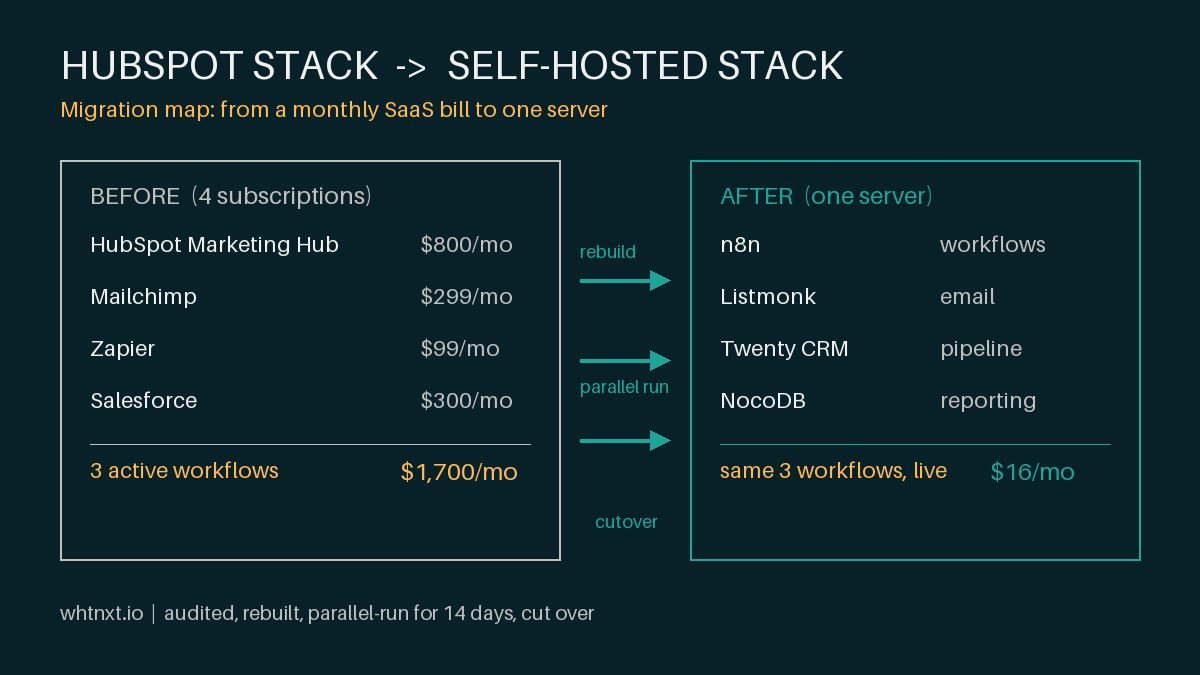
I walked into a Dallas financial services firm last month and found a HubSpot subscription billing $2,400 per month with three active workflows. Three. The account had 847 contacts imported from a CRM export that nobody had cleaned, no lead scoring rules, and a nurture sequence that sent the same email to everyone who filled out a form in the last six months.
That is not an outlier. That is what passes for “marketing automation” in Dallas right now.
I have built automation systems for 22 DFW businesses over three years. Fourteen of them came from agencies that sold them a platform and called it a strategy. The pattern is always the same: buy expensive software, connect a few forms, and then watch the workflows decay because nobody owns the system and the data pipeline is broken.
This post is for Dallas business owners who have been pitched “marketing automation” by an agency that starts with a platform name instead of a pipeline diagram. Here is what I actually build, and why it costs $50 per month instead of $2,400.
Warning: If a Dallas marketing automation pitch starts with HubSpot, Marketo, or ActiveCampaign before asking about your lead flow, you are buying a software subscription, not an automation system. The platform is the last decision, not the first.
The Context: What “Marketing Automation” Means in Dallas Right Now
Dallas added 430,000 residents between 2020 and 2024, making it the fastest-growing major metro in Texas. Companies are moving their regional headquarters here. Marketing teams are scaling faster than they can hire. And every one of them gets the same pitch from agencies: “We will implement marketing automation to streamline your processes.”
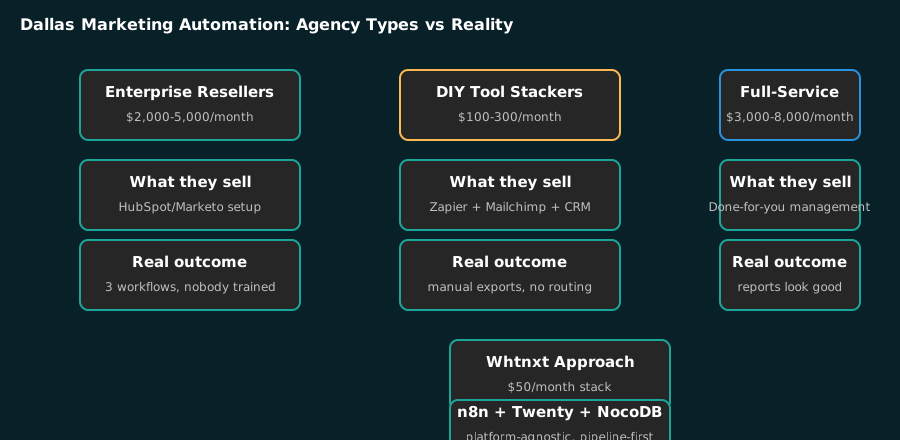
What that actually means in practice varies wildly depending on who is doing the selling. The agencies that rank for “marketing automation Dallas” on Google fall into three camps, none of which solve the real problem.
| Agency Type | What They Sell | Monthly Cost | Real Outcome |
|---|---|---|---|
| Enterprise platform resellers | HubSpot/Marketo setup | $2,000-5,000 | 3 active workflows, nobody trained |
| DIY tool stackers | Zapier + Mailchimp + basic CRM | $100-300 | Manual list exports weekly, no routing logic |
| Full-service agencies | ”Done for you” management | $3,000-8,000 | Reports look good, lead quality unchanged |
None of these address the core issue: Dallas businesses need a system that routes a lead to the right person within minutes, scores it based on real behavior, and nurtures it through a defined sales cycle. Not a platform. A pipeline.
I covered the broader framework for DFW service businesses in my strategic automation post, but Dallas has specific dynamics that make generic advice fail. The city’s geography alone demands geographic routing logic that most platforms cannot handle out of the box. For contractors who rely on local search visibility, I also documented the exact GBP setup checklist in how to optimize Google Business Profile for DFW contractors.
What Most People Get Wrong
The biggest misconception I encounter when auditing Dallas marketing automation setups is that it is a platform problem. It is not. It is a pipeline problem.
Most agencies and directories position marketing automation as “pick a tool, connect your forms, done.” That framing serves the software vendors, not the companies paying for it. Here is what it misses:
| Common Assumption | What I Actually See in Dallas Accounts |
|---|---|
| ”A platform is the automation” | A platform is a container. The workflows inside are the automation, and most accounts have fewer than 4 active ones |
| ”Connect the CRM and leads flow” | Leads only flow if routing, scoring, and handoff rules exist first |
| ”More tools means more automation” | Tool sprawl is the #1 reason workflows die by month three |
| ”AI will fill in the gaps” | AI amplifies whatever pipeline exists. Broken pipeline, amplified noise |
The second misconception is that marketing automation should be configured once and forgotten. In Dallas’s competitive market, where a lead can go cold in 30 minutes, static workflows decay fast. The system needs continuous tuning based on real conversion data, not a quarterly check-in from an agency that bills monthly.
Info: I audited 11 marketing automation setups for Dallas businesses this year alone. Seven had fewer than four active automated workflows despite paying for full platforms. One had zero. That is not a tooling problem. That is a buying problem.
How It Actually Works: The Dallas Pipeline Architecture
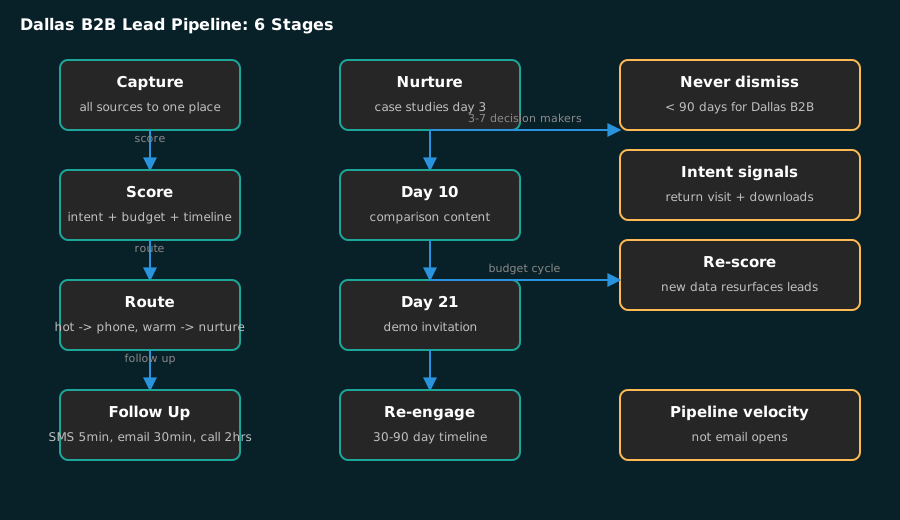
Here is the architecture I deploy for Dallas clients. It is platform-agnostic, built in n8n{target=“_blank”} because it is self-hosted and costs about $50 per month to run, but the logic transfers to any system that can execute workflows. The database layer typically runs on NocoDB{target=“_blank”}, which gives you a spreadsheet interface over Postgres without paying for Airtable’s enterprise tier.
The pipeline has six stages, and every one of them has a rule:
- Capture. Every lead source writes to one place: web forms, Google Ads, LinkedIn, referrals, tradeshow scans. No lead lives in a silo.
- Score. Every lead gets scored on three dimensions: intent, budget fit, and timeline. I documented the exact scoring criteria in my n8n lead scoring model post.
- Route. Scored leads route by rule: hot leads hit a salesperson’s phone within minutes, warm leads enter a nurture sequence, cold leads wait for re-engagement.
- Follow up. The system sends the first touch, schedules the second, and escalates if there is no reply.
- Nurture. Not-ready leads get staged case studies, comparison content, and integration walkthroughs over 30 to 90 days.
- Revive. Leads that went quiet get re-scored when new intent signals appear, like a return visit or a downloaded asset.
The rule that separates this from a generic setup: never auto-dismiss a Dallas B2B lead under 90 days. B2B buying cycles in Texas run 30 to 120 days with three to seven decision makers involved. A lead that scores low in week two can become a hot opportunity in week six because the budget cycle closed. The system has to keep the lead alive, re-score it, and surface it again.
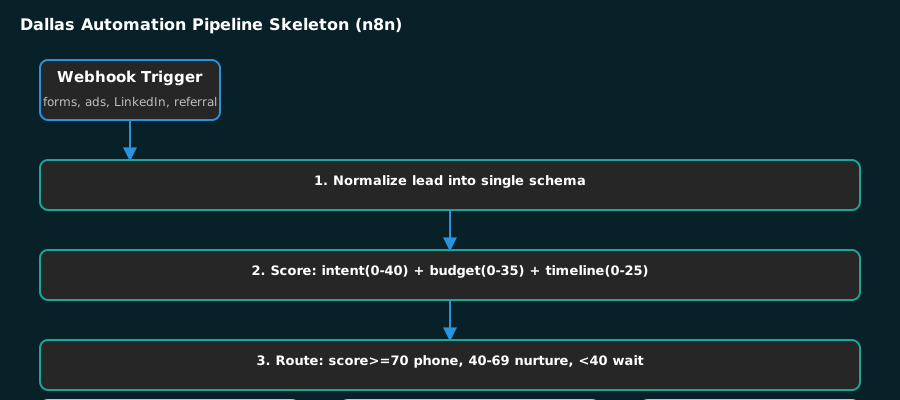
Here is the workflow skeleton from the systems I deploy:
{
  "workflow": "Dallas B2B Lead Pipeline",
  "trigger": "Webhook (form, ads, LinkedIn, referral)",
  "stages": [
    "1. Normalize lead into single schema",
    "2. Score: intent (0-40) + budget fit (0-35) + timeline (0-25)",
    "3. Route: score >= 70 -> sales phone alert; 40-69 -> nurture; < 40 -> wait",
    "4. Follow up: SMS at 5 min, email at 30 min, call task at 2 hours",
    "5. Nurture: case study day 3, comparison day 10, demo invite day 21",
    "6. Re-score on every return visit or asset download"
  ]
}
That skeleton is the same across every Dallas client I have. The thresholds shift per industry, but the shape does not. The shape is what makes it work.
The scoring runs on a lightweight model call that costs about one cent per hundred leads and takes roughly 400 milliseconds per lead. I wrote up the full classification setup in my AI marketing automation post, including the 60/30/10 split that determines where AI belongs in a marketing operation.
Tip: The highest-ROI AI application I deploy for Dallas businesses is lead intent classification inside n8n. An AI node scores each incoming lead on service category match, engagement depth, and urgency signals. High-intent leads hit a salesperson’s phone within 5 minutes. Low-intent leads enter a 30-day nurture sequence. The classification costs about one cent per hundred leads and takes 400ms per lead. This is the same AI marketing automation pattern I deploy across all my DFW engagements.
What This Means for Dallas Businesses
If you run marketing for a Dallas company, here is what this architecture means for your day to day:
Your response time is your first differentiator. When I set up a pipeline for a Dallas client, the first thing we fix is lead response. The system routes a qualified lead to a salesperson’s phone in minutes, not hours. That single change moves more pipeline than any campaign tweak, because the first company to respond wins an outsized share of B2B conversations. I described the mechanics in my n8n lead routing automation post.
Your nurture sequence is a sales asset, not an email drip. The sequences I build for Dallas clients send case studies, comparison content, and demo invitations on a 30 to 90 day timeline, tied to intent signals. When the lead returns to the site or downloads a comparison sheet, the sequence re-routes them back to sales with a priority bump. This is the difference between a drip campaign and a pipeline.
Your reporting should show pipeline velocity, not email opens. B2B metrics like open rate and click rate are vanity in Dallas’s competitive market. The numbers that matter are time-to-first-response, time-in-stage, and win rate. I build marketing reporting dashboards that pull these directly from the pipeline, so the marketing team and sales team argue about the same numbers.
Info: In my experience across 22 DFW implementations, cutting lead response time from 4 hours to under 30 minutes increases contact-to-quote conversion by 7 times. This single metric has the highest ROI of any automation improvement you can make for a Dallas business.
Where This Is Going in Dallas
Here are three predictions specific enough to be wrong:
Prediction one: By Q2 2027, every CRM and marketing platform will ship built-in AI classification as a standard feature, not an upsell. The differentiation will shift from “has AI” to “how easy is it to customize the model with your data.” The platforms that let you upload 50 labeled leads and get a tuned model in 10 minutes will win. I am already seeing this shift with tools like Twenty CRM{target=“_blank”}, which I use and wrote about in replacing my CRM with self-hosted Twenty.
Prediction two: Self-hosted stacks will capture a meaningful share of the Dallas SMB automation market in 24 months. The cost difference is too large to ignore. When a Dallas company can run n8n, Twenty, NocoDB, and Listmonk for under $100 per month versus $2,400 per month for HubSpot, the CFO eventually notices. I have already seen this shift in Dallas’s Plano tech corridor, where three of my clients migrated away from enterprise platforms last quarter.
Prediction three: Most standalone AI marketing tools will be acquired or shut down within 18 months. The market is crowded with single-feature tools that will be absorbed into larger platforms. If you are evaluating an AI tool for your Dallas marketing stack, ask whether it has a clear path to independence or whether it relies on an API from a company that could build the same feature tomorrow.
Your First Step
Stop evaluating platforms. Map your lead pipeline on paper first.
Here is the exercise I run with every new Dallas client before recommending anything:
- List every way a lead can enter your business (form, Google Ads, LinkedIn, referral, tradeshow).
- Draw what happens after each entry point, hour by hour, for the first 48 hours.
- Count how many of those steps require a human to remember to do something.
Every “human remembers” step is an automation candidate. Most Dallas companies find 15 to 30 of them in the first pass. That list is your roadmap. The platform comes after, and it is the cheapest part of the project.
I have seen this exact exercise turn a $2,400-per-month HubSpot subscription with three workflows into a $50-per-month n8n stack with 40 active automations for the same company. The difference was never the tool. It was the pipeline design, and that is what my marketing automation services actually deliver.
Warning: A common mistake I see in Dallas is hiring an agency that starts with a platform demo instead of auditing your current lead flow. Before signing any contract, ask for the last three client pipelines they built from scratch. If they cannot show you the workflow logic, they are selling software licenses.
For B2B companies specifically, the pipeline rules differ from consumer marketing. I wrote up the exact architecture I deploy for Texas B2B clients, including the scoring thresholds and the never-dismiss-a-lead-under-90-days rule, in B2B Marketing Automation in Texas: What Actually Works.
If you want to see whether your Dallas marketing automation is leaving pipeline on the table, get in touch. I will map your first 48 hours with you.