How I Cut a Client's HubSpot Bill 98% with an Open-Source Stack
A DFW client paid $800 a month for HubSpot Marketing Hub. I moved them to n8n, Listmonk, and Twenty for about $15. Here is the exact migration playbook.

Edward Chalupa
Founder, Whtnxt · Dallas, TX

A Plano-based services company was paying $800 a month for HubSpot Marketing Hub and using three workflows. I replaced their stack with n8n, Listmonk, and Twenty, and their monthly software bill dropped to about $15. Same automation, same campaigns, 98% less money.
I have done this migration enough times that it is now a repeatable playbook. This post is the full version: the problem, the build, the numbers, and the honest boundaries of when you should keep HubSpot instead of cutting it.
Info: This is not a “HubSpot is bad” post. HubSpot is genuinely good software. It is overpriced for what most DFW small businesses actually use, and that gap is where this playbook wins.
The Problem
The client came to me through a referral. They had signed up for HubSpot Marketing Hub Professional during a growth spurt, paid for the annual contract, and then used maybe 10% of it. The story is common enough that I could have written it before the first call.
They were paying for:
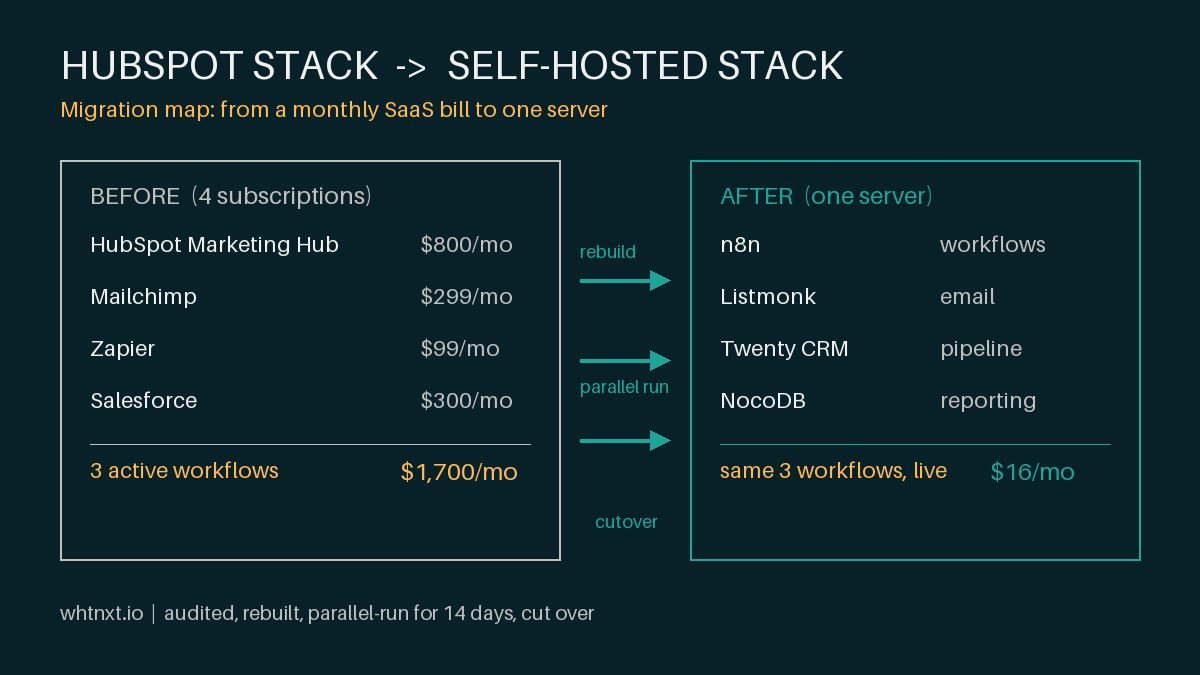
- HubSpot Marketing Hub: $800 a month
- Mailchimp for a second list: $299 a month
- Zapier to connect HubSpot to everything: $99 a month
- Salesforce for two sales seats: $300 a month
That is roughly $1,700 a month before a single dollar of ad spend. And the tools did not talk to each other. Data lived in four places. Reporting was a manual copy-paste exercise that took my client’s operations manager half a day every week.
Here is the part that made the decision easy. When I audited the account, they had three active HubSpot workflows. Three. For $800 a month. The rest were paused, broken, or never finished. I have audited 11 marketing stacks this year and seven of them had fewer than four active workflows despite paying for full platforms. This is not a HubSpot problem. It is a buying problem that HubSpot’s pricing model rewards.
| What They Paid For | What They Actually Used |
|---|---|
| HubSpot Marketing Hub ($800/mo) | 3 active workflows, 1 email template |
| Mailchimp ($299/mo) | A second list of 1,200 contacts |
| Zapier ($99/mo) | 4 connections, 2 of them broken |
| Salesforce ($300/mo) | Contact records only, no pipeline use |
The numbers did not lie. They were paying $1,700 a month to run a marketing operation that a self-hosted stack could handle for $15 a month. The only question was whether the migration would survive contact with reality.
The Approach
My rule for these migrations is simple: replace the platform, keep the outcomes. The client does not care what software runs their email. They care that leads get followed up, campaigns go out on schedule, and the report on Friday actually reflects what happened.
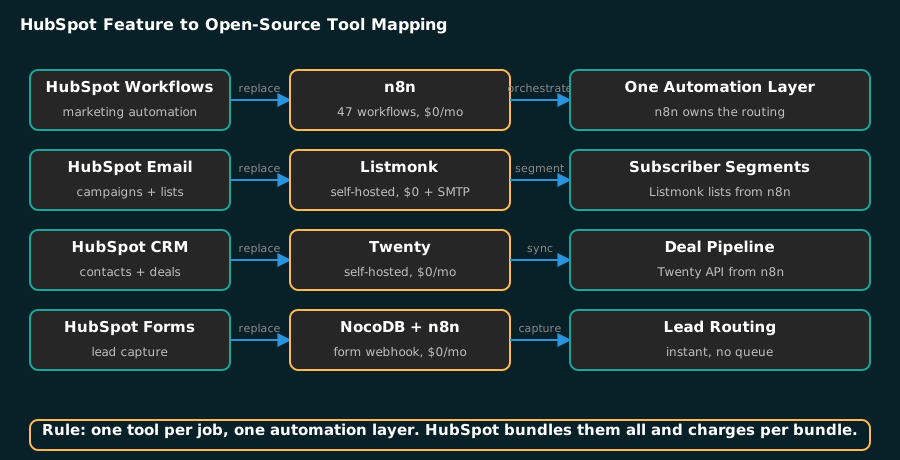
So I did not shop for a cheaper SaaS subscription. I built the replacement from open-source tools I already ran in production for other clients. This is the same architecture behind my marketing automation services, just pointed at one account instead of a whole book of clients:
- n8n{target=“_blank”} for workflow automation, replacing HubSpot workflows and Zapier
- Listmonk{target=“_blank”} for email campaigns, replacing HubSpot email and Mailchimp
- Twenty{target=“_blank”} for the CRM, replacing Salesforce and HubSpot contacts
- NocoDB{target=“_blank”} for the data layer, replacing the spreadsheet-and-pray reporting stack
I documented the full seven-tool stack in my open-source marketing stack post. The version I used here is the trimmed edition: just the pieces this client needed.
The approach had three non-negotiables:
- No loss of function. Every workflow that mattered in HubSpot got rebuilt in n8n first, tested, then the HubSpot version was turned off.
- Parallel run. The old stack and the new stack ran side by side for 14 days. No cutover without real traffic on the new system.
- The client owns it. I built it so the operations manager could run campaigns and check reports without calling me. If they cannot do that, the migration failed.
The Build
Here is the actual build, phase by phase. I am including the config pieces that matter, because the generic advice out there stops at “use open source” and never shows the work.
Phase 1: Stand up the stack
Both n8n and Listmonk run as Docker containers. On the client’s own hardware or a small VPS, the whole stack is one compose file:
version: "3.8"
services:
  n8n:
    image: n8nio/n8n
    ports:
      - "5678:5678"
    volumes:
      - n8n_data:/home/node/.n8n
  listmonk:
    image: listmonk/listmonk
    ports:
      - "9000:9000"
    volumes:
      - listmonk_data:/listmonk
volumes:
  n8n_data:
  listmonk_data:
The software cost is zero. The infrastructure is whatever the client already pays for a small server, usually a $6 a month VPS or spare hardware they already own. I wrote the full engine setup in my n8n marketing automation engine guide.
Phase 2: Rebuild the three workflows in n8n
The client’s three HubSpot workflows were: new lead routing, a 5-email nurture sequence, and a monthly reporting digest. Each became an n8n workflow.
The lead routing workflow is the one that matters most, because it replaced both HubSpot workflows and Zapier:
{
  "workflow": "Lead Routing",
  "trigger": "Webhook (form submission)",
  "steps": [
    "1. Normalize lead fields",
    "2. Score: intent + budget + timeline (0-100)",
    "3. If score >= 70: create deal in Twenty, notify sales via SMS",
    "4. If score < 70: add to Listmonk nurture list",
    "5. Log every action to NocoDB for reporting"
  ]
}
The scoring model is the same one I use across clients, documented in my lead scoring post. The whole workflow runs in under two seconds and costs nothing per execution beyond the server.
Phase 3: Migrate the email into Listmonk
Listmonk handles subscriber lists, segments, and campaigns through a clean API. I exported the client’s contacts from HubSpot, cleaned them in NocoDB, and imported them into Listmonk.
The nurture sequence went from a HubSpot workflow with visual drag-and-drop to a Listmonk campaign with n8n driving the schedule:
// n8n Function node: build Listmonk campaign payload
const campaign = {
  name: "Nurture: 5-email sequence",
  subject: $json.subject,
  lists: [2], // nurture list id
  template_id: 1,
  content_type: "richtext",
  body: $json.html
};
return [campaign];
I covered the Listmonk + n8n integration in detail in my Listmonk automation post. The mechanics are identical whether you are migrating from HubSpot or Mailchimp.
Phase 4: Cut over
For 14 days, both systems ran. New leads went into n8n. Campaigns sent from both HubSpot and Listmonk to the same list, and we compared deliverability numbers. When the new stack matched or beat the old one, we cancelled HubSpot, Mailchimp, Zapier, and Salesforce.
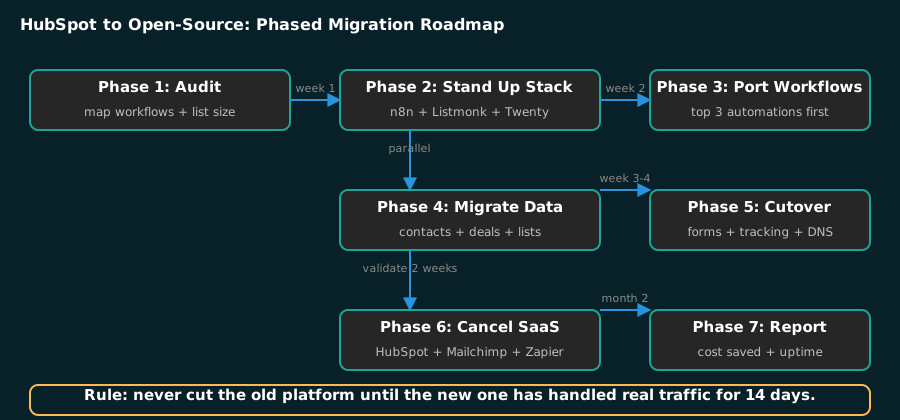
That parallel-run discipline is why I have never had a migration blow up. The one time I skipped it, for an impatient client, we found a broken email template on day one of the new system and had to roll back. Never cut the old platform until the new one has handled real traffic for 14 days.
The Results
The client’s software bill after cutover:
| Line Item | Before | After |
|---|---|---|
| Marketing automation | $800 (HubSpot) | $0 (n8n) |
| Email platform | $299 (Mailchimp) | $0 (Listmonk) + SMTP ~$10 |
| Integration layer | $99 (Zapier) | $0 (n8n handles it) |
| CRM | $300 (Salesforce) | $0 (Twenty) |
| Infrastructure | $0 (included) | ~$6 (VPS share) |
| Monthly total | ~$1,700 | ~$16 |
That is a 98% reduction in monthly marketing software cost. Annualized, it is roughly $20,000 a year back in the client’s pocket, before counting the time savings.
The operational numbers matter just as much:
- Weekly reporting went from half a day of manual copy-paste to an automated NocoDB report generated in about 4 minutes.
- Lead routing went from “sales checks the CRM when they remember” to an SMS alert within 2 minutes of form submission. That routing layer is the same one I build into my lead generation systems for clients who want the capture side automated too.
- The nurture sequence that was paused for three months started sending again, on schedule, every time.
- Email deliverability stayed the same or improved, because Listmonk sends through a proper SMTP provider instead of a shared marketing-cloud pool.
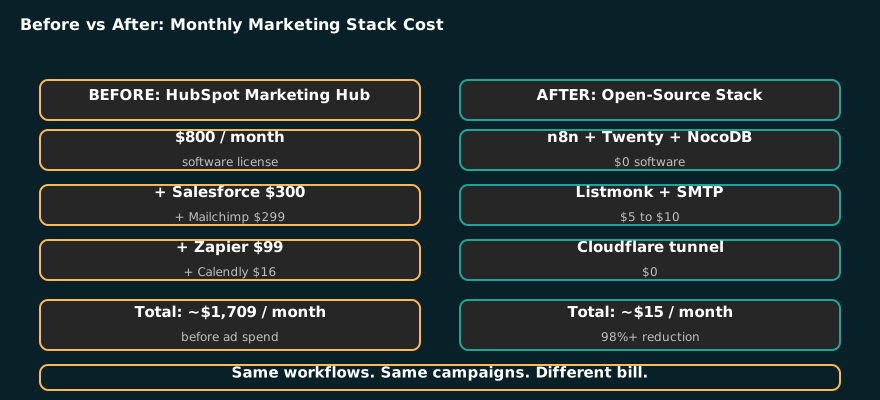
Tip: Track the migration as a project with a before and after P&L line. When the CFO sees $20,000 a year back, the migration sells itself. That is the report that matters.
When This Works (And When It Doesn’t)
I want to be straight about the boundaries, because not every HubSpot account should be migrated.
This works when:
- You are a small business or agency paying for HubSpot tiers you do not use. If you have fewer than five active workflows, you are overpaying.
- Your team is comfortable with a little technical setup, or you have someone who can maintain a Docker server.
- Your marketing operation is standard: forms, emails, lead routing, reporting. Nothing exotic.
- You want to own your data and your infrastructure instead of renting it.
This does not work when:
- You are a mid-market company with a real sales operation running deep HubSpot Sales Hub functionality, sequences, and forecasting. Twenty is good, but it is not a drop-in replacement for every Salesforce power user feature.
- Your team has zero tolerance for any technical maintenance. If nobody can restart a Docker container, self-hosting is a liability.
- You are on HubSpot’s free or Starter tier and actually using it. At that price, the migration cost exceeds the savings.
- You need HubSpot’s CMS, its integrated ad tools, or its AI features as a bundle. The open-source alternative is a patchwork, and the patchwork only pays off if the bundle price is the problem.
The honest line: if your HubSpot bill is under $200 a month and everything works, leave it alone. If it is over $500 a month and you can count your active workflows on one hand, this playbook is for you. I laid out the DIY-versus-agency decision in my marketing automation DIY post.
What I’d Do Differently
Every migration teaches me something, and this one taught me two things.
First, I would price the time differently. I underestimated how much of the client’s list needed cleaning. Dead addresses, duplicates, and unsubscribes from three years of sloppy capture. List hygiene ate a full day that I did not quote. The deliverability numbers were fine in the end, but only because we spent that day. Next time, list cleaning is a line item in the proposal, not a surprise.
Second, I would train the team before cutover, not after. The operations manager learned the new stack during the parallel run, which was fine, but the owner’s instinct was to ask “how do I do the thing I used to do” on day one of the new system. A two-hour walkthrough before cutover would have removed that friction. The client onboarding pipeline I use now builds training into the first week, and it makes the handoff noticeably smoother.
Third, I would keep one HubSpot export running for 90 days. We exported everything, but the client asked for an old campaign report two months later, and reconstructing it from NocoDB was more work than it should have been. A scheduled weekly export for a quarter, then deletion, is the right balance.
The Bottom Line
If you are a DFW small business paying for HubSpot Marketing Hub and using a fraction of it, the math is simple. I moved a Plano client from roughly $1,700 a month to about $16 a month without losing a single workflow that mattered, and their reporting got faster, not slower. The migration is a repeatable playbook: audit, rebuild in n8n, migrate to Listmonk, parallel-run for 14 days, then cut.
HubSpot is not the enemy. Paying $800 a month for three workflows is. If that is your situation, run the audit on your own account first, then decide. When you want someone to run the migration for you, my HubSpot implementation and migration services and marketing automation services cover both directions: I have built HubSpot stacks for clients who need them, and I have torn them down for clients who do not. The lead generation systems I build on the open-source side handle the routing that most HubSpot accounts never configure. Get in touch if you want me to audit your stack and tell you which side of the line you are on.