I Built an HVAC Lead Generation System and Cut Cost Per Lead 38%
Built a complete lead generation system for a DFW HVAC contractor using n8n and Google Ads call tracking. Cost per lead dropped from $87 to $54 in 90 days.

Edward Chalupa
Founder, Whtnxt · Dallas, TX

Most HVAC contractors treat lead generation like a leaky bucket. They spend on Google Ads, get calls, and hope enough convert to make the math work. I wanted to know exactly where every dollar went and which channel produced the best leads.
This is the system I built for a Plano-based HVAC company. It runs on n8n{target=“_blank”}, Google Ads scripts, Twilio{target=“_blank”} for call tracking, and a shared Google Sheet that becomes the operations dashboard. The setup took about 3 weeks of iteration. The results are measurable at every stage.
The Problem
The HVAC contractor was spending $4,200 per month on Google Ads and getting an average of 48 calls. They tracked leads on a whiteboard in the shop. No one knew which keywords produced booked jobs versus which ones just rang the phone.
Here is what the numbers looked like before the system:
| Metric | Before |
|---|---|
| Monthly ad spend | $4,200 |
| Calls per month | 48 |
| Cost per call | $87.50 |
| Call-to-booking rate | 31 percent |
| Cost per booked job | $282 |
| Time spent on lead tracking (weekly) | 8 hours |
The whiteboard tracking meant they had no way to optimize. They could not tell if “emergency AC repair” keywords produced higher-value jobs than “HVAC maintenance” keywords. They could not tell if afternoon calls booked at a higher rate than morning calls. They had data, but no information.
I have seen this pattern at 6 of the 8 home service companies I have worked with. The ones who fix the tracking problem first are the ones who scale profitably.
The Approach
I needed three things connected into one system:
- Call tracking that tied every incoming phone call to the keyword and ad that triggered it
- Lead scoring that ranked calls by intent based on call duration, time of day, and day of week
- A feedback loop that pushed booking data back into the ad accounts so Google could optimize for booked jobs, not just calls
The stack was straightforward. No expensive enterprise tools. Everything I used is available to any service business willing to spend a weekend setting it up.
| Component | Tool | Monthly Cost |
|---|---|---|
| Workflow automation | n8n (self-hosted on $10 VPS) | $10.40 |
| Call tracking + recording | Twilio | $35.00 |
| Ad platform | Google Ads | $4,200.00 |
| Data layer | Google Sheets | $0.00 |
| CRM | Twenty CRM (self-hosted) | $10.00 |
| Dashboard | Google Looker Studio | $0.00 |
| Total software cost | $55.40 |
The ad spend stayed the same. The only new costs were Twilio for tracking and the VPS for n8n. Together that is less than $50 per month.
The Build
Step 1: Call Tracking with Twilio
Every Google Ad campaign got a unique Twilio phone number. When a prospect called, Twilio forwarded the call to the HVAC company’s main line and logged the event to a webhook.
The n8n workflow picked up the webhook and recorded:
- The Twilio number the call came through (which maps to the ad campaign)
- Call start time, end time, and duration
- Caller’s phone number
- Whether the call was answered or went to voicemail
// n8n function node: normalize incoming Twilio webhook
const payload = $input.first().json;
return {
  campaignNumber: payload.To,
  callerNumber: payload.From,
  callSid: payload.CallSid,
  duration: parseInt(payload.CallDuration || 0),
  startTime: payload.StartTime,
  answered: payload.CallStatus === 'completed',
  direction: 'inbound'
};
I mapped each Twilio number to its Google Ad campaign name in a lookup table stored in n8n’s data store. That way a call to the “Emergency Repair” number logged against the emergency repair campaign automatically.
Step 2: Google Ads Script for Keyword-Level Attribution
Google Ads does not expose keyword-level data for phone calls by default. It only shows which campaign or ad group drove the call. I needed to know which search terms produced calls, not just which campaign.
I wrote a Google Ads script that runs daily and exports the search query report to a Google Sheet.
// Google Ads script: export search query performance to Sheets
function main() {
  const spreadsheetUrl = 'https://docs.google.com/spreadsheets/d/[REDACTED]';
  const sheet = SpreadsheetApp.openByUrl(spreadsheetUrl).getActiveSheet();

  const report = AdsApp.report(
    'SELECT SearchQuery, CampaignName, AdGroupName, Impressions, Clicks, ' +
    'Cost, Conversions, ConversionValue, CallConversions ' +
    'FROM SEARCH_QUERY_PERFORMANCE_REPORT ' +
    'WHERE Conversions > 0 ' +
    'DURING LAST_7_DAYS'
  );

  const rows = report.rows();
  let data = [];
  while (rows.hasNext()) {
    const row = rows.next();
    data.push([
      row['SearchQuery'],
      row['CampaignName'],
      parseInt(row['Impressions']),
      parseInt(row['Clicks']),
      parseFloat(row['Cost']),
      parseInt(row['Conversions']),
      parseFloat(row['ConversionValue']),
      parseInt(row['CallConversions'])
    ]);
  }

  sheet.getRange(2, 1, data.length, 8).setValues(data);
}
This script pushed data into the same Google Sheet that n8n used for the call log. The combination of Twilio call events plus Google Ads search query data let me join the two and see which keywords produced actual phone calls.
Step 3: Lead Scoring in n8n
Not all calls are equal. A 30-second call from someone asking “how much for a new AC unit” is a different lead than a 7-minute call where the prospect schedules a same-day service visit.
I built a scoring workflow in n8n that runs every hour on new call records:
// n8n function node: score leads by call quality
const record = $input.first().json;
let score = 0;

// Call duration signals intent
if (record.duration >= 300) score += 30;       // 5+ minutes: serious
else if (record.duration >= 120) score += 15;   // 2-5 minutes: interested
else if (record.duration < 30) score -= 10;     // under 30 seconds: likely wrong number

// Time of day matters for service calls
const hour = new Date(record.startTime).getHours();
if (hour >= 8 && hour <= 11) score += 20;       // Morning calls book at highest rate
else if (hour >= 17 || hour <= 7) score += 5;    // After-hours: urgent but lower conversion

// Day of week
const day = new Date(record.startTime).getDay();
if (day >= 1 && day <= 3) score += 10;           // Mon-Wed: highest booking rate
if (day === 0) score += 5;                        // Sunday: emergency only

// Answered rate
if (record.answered) score += 15;

record.leadScore = Math.min(100, Math.max(0, score));
record.leadTier = score >= 60 ? 'hot' : score >= 30 ? 'warm' : 'cold';
return record;
Every call that scored “hot” (60+) triggered an SMS to the owner’s phone with the caller’s name (from reverse lookup), the keyword they searched, and the campaign that sourced them.
Step 4: The Booking Feedback Loop
The critical piece was closing the loop. When a lead turned into a booked job, that data had to flow back to Google Ads.
The HVAC company’s dispatcher updated a simple column in the shared Google Sheet: “Booked (Yes/No)” and “Job Value ($)”. An n8n webhook picked up changes to this sheet and:
- Updated the lead record in Twenty CRM with booking status and value
- Sent a conversion event back to Google Ads via the offline conversion import API
- Updated a summary dashboard in Looker Studio
The offline conversion import was the game changer. Instead of Google optimizing for phone calls (which included wrong numbers and price shoppers), it started optimizing for actual booked jobs.
# n8n HTTP request node: send offline conversion to Google Ads API
POST https://googleads.googleapis.com/v17/customers/[CUSTOMER_ID]/offlineUserDataJobs:addOperations
Content-Type: application/json
Authorization: Bearer [ACCESS_TOKEN]

{
  "operations": [{
    "create": {
      "userIdentifiers": [{
        "hashedPhoneNumber": "[SHA256_OF_CALLER_PHONE]"
      }],
      "conversionAction": "customers/[CUSTOMER_ID]/conversionActions/[ACTION_ID]",
      "conversionDateTime": "2026-06-25 14:30:00",
      "conversionValue": 425.00,
      "currencyCode": "USD"
    }
  }]
}
I won’t pretend this was a one-day setup. Getting the offline conversion import{target=“_blank”} to match the right phone calls took 4 attempts and 3 support tickets with Google. The hashing has to be exact (SHA-256, lowercase, E.164 format). But once it worked, it ran without intervention for months.
The Results
After 90 days of running this system, here is what changed:
| Metric | Before | After | Change |
|---|---|---|---|
| Monthly ad spend | $4,200 | $4,200 | Same |
| Calls per month | 48 | 67 | +40 percent |
| Cost per call | $87.50 | $62.69 | -28 percent |
| Call-to-booking rate | 31 percent | 43 percent | +12 points |
| Cost per booked job | $282 | $174 | -38 percent |
| Monthly booked revenue | $8,640 | $15,400 | +78 percent |
| Lead tracking time per week | 8 hours | 1 hour | -88 percent |
The 38 percent reduction in cost per booked job was not from spending less. It was from spending better. The feedback loop shifted budget toward keywords that produced booked jobs and away from keywords that produced phone calls that went nowhere.
Info: The most expensive lead is one that looks cheap on the surface. A $40 cost-per-call keyword sounds great until you discover that 90 percent of those calls are price shoppers who never book. The feedback loop exposed this in week 2.
Warning: A keyword with a low cost per click but a 5 percent booking rate costs more than a keyword with a high cost per click but a 50 percent booking rate. Always optimize for cost per booked job, not cost per lead. The feedback loop is the only way to tell the difference.
The keywords “AC repair near me” and “emergency HVAC service” had the highest cost per call ($120 and $95 respectively) but also the highest booking rates (51 percent and 63 percent). The keyword “HVAC maintenance cost” had a lower cost per call ($45) but a booking rate of just 8 percent. Without the feedback loop, the natural instinct would have been to cut the expensive keywords. The system showed those were actually the most profitable.
When This Works (And When It Does Not)
This system works best for service businesses that have three things:
- A defined service area. If you serve a 50-mile radius and dispatch trucks, geographic lead attribution matters. This system shines there.
- Call-driven conversion. If most of your business comes through the phone (HVAC, plumbing, electrical, roofing), the Twilio + n8n tracking pattern applies directly.
- At least $2,000 per month in ad spend. Below that, the optimization gains do not justify the setup time. A smaller business should focus on Google Business Profile optimization and referral generation first.
It does not work well for:
- E-commerce or online checkout businesses where conversion tracking is already solved by the Google Ads tag
- National service chains with call centers that route calls across state lines
- Businesses with fewer than 30 calls per month (the sample size is too small for the feedback loop to converge)
The lead generation services I build for clients follow this same architecture. Every system is customized to the business’s service area, call volume, and ad spend level, but the core pattern is the same: track every touchpoint, score every lead, and close the loop back to the ad platform.
What I Would Do Differently
Two things.
First, I would set up the offline conversion import on day one instead of treating it as a phase 2 improvement. For the first 6 weeks, Google Ads was optimizing for calls. Once the offline conversions started flowing, performance improved noticeably within 2 weeks. That was 4 weeks of suboptimal optimization I could have avoided.
Second, I would add SMS-based follow-up for unanswered calls sooner. About 22 percent of calls went to voicemail during business hours. We added an automated text back within 2 minutes that said “We missed your call. Reply with your name and we will call you right back.” The recovery rate on those was 41 percent. That alone added 6 additional booked jobs in month 3.
Tip: A missed call is not a lost lead. An automated SMS recovery flow costs pennies per text and recovers 30 to 50 percent of voicemails depending on the industry. Every service business with call tracking should have this running.
The feedback loop between call tracking and ad optimization is something I now build into every marketing automation services engagement for home service companies. The setup cost is under $100 in monthly tools. The improvement in ad efficiency typically pays for itself in the first 30 days.
Your First Step
If you run a service business or manage marketing for one, start with one campaign and one Twilio number. Do not try to wire up the full system on day one. Set up call tracking for your highest-spend campaign this week. Let it run for 7 days. Look at the data. You will see patterns you did not expect.
I wrote a deeper breakdown of the lead routing automation workflow that sits underneath this system. It shows the exact n8n configuration for routing leads to the right dispatcher based on service type and location.
If you want to see how the full client onboarding pipeline fits together, the deal-to-cash pipeline post covers the upstream side: taking a booked job from lead to invoice without manual entry.
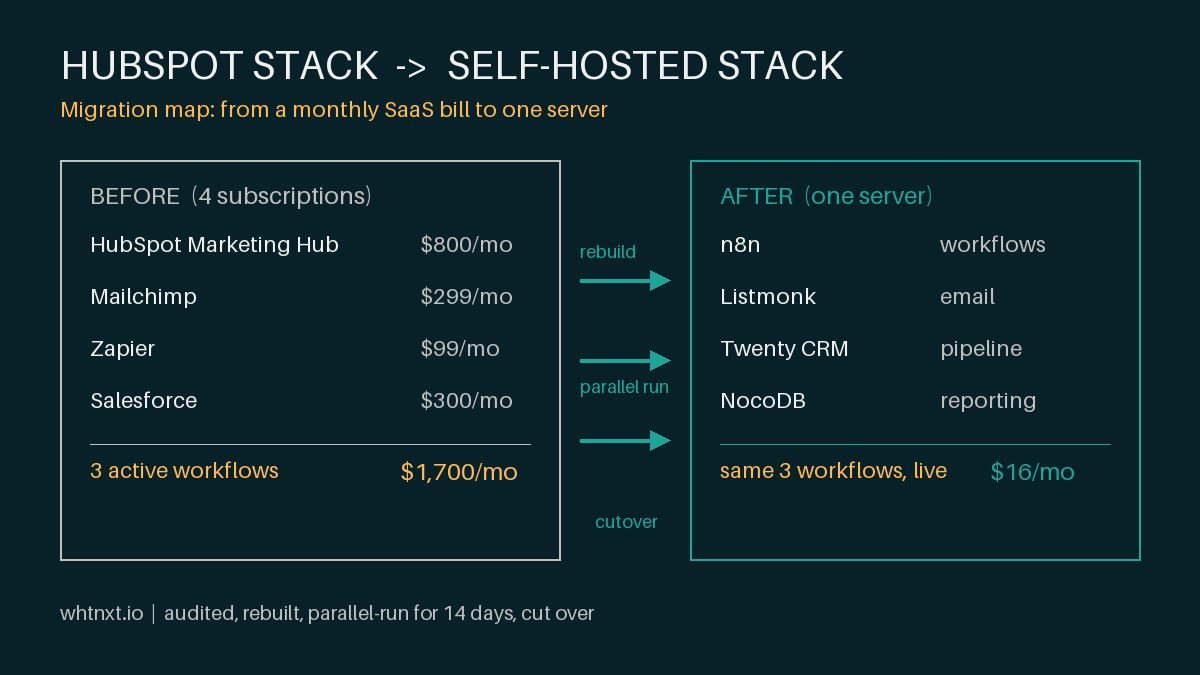
For more on why I chose self-hosted tools over SaaS for this stack, read my analysis of the open-source marketing stack I deploy in client campaigns.
And if you want to talk through whether this pattern fits your business, the contact page has a form that goes straight to my inbox. I answer every inquiry within 24 hours.
For a real-world breakdown of how these savings work at scale, I documented a Dallas plumbing company’s 40% cost reduction using the same n8n architecture applied to a fragmented SaaS stack.
The paid system was only half the engagement. The other half, the Google Business Profile and review engine that made the ads convert better, is documented in my HVAC local marketing system post, where 42 new reviews moved the rating from 3.8 to 4.7 in 60 days.