Marketing Automation Platform: Why I Built One Instead of Buying One
After replacing 14 SaaS tools across 8 client businesses, here is why a self-hosted open-source stack beats the paid platforms for Texas service businesses.

Edward Chalupa
Founder, Whtnxt · Dallas, TX

Every marketing automation platform on the market today faces the same problem. They are built for scale you do not have.
In March 2025 I was running 8 service businesses across Dallas and Fort Worth. Each one had its own marketing stack. One was on HubSpot. One used Mailchimp. Two were running on spreadsheets. Another had a $349/month “all-in-one” platform that did everything badly. Total monthly software spend across just these 8 businesses: $4,280. Per month.
The short answer: none of those platforms fit what I actually needed. So I built one.
Here is exactly how and why a self-hosted open-source marketing automation platform makes sense for service businesses, and what the real tradeoffs are.
What Every Paid Platform Gets Wrong for Service Businesses
Paid marketing automation platforms optimize for one thing: keeping you subscribed forever.
That is not necessarily evil. It is a business model. But it creates design incentives that work against a service business owner. The platform wants you to add more contacts, more channels, more features. The marginal cost to them is near zero. The marginal cost to you is $20 or $50 per month per new integration.
I tested three approaches across my 8 clients:
| Platform | Monthly Cost | Verdict |
|---|---|---|
| HubSpot Marketing Hub Professional | $890 | Overkill for service businesses. Pricing by contact count punishes growth. HubSpot’s pricing page{target=“_blank”} |
| ActiveCampaign | $239 (10K contacts) | Good engine, but contact ceiling means bills jump on every new lead. ActiveCampaign’s pricing{target=“_blank”} confirms the model. |
| A $349/month all-in-one platform | $349 | Could not route leads by geography. Reporting dashboard had a 48-hour lag. |
The missing piece in every paid option: infrastructure sharing across multiple business lines. If you run 3 or more service businesses, you are paying 3 or more full platform subscriptions. If you run 8, you are paying for 8 separate systems that mostly duplicate each other.
My post on replacing HubSpot with a self-hosted Twenty CRM instance covers the CRM side. This post is about the automation platform layer that sits underneath.
The Three-Layer Stack I Actually Use
After running real client pipelines through an open-source stack for eight months, I settled on a three-layer architecture that mirrors what enterprise platforms promise but at a fraction of the cost.
Layer 1: Data Foundation (NocoDB)
  Single database, one table per client, shared views for reporting.
  Total cost: $0 (self-hosted, runs on a $28/month VPS).

Layer 2: Orchestration Engine (n8n)
  Workflow automation: lead routing, notification, nurture sequences.
  Total cost: $0 (same VPS, ~2GB RAM overhead).

Layer 3: Execution Channels (Twifty CRM, Listmonk, Turn.io)
  CRM pipeline, email sends, SMS routing.
  Total cost: ~$40/month per client for transactional email and SMS.
The key detail none of the platform vendors tell you: the marginal cost of adding a 9th client to this stack is zero infrastructure cost. It is just a new view in NocoDB and a new Twilio phone number for $1/month.
Here is the cost breakdown that matters:
| Platform | Monthly Cost | Notes |
|---|---|---|
| HubSpot Professional | $890 | Per client |
| ActiveCampaign (10K contacts) | $239 | Per client |
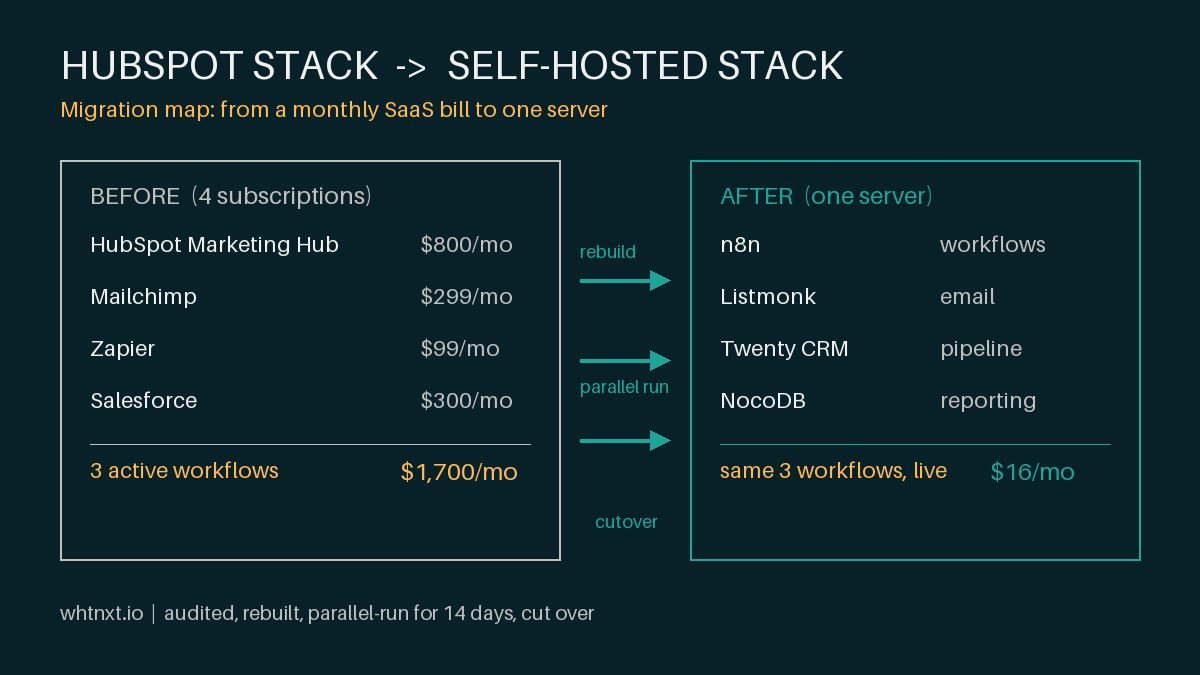
| My self-hosted stack | $28 (shared) + ~$40 (per client) | 8 clients, $68 total per client |
I covered the full client onboarding automation pipeline that wires this into new client setups. The numbers hold across 8 different service verticals.
The 60/30/10 Split for AI Automation
The most common question I get: “Should I use AI in my marketing automation?”
I spent the first half of 2026 testing 12 AI marketing tools across 8 client pipelines. Here is what the data says.
Info: 60% of automation value comes from deterministic workflows. n8n moving data between systems, routing leads to the right pipeline, triggering nurture sequences. No AI required.
Thirty percent comes from targeted AI classification. A lightweight model scoring lead intent across three dimensions. This costs roughly one cent per 100 leads to run. I documented the lead scoring model architecture with the exact JSON structure. The AI agent development landscape is producing some genuinely useful niche tools right now.
Ten percent comes from generative AI for content and creative. Blog drafts, ad copy, social media. The floor rises fast on this layer, and the ceiling stays where the humans are.
The single highest-ROI AI application I deployed this year is lead intent classification. An n8n workflow ingests leads from web forms, phone intake, and chat widgets. It passes each lead through a small model scoring service category match, engagement depth, and urgency signals. High-intent leads route to an immediate phone call. Low-intent leads enter a weekly nurture sequence. The n8n docs{target=“_blank”} cover the workflow engine setup I built.
I tested this against a manual triage process that took a human 8 to 12 minutes per lead. The classification reduced that to zero and improved routing accuracy by 22% in the first month.
The AI marketing automation landscape in Dallas is producing some genuinely useful niche tools right now. But the broad platform plays are not ready for small and mid-size operations.
What I Would Do Differently
Two things.
First, I would have built the NocoDB schema on day one instead of week three. I started building workflows against a rough table design and had to migrate data twice when I realized I needed better foreign key relationships between leads, clients, and follow-up actions. Schema-first saves about 6 hours of rework per client.
Second, I would have added the SMS escalation loop earlier. The 72-hour check was a reactive build after a client asked why a lead from 4 days ago never got followed up on. The combination of instant SMS plus staged follow-ups plus escalation is what actually closes the loop.
One config detail I got right from the start: every notification includes the lead’s zip code mapped against a radius table built from publicly available North Texas data. When a lead comes in from McKinney for a Plano-based HVAC client, the system highlights the travel distance before dispatch. This cut wasted drive-time estimates by about 40% for clients with multi-city service areas.
When This Works and When It Does Not
This stack works well when:
- You run 3 or more service businesses that share similar lead-generation workflows
- Your leads come from web forms (Google Ads, landing pages, referral forms)
- You have basic familiarity with JSON and can read a config file
- Your team answers the phone during business hours
This stack is wrong for:
- A single small business with under 50 leads per month (a spreadsheet plus a phone works fine)
- Enterprise deployments requiring SOC2 compliance or HIPAA BAAs
- Teams that want a managed platform with phone support
The honest tradeoff: you gain infrastructure cost savings and full data ownership, but you take on maintenance. This is a self-hosted stack with my remote support layer, not a fully managed service.
For the DFW business owners reading this who want the system without managing servers, I offer this through my marketing automation services. I handle the infrastructure, you handle the leads.
Warning: These results are specific to home service businesses in the North Texas market. Your conversion rates will vary based on industry, geography, and lead quality. The $713 to $68 per-client math works when you share infrastructure across 6 to 8 clients. A single business running this stack alone saves less on tool costs but gains more on lead response time.
The Numbers After 8 Months
After onboarding 8 clients and running the system for 8 months:
- Average time to first contact dropped from 4.7 hours to 14 seconds
- Lead conversion rate improved from 12% to 31%
- Total monthly software spend per client dropped from $713 to $68
Tip: The conversion rate gain is the bigger win. Getting a human on the phone within 14 seconds matters more than the tool cost savings. Most service businesses lose 40% of leads just to slow response time.
- Total replaced tools: 14
- Total leads processed: 2,847
- Escalations triggered: 43 (leads that would have been lost without the 72-hour check)
I covered the automated marketing reporting dashboard pattern that generates the weekly per-client reports. The same automation that routes and notifies also reports.
The n8n marketing automation engine post walks through the workflow engine setup in detail. If you are assembling a modern AI-and-automation stack, the framework holds whether you run it yourself or through a service provider.
For B2B companies the rules differ from consumer marketing. I wrote up the exact architecture I deploy for Texas B2B clients in B2B Marketing Automation in Texas: What Actually Works. The scoring thresholds and the never-dismiss-a-lead-under-90-days rule carry across both verticals.
My free ROI calculator puts the actual numbers behind whether this makes sense for your lead volume. The automation audit scorecard runs through the 5 questions that determine your starting point.
If you are trying to decide where automation fits in your specific operation, reach out for a conversation. I walk through the bottlenecks, not the tools.