How to Build a Multi-Agent Marketing Team with n8n AI Agents
Build five AI marketing agents on n8n that share state through Postgres: the architecture, the approval gate, model routing, and real monthly cost data.

Edward Chalupa
Founder, Whtnxt · Dallas, TX
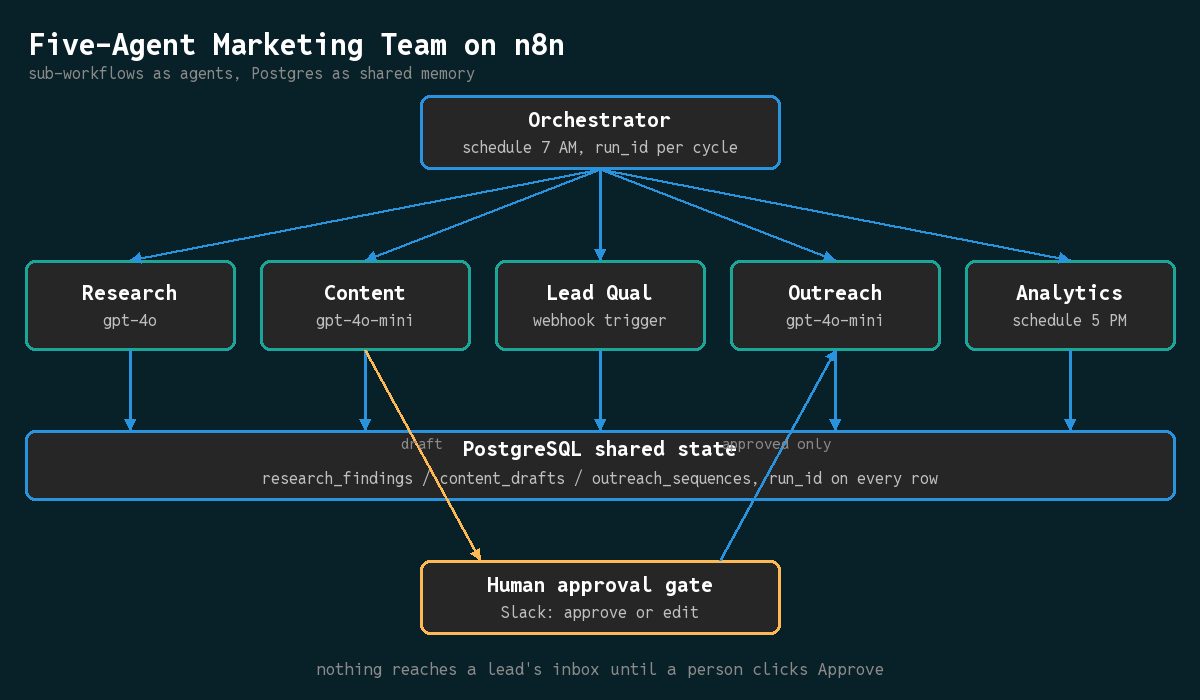
I built a five-agent marketing team that researches competitors, drafts content, qualifies leads, sends outreach, and reports on results. It runs on n8n sub-workflows for about $22 per month across eight DFW client accounts, and the single-agent baseline that came before it is documented in my step-by-step AI agent guide.
Most teams stop at one AI agent doing one job. The n8n platform lists AI agents as a core capability but stops short of showing how agents hand work to each other. The vendor’s own multi-agent tutorial wires a lead agent to sub-agents through workflows-as-tools, which is right for triage and wrong for a marketing pipeline that has to survive a bad day.
This guide shows the production pattern I use: five agents that call each other through sub-workflows, share state through PostgreSQL, and never touch a lead’s inbox without a human click.
What You Need Before You Start
You need three things before assembling the team. Skip any of these and the agents will talk past each other instead of collaborating.
n8n instance (self-hosted or cloud). The self-hosted setup takes about 30 minutes, and I walk through the Docker Compose in my n8n automation engine guide. Size the box for concurrent LLM calls: 4 CPUs and 8 GB RAM is the floor for five active agents, 16 GB is what I use on client instances.
OpenAI API key (or any LLM provider n8n supports). The research and analytics agents use the frontier model because they synthesize across sources. Every other agent runs on the mini model, which costs $0.15 per million input tokens according to my original agent tutorial.
PostgreSQL database for shared state. Each agent writes its output to a table, and the next agent reads from that table. This replaces the window buffer memory from the single-agent build, which only works inside one workflow.
| Component | Minimum | Production |
|---|---|---|
| n8n RAM | 8 GB | 16 GB |
| OpenAI keys | 1 (mini model) | 2 (both tiers) |
| Postgres tables | 3 | 5 |
How to Design the Five-Agent Team
The five agents map to stages in a marketing flywheel. Each has one job and one output table.
- Research Agent reads competitor pages, search results, and industry news, then writes findings to a
research_findingstable. It uses the frontier model because it reasons across multiple sources. - Content Agent reads the findings table, drafts a blog post or social caption, and writes to
content_drafts. It uses the mini model because the output is structured and predictable. - Lead Qualification Agent fires on a CRM webhook, scores each new lead against your ideal customer profile, and writes the score back. The lead scoring model tutorial covers the scoring logic this agent wraps.
- Outreach Agent reads approved drafts, generates a short email sequence, and queues it through your email platform. It runs on the mini model.
- Analytics Agent reads all four output tables plus ad platform data, writes a daily summary, and sends it out on its own schedule.
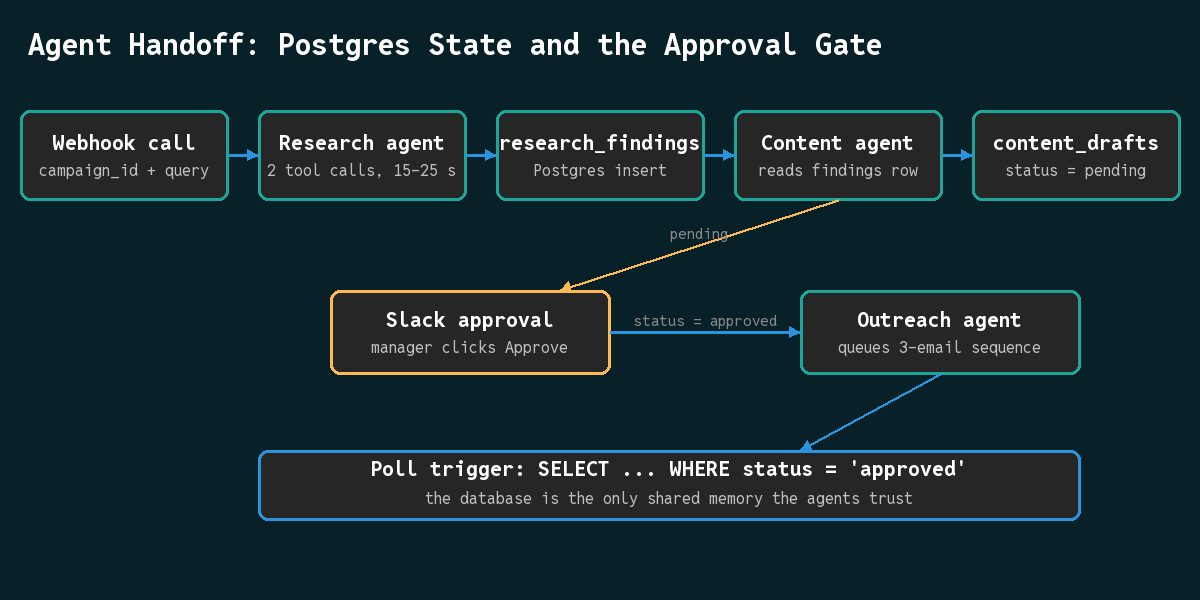
The orchestration pattern is a chain with one branch. Research triggers Content. Content waits for approval, then triggers Outreach. Lead Qualification runs in parallel on the CRM webhook. Analytics runs on a separate schedule reading every table.
The economics behind this split come from Anthropic’s published eval of its own system: a multi-agent configuration outperformed a single-agent baseline by 90.2% on their internal research tasks, at roughly 15 times the token consumption. Specialization buys quality and bills for it. Everything in the build below is about capturing the quality while routing 4 of 5 agents to the cheap model.
How to Build the Research Agent Sub-Workflow
Start here because every other agent depends on it. Reuse the AI Agent node pattern from the single-agent tutorial with two changes: shared Postgres state instead of window memory, and a webhook trigger instead of a schedule.
Create a workflow called agent-research. Add a Webhook trigger node; the other agents will call this endpoint by POSTing a query.
Add the AI Agent node after the webhook:
- Language Model: the frontier model
- Max Iterations: 10, to prevent runaway loops
- System Prompt: define the role as a marketing researcher with a fixed output schema
Connect two HTTP Request tool nodes as sub-nodes. One calls SerpAPI for Google results (each search costs a cent). The other reads a competitor page.
After the AI Agent node, add a Postgres node writing to research_findings with columns for query, findings, run_id, validated, and timestamp. The workflow structure:
Webhook -> AI Agent -> Postgres
             >_ HTTP Request (SerpAPI search)
             >_ HTTP Request (read competitor page)
Activate the workflow and copy the production webhook URL. You will need it in the orchestrator step.
How to Build the Content and Outreach Agents
The content agent follows the same shape with different tools and a different output table. Create agent-content with a Webhook trigger, an AI Agent node on the mini model, and a Postgres node writing to content_drafts.
The key difference: the content agent’s first node is a Read Postgres query against research_findings, filtered to the current campaign and run. Its system prompt tells the agent to base the draft only on those findings.
The outreach agent is triggered differently. Create agent-outreach with a Postgres poll trigger that watches content_drafts for rows where status equals approved. When one appears, the agent reads the draft, generates a three-email sequence, and writes to outreach_sequences with columns for lead_segment, the three emails, and send_schedule.
For self-hosted email, connect the outreach agent to Listmonk through the workflow pattern in my Listmonk campaign automation tutorial. For clients on an existing ESP, swap in that platform’s API node.
One rule decides whether this system survives contact with real leads: the outreach agent never reads unapproved rows. Nothing else in the build matters as much.
How to Wire the Orchestrator and Keep Runs Apart
The orchestration workflow ties everything together. Create marketing-agent-orchestrator with a Schedule trigger that fires daily at 7 AM.
The first node is a Postgres query checking the campaigns table for active campaigns. For each campaign, an HTTP Request node calls the research agent’s webhook:
POST https://your-n8n-instance.com/webhook/agent-research
Body: { "campaign_id": "camp_north", "query": "competitor research", "run_id": "..." }
The response returns the agent’s output ID. Pass that into a Wait node set to 30 seconds; a two-tool research call typically finishes inside that window. Then read research_findings for the same run, call the content agent, wait for the draft, and stop. The approval gate takes it from there.
The run_id convention is what keeps this debuggable. The orchestrator generates one ID per campaign cycle and passes it to every agent. Each agent writes it on every row, and each downstream read filters on it. When two campaigns run on the same day, their rows cannot corrupt each other, and you can replay a full cycle without stale data in the way.
How Much Does a Five-Agent Team Actually Cost?
This is where the single-agent comparison gets interesting. Five agents running daily plus on-demand does not cost five times what one agent costs, because model routing keeps four of the five on the cheap tier.
Here is the per-client monthly figure from the client accounts where this architecture is live:
| Agent | Model | Monthly cost |
|---|---|---|
| Research | frontier | $0.90 |
| Content | mini | $0.24 |
| Lead Qualification | mini | $0.43 |
| Outreach | mini | $0.12 |
| Analytics | frontier | $0.45 |
| SerpAPI | - | $0.60 |
| Total per client | $2.74 | |
| Eight clients | $21.92 |
Compare that to the single research agent my earlier guide documented: sixty cents per month in API calls plus $2.40 in search calls, $3.00 total. The five-agent team runs each account for less than the single agent did, because four of the five agents never touch the expensive model and the research agent shares its searches across the whole cycle.
Quality control is where the human fits in. The content agent writes its draft to Postgres with status = pending. A Slack notification goes to the marketing manager with the draft and its source findings. They click Approve or Edit. Only an approved row moves.
Why Five Small Agents Beat One Big Agent
A single agent can research, draft, and score, but it does each task sequentially, in one context window, charged against the most expensive model you pointed it at. The multi-agent split pays for itself once an account runs more than two distinct automations on the same schedule.
This is a position I will defend against any architect who wants everything in one framework script. A single large agent fails as one unit: one bad tool call poisons the context for every later task, and fixing it means rebuilding the prompt for all jobs at once. The five-agent version fails narrowly, upgrades piecewise, and lets you point each role at the model its job actually needs. The case study on the eight-client stack shows the same narrow-failure logic at the platform level.
I won’t ship a lead-facing agent that can email anyone without a human approval row, and I’d rather lose the “fully autonomous” demo than lose a client’s sender reputation. Every vendor pitch collapses on this point, and every build that stays live past its first quarter keeps this gate.
How to Verify the Build Within 24 Hours
After one full day, check three things.
1. Database rows. Open the Postgres tables and confirm each agent wrote its output. If research_findings is empty, the research agent failed silently: check the webhook URL in the orchestrator first, because an import regenerates webhook paths.
2. Cost report. Compare actual API spend against the table above. More than double means an agent is looping. The usual cause is an AI Agent node without a max-iterations cap, calling tools when it should give up.
3. Content quality. The analytics agent should have sent yesterday’s summary to your inbox and to the reporting dashboard the ad accounts already use. If drafts sound generic, add example outputs to the content agent’s prompt. If research misses competitor moves, make its system prompt name the specific changes worth flagging.
If you would rather have the architecture reviewed than debug it alone, the AI marketing automation service page explains how engagements start, and the AI agent development page covers builds that start from your stack instead of mine.
Common Mistakes When Agents Share One Database
- Agents not triggering. The webhook URL in the orchestrator does not match the agent’s live endpoint. n8n regenerates webhook paths when workflows are imported.
- Costs spiraling. Point conditional logic at the AI Agent nodes: when an input is a stub, route to the mini model or stop. A research call that returns almost nothing is not worth frontier-model tokens.
- Malformed handoffs. An agent writes broken JSON, and the next agent crashes reading it. Every shared table gets a
validatedcolumn that the downstream agent checks before parsing, and the orchestrator truncates over-long outputs instead of passing them whole. - Off-brand drafts. Add a style reference to the content agent’s prompt. Mine points at the site’s own marketing automation service page plus two or three published examples, so the agent anchors on real samples rather than adjectives.
- Cross-campaign contamination. Two campaigns interleaving rows on the same day. This is the
run_idfilter again, and it is the cheapest fix in this post.
The lead routing automation tutorial covers the simpler single-workflow version of this pipeline, and the pricing page breaks down what it costs to have the team build it for you.