How to Replace HubSpot With a Self-Hosted Marketing Automation Stack
A Plano client ran four SaaS subscriptions while three workflows did all the work. This self-hosted playbook moved the stack to one server for $16 a month.

Edward Chalupa
Founder, Whtnxt · Dallas, TX
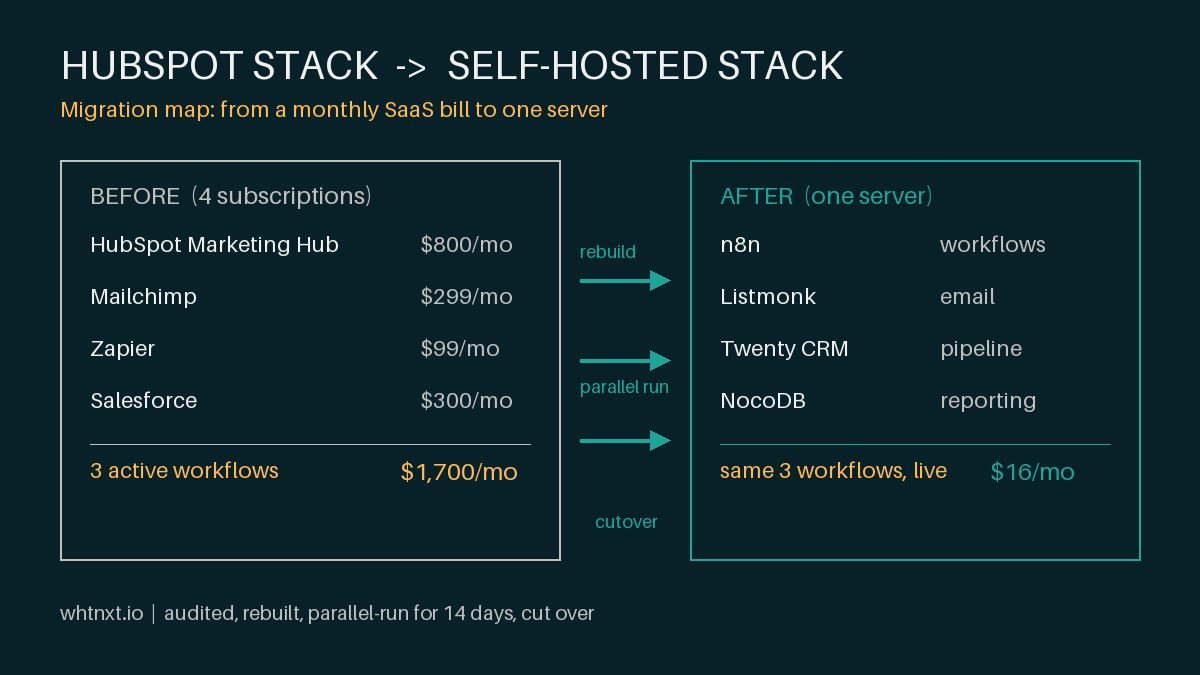
Every top result for marketing automation software is a vendor page or an affiliate list. Neither tells you what I see inside real accounts: four SaaS subscriptions while three workflows do all the work. I moved a Plano client to a self-hosted stack in two weeks and cut the software bill to $16 a month. Here is that playbook.
What Do You Need Before You Start?
Do not begin a migration until three questions have real answers. They decide whether you should migrate at all, and they take one afternoon to resolve.
- How many workflows actually fire? Count workflows that ran this month, not the ones sitting in the UI. For the Plano client, paper showed many more HubSpot workflows than production actually ran, and the account teardown itemizing each one lives in the cut-HubSpot-bill post.
- What is the full monthly bill? List every tool and seat. The Plano client stacked four subscriptions before a single dollar of ad spend: $800 HubSpot, $299 Mailchimp, $99 Zapier, $300 Salesforce, all broken out in the same migration breakdown.
- Who can run a Docker container? The stack needs a Linux server with 4GB of RAM, and a $28 a month VPS handles the production stack across multiple client pipelines. If nobody on your team can restart a container and read a log file, this path creates more problems than it solves.
The honest filter: if your automation bill is small and everything works, keep your tool. If the bill is heavy and you can count your active workflows on one hand, the numbers below are hard to argue with.
Step 1: What Should the Audit Cover?
The audit is a spreadsheet with four columns: tool, monthly cost, function, and whether that function is active or dead weight. Most businesses find that half their SaaS spend covers features nobody touches.
The Plano client’s audit is the shape I see repeatedly, and the row-by-row evidence lives in the workflow-by-workflow teardown:
| What They Paid For | What They Actually Used |
|---|---|
| HubSpot Marketing Hub ($800/mo) | 3 active workflows, 1 email template |
| Mailchimp ($299/mo) | A duplicate second contact list |
| Zapier ($99/mo) | 4 connections, 2 of them broken |
| Salesforce ($300/mo) | Contact records only, no pipeline use |
The diagnosis is never that the software is bad. HubSpot is genuinely good software. The problem is that its pricing model rewards buying more platform than a small business can operate, and the annual contract locks the overage in. HubSpot’s own product page lists Professional from $890 a month, and the paid features below that tier do not include the deep automation most buyers imagine when they sign.
Step 2: Which Tool Replaces Which?
Four open-source tools cover what the four SaaS products were doing. No affiliate roundup puts these four in one stack, because there is no commission on software you host yourself.
- n8n replaces HubSpot workflows and Zapier: a workflow automation engine you install as a Docker container, with native nodes for HTTP, databases, AI calls, and email.
- Listmonk replaces HubSpot email and Mailchimp: subscriber lists, segments, and campaigns through a clean API, sending through your own SMTP provider.
- Twenty replaces Salesforce and HubSpot contacts: an open-source CRM for contacts, companies, deals, and tasks, driven over its API.
- NocoDB replaces the spreadsheet-and-pray reporting layer: a spreadsheet interface on a real Postgres database.
This architecture runs across live client pipelines, and the cost curve is published in the $68 per client stack post. The number that decides most migrations is the crossover documented there: a second business lands on the self-hosted stack at near-zero infrastructure cost, while a second HubSpot Professional account costs $890 a month according to HubSpot’s pricing page. Past two businesses, self-hosted is cheaper forever.
Step 3: How Do You Rebuild the Live Workflows?
Rebuild every workflow that fired in the audit before you touch a single SaaS setting. The Plano client ran three in production: lead routing, a five-email nurture, and a monthly reporting digest. Each became an n8n workflow tested against real form submissions.
Lead routing matters most because one workflow replaces both the HubSpot workflows and every Zapier connection:
{
  "workflow": "Lead Routing",
  "trigger": "Webhook (form submission)",
  "steps": [
    "1. Normalize lead fields",
    "2. Score intent, budget, and timeline",
    "3. High score: create deal in Twenty, notify sales by SMS",
    "4. Low score: add contact to the Listmonk nurture list",
    "5. Log every action to NocoDB for reporting"
  ]
}
The scoring logic inside that workflow is the same model documented in the lead scoring architecture guide, and the whole routing run completes in under two seconds because you own the server. The full engine setup, from Docker compose to the Cloudflare tunnel, is in the n8n marketing automation engine guide.
Step 4: How Do You Move Email Without Losing Deliverability?
Export contacts from HubSpot and Mailchimp, clean them once in NocoDB, then import into Listmonk. Do the cleaning before the import, not after: dead addresses and duplicates from years of sloppy capture are the biggest threat to deliverability on a new sending domain. List hygiene took a full day on this project, more than I quoted, and it is the first thing I now price as a line item.
The nurture sequence moves from a HubSpot drag-and-drop workflow to a Listmonk campaign that n8n schedules through the API. The mechanics are identical whether you come from HubSpot or Mailchimp, and I covered them end to end in automating Listmonk campaigns with n8n. Because Listmonk sends through your own SMTP provider rather than a shared marketing-cloud pool, deliverability typically holds steady or improves after cutover.
Step 5: When Is It Safe to Cut Over?
This is the step no vendor migration guide includes, and it is the reason my migrations have never blown up. Run the old stack and the new stack side by side for 14 days, exactly as documented in the parallel-run cutover section. New leads flow into n8n. Campaigns send from both platforms to the same list. Compare deliverability and routing daily.
The one time I skipped the parallel run for an impatient client, we discovered a broken email template on day one of the new system and rolled back at the worst moment. Never cancel the old platform until the new one has handled real traffic for two full weeks.
After the parallel window matched, we cancelled all four SaaS subscriptions. The line-by-line result recorded in the completed migration:
| Line Item | Before | After |
|---|---|---|
| Marketing automation | HubSpot | n8n, no license fee |
| Email platform | Mailchimp | Listmonk plus SMTP |
| Integration layer | Zapier | Absorbed into n8n |
| CRM | Salesforce | Twenty, no license fee |
| Infrastructure | Included in subscriptions | Small VPS share |
The operational changes mattered as much as the invoice. Weekly reporting dropped from half a day of copy-paste to a NocoDB report that builds itself in minutes. Lead routing moved from “sales checks the CRM when they remember” to an SMS alert within two minutes of a form submission. The nurture sequence that had been paused for months ran on schedule again the week after cutover.
How Do You Verify the Migration Worked?
Do not call the migration finished because the invoices stopped. Run these checks two weeks after cutover:
- Routing fired. Pull the NocoDB action log for the last 14 days. Every form submission produced a score, a destination, and a notification. A missing row is a dropped lead, and the log is your only witness.
- Campaigns match. Compare Listmonk’s sent and open counts against the final HubSpot exports. A wide open-rate gap means list cleaning was incomplete; fix it with a second dedup pass before sending more volume.
- The team runs it alone. Have the operations manager build and send one campaign, unassisted, start to finish. If they have to call you, the migration is not finished; it is just cheaper outsourcing.
| Symptom | Cause | Fix |
|---|---|---|
| Leads reach Twenty but no SMS fires | n8n notification node credentials stale | Re-test the Twilio node and fire one manual test lead |
| Open rates collapse after cutover | Unverified list imported without cleaning | Re-run the NocoDB dedup pass and warm the domain gradually |
| Reporting digest missing a week | Schedule kept the old HubSpot timezone | Correct the n8n schedule node and backfill from the archive |
When Should You Keep HubSpot Instead?
Self-hosted is not the right answer for everyone, and pretending otherwise is how agencies sell migrations that churn back within a quarter. Keep HubSpot when you have a real sales operation on deep Sales Hub functionality, when you need its CMS or bundled AI features, or when your bill is on the free or Starter tier and you actually use it.
Here is the position I will defend: a marketing automation platform earns its price only if the people operating it can audit every workflow and every contact record without a vendor login. A subscription that hides its own logic behind a dashboard is renting you an opinion about your own marketing. If your team can meet that bar on HubSpot and the bill stays small, stay. Most DFW accounts I open cannot.
For the buyer still comparing platforms before deciding, my platform selection framework covers the seven questions that cut through vendor demos, and the build-versus-buy breakdown walks the decision from the other side. If you want the migration run for you, the marketing automation services page has the engagement scope and the pricing page shows what a managed engagement costs. The paid search service plugs into the same stack when you want the traffic engine automated alongside it, and the contact page reaches my inbox directly.