AI Intake Automation for Carrollton TX Professional Offices
Build a Carrollton office AI intake automation project with n8n and OpenAI: map channels, qualify every inquiry, and verify the handoff before go live.

Edward Chalupa
Founder, Whtnxt · Dallas, TX
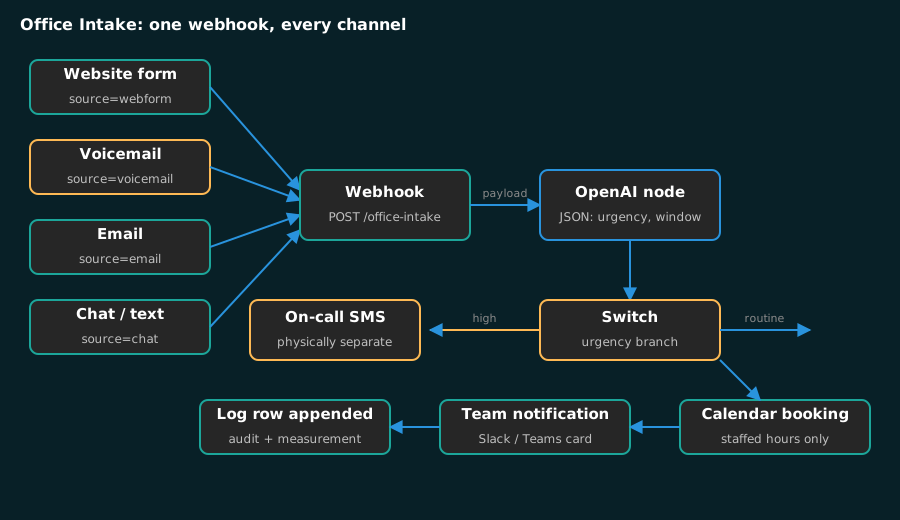
Carrollton professional offices compete with firms across the metroplex for the same clients, and most lose inquiries to a response delay nobody measures. This guide is the intake automation order I use, kept to a single office. Map every channel, route one webhook, qualify with one AI node, and prove the handoff before the old path goes away.
The diagrams and the workflow order here come from engagements across the metroplex, the same builds I documented in why one owned platform beats renting a suite. Today’s guide covers one workflow that manufactures no revenue on its own and quietly saves whole days of someone’s week.
What Do You Need Before You Start?
Everything here runs on tools a solo office manager can hold without a developer. Confirm each piece before opening a workflow, because a half-installed stack is the usual reason a weekend build dies at Sunday night.
| Item | Why you need it | Setup time |
|---|---|---|
| A website with a contact form | Provides the JSON payload to your webhook | Already done |
| An n8n instance | Hosts the routing logic | 30 minutes |
| An OpenAI API key | Powers extraction and qualification | 5 minutes |
| A Google account | Calendar, Sheets, and Gmail nodes | Already done |
| A business phone with transcription | Captures after-hours callers | 15 minutes |
| One focused evening | The first workflow is one sitting of real attention | One evening |
If the form currently lands in a shared inbox, leave it live. Add the automation beside the existing path and switch over only after real inquiries have passed through the new route. If n8n is not installed yet, my n8n marketing automation engine guide walks the base install and the credential vault first.
Which Intake Channels Deserve Automation First?
Four channels carry nearly every inquiry a professional office receives, and the routing logic is different for each. Write the current delay for each one down before you automate anything, because that delay is the only honest measure of whether the build earned its keep.
| Channel | Usual failure mode today | What fixes it |
|---|---|---|
| After-hours phone | Message sits in a mailbox until morning | Transcription into the webhook with an urgency branch |
| Website form | Reply happens when someone checks the shared inbox | Extraction, booking rules, confirmation |
| Consultation and billing requests share one queue | Classification into service type before routing | |
| Chat and text | Arrives while the only responder is with a client | Auto-acknowledgment plus a queued callback |
Automate the channel where the delay is longest, not the one that sounds most modern. For most medical and legal practices that is the after-hours phone; for a referral-heavy accounting firm it is often the form, because referrals call and cold leads type. The lead scoring model I wrote up shows how a delay baseline becomes a priority value, which matters for the Switch node later in this build.
How to Wire One Webhook to Every Intake Channel
The core of the automation is a single workflow all four channels post into. One entry point keeps you from maintaining four divergent copies of the same qualification logic, which is how these projects sprawl.
Step 1: Create the webhook trigger
Open a new workflow in n8n and add a Webhook node. Set the method to POST and the path to office-intake. The node hands you a URL on your own domain. Every channel sends its payload there, which means the extraction logic exists in exactly one place no matter how many front doors you add later.
Step 2: Point the contact form at it
A plain HTML form needs no plugin. If you host your own n8n, n8n’s self-hosting guide covers the install the webhook node assumes:
<form action="https://your-n8n-domain/webhook/office-intake" method="POST">
  <input name="name" placeholder="Your name" required>
  <input name="email" type="email" placeholder="Your email" required>
  <input name="phone" type="tel" placeholder="Your phone" required>
  <textarea name="message" placeholder="How can we help?"></textarea>
  <input type="hidden" name="source" value="webform">
  <button type="submit">Request a consultation</button>
</form>
The hidden source field is the load-bearing piece. Phone transcription and email each post their own source value into that same field, and the workflow branches on it later. The n8n HTTP node reference covers payloads and headers when your site sends something other than a plain posted form.
Step 3: Confirm the payload shape
Submit the form once with obvious test text and open the node’s execution log. Confirm the fields arrive under the keys you expect before adding anything downstream. Debugging a broken key name after four nodes exist costs an hour; debugging it now costs ten seconds.
How Should the AI Node Qualify an Inquiry?
This is the point where the draft stops being a form handler and starts being intake. Add an OpenAI node after the webhook, choose a small model, and ask for structured output rather than prose, following the pattern in OpenAI’s structured outputs guide.
You are the intake assistant for a professional office in Carrollton, TX.
Read the inquiry and return JSON only, with these fields:
name, phone, email, service_type, urgency, window, conflicts.
urgency is low, medium, or high, based on words like emergency,
deadline, court date, or audit.
window is the appointment time the sender asked for, or null.
conflicts is any stated conflict, prior counsel, or competitor
relationship, or null.
Never invent a field the inquiry did not state.
That last line matters more than the rest. An agent that guesses fills your calendar with phantom appointments, and the fix for a guessed field is always a narrower prompt rather than a bigger model. This is the same warning I give in why AI marketing automation fails small businesses: the failure is almost never the model, it is the boundary the prompt never drew.
Wire a Switch node to urgency. High goes to a phone notification for whoever is on call. Everything else continues into booking. Keep the emergency path physically separate from your routine queue, because an intake system that buries an urgent matter among ordinary requests is worse than the inbox it replaced.
What Booking Rules Do Carrollton Offices Actually Need?
Three nodes finish the pipeline, and each closes a hole the earlier steps leave open.
Google Calendar books the appointment. Set availability to the hours the office actually staffs, because the default accepts bookings around the clock and will happily place a consultation at two in the morning. Build a prep buffer before the first slot so intake staff read the matter before the client sits down.
| Office type | Booking rule that matters | Why |
|---|---|---|
| Medical practice | Urgent needs the next open slot, not the next open day | A delayed urgent inquiry becomes an emergency room visit and a lost patient |
| Law firm | Same-day intake requires a review before any slot is promised | A conflicts check has to precede a commitment, not follow it |
| Accounting firm | Peak-season hours differ from calendar hours | Autumn deadlines move availability, and a stale calendar overbooks |
The notification node posts to one channel the whole team watches. A Slack or Teams message with name, phone, service type, and urgency visible without opening a thread beats a dashboard nobody refreshes.
The log node appends one row per inquiry. Timestamp, extracted fields, whether an appointment got booked, and who picked it up. That sheet is both your compliance record and the measurement system for the verification step below. My n8n lead routing walkthrough uses the same log so a router’s decisions stay auditable.
How Do You Add After-Hours Phone Capture Last?
Phone automation is the highest-value channel and the hardest to wire, which is precisely why it belongs last. Get the form path stable, then extend it.
Configure voicemail transcription so a saved message posts to the same webhook with source set to voicemail, using the Twilio recording API as the transport. Add a branch that reads the source value. High-urgency transcriptions trigger an SMS to the on-call person. Everything else queues a next-day callback and sends the caller a short text confirming the callback, which stops them from trying a second line.
Calls from your Google Business Profile often bypass the phone system entirely, so add a Gmail trigger watching for profile call notifications, pull the caller details out, and feed them into the pipeline as their own source value. Otherwise after-hours calls land in notifications and vanish while the log reads quiet.
How Do You Verify the Build Before You Trust It?
Run each channel end to end with test data, then keep the old path live alongside the new one for one full week. Real traffic surfaces problems a test payload never will.
- Submit the form with your own number. Confirm the row reaches the log, the notification appears, and the calendar invite arrives.
- Generate one test voicemail. Confirm transcription reads high urgency and the SMS actually lands on a human phone, not just in the execution log.
- Compare every extracted field against what you said out loud. A transposed digit captures a lead nobody can reach, and the log is what catches it.
- Confirm the high-urgency path cannot be swallowed. If a message containing the word emergency lands in the routine queue, the Switch is misconfigured and nothing else matters until it is fixed.
Should the Office Still Have a Chatbot?
Not yet, and this is a position worth defending. I disagree with agencies that open every intake conversation with a conversational bot. A Carrollton practice does not need a chatbot until its webhook, extraction, and handoff are trustworthy under real load; a chatbot in front of a broken routing pipeline just automates a bad first impression. If that is the conversation you want, my AI marketing automation service starts at the routing layer instead, and a free automation audit will tell you whether you need a bot at all.
What Happens to Spanish-Speaking Callers?
Add a language branch ahead of the extraction step. Route non-English transcriptions to a bilingual staff member, or handle the acknowledgment in Spanish through a matching prompt. Do not let the workflow quietly drop an inquiry because a prompt was written in one language only. My build an AI agent in n8n guide covers that prompt structure.
What Does This Cost to Run?
Two line items, and neither grows with headcount. On one modest VPS, an n8n instance holds the workflow, and OpenAI usage covers extraction with a small model. Dropped forms burned a full working morning each month on manual re-entry before this automation, so the payback per office usually lands inside the first billing cycle.
What Usually Breaks in Week One?
Four failure modes account for nearly every support call on an intake automation like this. Automating all four channels at once tops the list: an office that wires phone, form, email, and chat in one sitting cannot tell which branch produced a bad result, and every fix becomes guesswork, adding one branch per week instead.
Over-trusting auto-confirmation is second. At one accounting profile in our roster the confirmation skipped human review, and a personal-tax caller reached a CPA who works exclusively in entity filings. At one practice front desk, staff dialed back every voicemail from their phones instead of trusting the log.
Both failures trace to the same missing step: no training and no verification pass before go-live. Over-trusting the model’s confirmations is third and staff habits are fourth: send a confirmation without a human review and it will eventually book the wrong appointment for you. Add a human checkpoint on anything that commits your team’s time.
Related-intake patterns worth a look next: the automated marketing reporting dashboard reports the log output, and the decision between building and hiring is laid out in marketing automation DIY vs hiring a consultant.
What Are the Limits of This Approach?
Two things are honest caveats. First, the workflow owns answers only within its English prompt and fixed handoff logic, so multilingual and genuinely complex inquiries need either a human or a second language branch. Second, the log measures the handoff, not revenue. It records the waits and the booked visits, but silent churn on the booked side of the automation stays invisible to it, so pair the log with a quarterly check-in on closed matters.
If you would rather have this built and monitored, my AI agent development service ships this exact class of intake pipeline for professional offices, and my lead generation engagements run the same frame with human triage on high-urgency calls. Start with either, or start after a free automation audit shows which of your four channels has the longest delay.