How to Connect Adtraction to Power BI via n8n
Adtraction has no Power BI connector. The bridge: a nightly n8n pull of the affiliate stats API into Google Sheets, then a scheduled Power BI refresh.

Edward Chalupa
Founder, Whtnxt · Dallas, TX
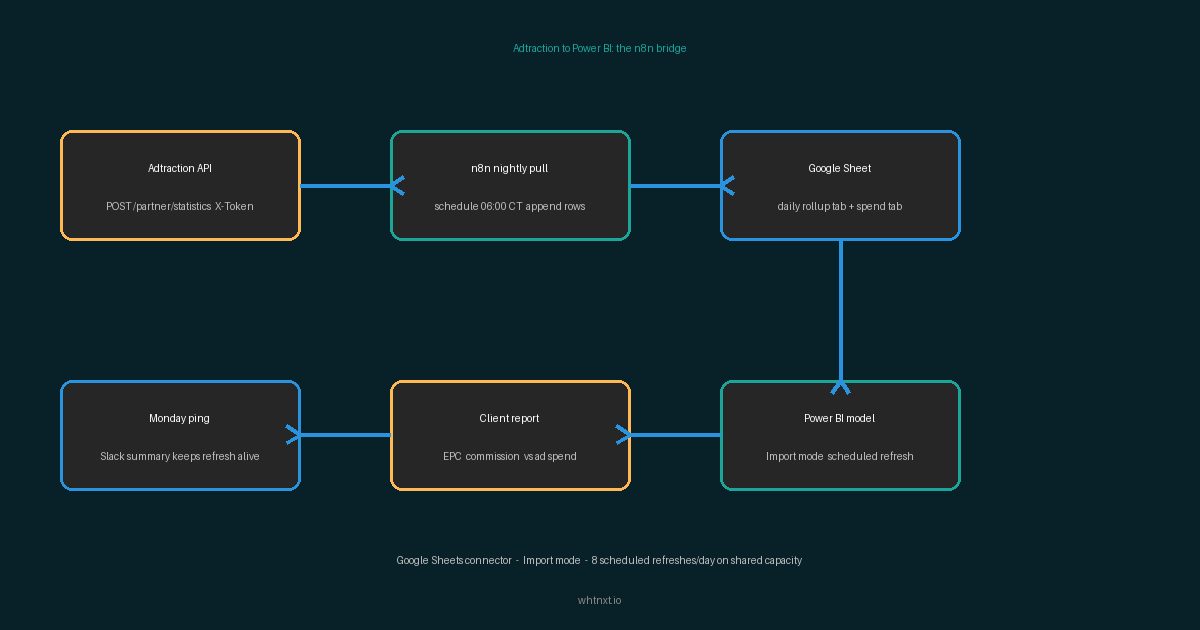
Adtraction ships a REST API. Power BI ships a Google Sheets connector. Nothing joins them directly, and the vendor connectors want a monthly fee per source. The bridge is the nightly n8n pull I already run: Adtraction statistics into a Google Sheet, then a Power BI semantic model that refreshes on a schedule.
This guide carries that pipeline from the Looker side to the Power BI side. The data source is the same sheet. The credential model is different, and the refresh ceiling Power BI enforces on shared capacity is the trap that surprises every first-day publisher.
What You Need Before You Start
The report sits on top of a data pipe, so gather the pipe pieces first. Nothing here needs a server beyond the n8n box you already run.
| Component | Where it comes from | Time |
|---|---|---|
| Adtraction partner account with an API token | Account > Settings > API tab > Create new API token | 3 minutes |
| n8n instance pulling daily stats into a Google Sheet | The Adtraction Sheets workflow builds this in one sitting | 40 minutes if not built |
| Google Sheet with daily affiliate rows | Created by the n8n workflow; the service account holds Editor access | Done already |
| Power BI Desktop or a Service workspace | Desktop builds the model, the Service hosts the refresh | 10 minutes to install |
| Google account that owns the sheet | Must sign in once from Power BI Desktop to authorize the connector | 0 minutes |
Two notes before the steps. The Adtraction token is a single static key sent as an X-Token header on every call, a fact the Adtraction API v3 documentation states in its general notes. That is why the pipeline survives unattended: no expiry, no refresh dance. And if the Sheets pull underneath this report does not exist yet, build that layer first. This post is the report half of a two-post pipeline, and the field mappings it depends on live in the Adtraction to Google Sheets workflow.
Why Power BI Over Another Looker Tab?
Some teams live in Microsoft. Their finance models, their SQL Server warehouse, their whole reporting cadence sits in the Power BI service. For those accounts, bolting one more Google dashboard onto the stack creates a second place nobody looks. One pane of glass wins.
The honest comparison before you build:
| Route | What you pay | What you give up |
|---|---|---|
| Third-party Power BI connector | Monthly subscription per source account | Your affiliate API token sits with a vendor you do not control |
| n8n to Sheets to Power BI (this build) | Nothing beyond the workflow you already run | Freshness equal to your schedule, not real time |
| CSV export, loaded by hand | Your Sunday evening | Everything; a manual export is stale the hour it lands |
Here is the position I will defend under pressure: I will not route a client’s commission ledger through a connector vendor when the client’s own spreadsheet and workspace do the job for free. A connector service holds a live API token against your revenue data and moves every sale through its infrastructure. The build below hands that token to exactly one machine: the n8n box in your account. The trade you accept is freshness. The report is as current as last night’s pull. For affiliate program review cycles measured in weeks, that is the right trade.
How to Extend the Sheets Pipeline to Power BI in Four Steps
The sheet that feeds this report is the same one the Adtraction to Looker Studio bridge uses: one row per day, one column per field. Power BI reaches it with the native Google Sheets connector rather than the Adtraction API directly. Adding that connector layer, not a second API integration, is what keeps this a one-evening build.
Step 1: Pull the sheet into Power BI Desktop
Open Power BI Desktop, choose Get Data, and search for Google Sheets. Paste the full workbook URL from your browser’s address bar and sign in with the Google account that owns the sheet. In the navigator, select the summary tab rather than the raw daily tab, because that is where row-count surprises hide. Microsoft’s Power Query Google Sheets connector documentation confirms the connector parses the spreadsheet ID from the URL and supports Import mode only. Power BI therefore copies rows into the model on every refresh instead of querying the sheet live.
Step 2: Verify the field types survived the trip
Open Power Query before loading anything final. Check that the numeric columns actually arrived as numbers. An n8n append that wrote a blank or a comma-led string will make Power BI read a commission column as text, and every measure built on it fails silently to zero. Coerce commission, orderValue, epc, and conversionRatio to decimal in Power Query, then close and apply. This is the same type-drift bug the Looker side warns about, and the fix is identical.
Step 3: Build the measures and the spend blend
Add the DAX measures the account review actually uses: total commission, EPC as commission divided by unique clicks, and conversion ratio as sales divided by unique clicks. Adtraction returns epc and conversionRatio per program already, so compute the blended figures only where you cross programs.
Then bring in the other half of the picture: spend. Affiliate commissions are a cost, and a report without the other costs next to them answers half the question. Create a second tab for ad spend in the same workbook. The automated marketing reporting dashboard workflow fills that tab from GA4 and Google Ads on the same nightly schedule. Blend the two tables on the Date column, keeping both sides at one row per day so totals do not multiply across the join.
Step 4: Publish and set the refresh schedule
Publish the report to a workspace in the Power BI service. Open the semantic model settings and switch on Schedule refresh. The quota depends on your capacity: Microsoft’s data refresh documentation states that shared capacity allows eight scheduled refreshes per day, while Premium and Fabric capacities allow up to 48. Eight is generous for a sheet that fills once nightly, so set the refresh for one hour after your n8n run lands. On a 6 AM Central pull, schedule 7 AM and the report is never caught mid-append.
One scheduling trap worth knowing before the first week ends. Microsoft’s scheduled refresh configuration page notes that Power BI pauses scheduled refresh after two months of inactivity, counted by whether anyone has opened the report. A client dashboard nobody opens quietly stops refreshing, and the numbers freeze without an error. A Monday summary ping into Slack keeps both the client and the refresh alive.
What Do You Do When the Report Disagrees With the Sheet?
Work the checks in order. Every mismatch I have chased came from the first three.
- Compare the same window. The sheet shows all history, the visual shows the report’s date range. Set both to the same seven days before believing a discrepancy exists.
- Refresh the report data. The sheet gained rows an hour ago and the semantic model has not asked since. Trigger a refresh now before debugging anything.
- Check the tab range. The connector reads the used range of the tab you picked. A filtered view or a renamed tab can silently drop the newest rows from the pull.
- Verify field types survived. Add a column to the sheet and the connector can re-read a number as text. Missing bars on a chart that worked last week is this bug two times out of three.
- Watch row scale before it hurts. Import mode copies every row on every refresh. A daily summary tab takes years to grow large; a transaction-level export will not. The rollup tab built into the n8n workflow exists for exactly this reason.
Frequently Asked Questions
Does Power BI have a native Adtraction connector? No. Microsoft’s connector list carries no Adtraction entry, and the vendor ecosystem fills the gap with paid connectors. That gap is the whole reason this pipeline exists.
Can Power BI read the Adtraction API directly instead of the sheet? In principle, via a custom Power Query function against the POST statistics endpoints. In practice you rebuild pagination, rate-limit handling, and credential rotation inside Power Query, where debugging is worse and the refresh quota is unforgiving. The sheet layer costs one workflow and makes every downstream tool, including Looker Studio on the other side of the stack, read the same numbers.
Which account should own the dataset? The client’s workspace, with your account as a member. The credentials ride on an owner, and a report whose owner leaves the agency stops refreshing on someone else’s watch. Own the pipe, hand over the dashboard.
What to Do Next: Verify Before the Client Does
Verify the outcome once by eye before automating the client’s trust in it. Open the report in a logged-out browser and confirm the latest rows render. Then click through it on a phone, because finance people read dashboards on phones. A dashboard nobody validates against the source becomes a rumor with charts.
Once the report is verified, three upgrades earn their keep in this order: the Monday summary ping, a budget alert when a program’s EPC dips below its trailing average, and a lead generation hand-off that pushes new affiliate-sourced leads into the client’s CRM the day they land. The 3 automations every marketing team needs covers where each fits in the priority order.
If the affiliate channel sits inside a wider stack you are consolidating, this pipeline is one module of the marketing automation platform I build for clients. Reporting pipes like this one, the nightly pulls underneath them, and the alerting around both are core automation services work. And if the question is whether to build this or buy it for your team, the pricing page lays out what a done-for-you engagement costs against the connector subscriptions you would otherwise stack. Start with a free automation audit to see which of your reporting routines are wasting hours.