How to Connect Outbrain DSP (Zemanta) to Looker Studio via n8n
Outbrain DSP ships no Looker Studio connector. The bridge: an n8n OAuth2 pull into Google Sheets, then a client-facing dashboard that refreshes on load daily

Edward Chalupa
Founder, Whtnxt · Dallas, TX
Outbrain DSP ships no free Looker Studio connector, but it does ship a full REST API. The bridge is an extension of the Outbrain to Google Sheets reporting workflow I already run: a nightly pull into Google Sheets, then a client-facing Looker Studio report that refreshes on load.
This guide carries that pattern from the Amplify side to the DSP. The API is different, the auth is different, and the credential trap at the end is the same one that breaks every shared report.
What You Need Before You Start
The dashboard sits on top of a data pipe, so gather the pipe pieces first. Nothing here needs a server beyond the n8n box you already run.
| Component | Where it comes from | Time |
|---|---|---|
| Outbrain DSP (Zemanta) account | Active advertiser account with at least one campaign | Already done |
| API client ID and secret | dsp.outbrain.com/o/applications, New Application button | 5 minutes |
| n8n instance | Any self-hosted install; the n8n automation engine setup runs this on one cheap VPS | 30 minutes if not built |
| Google Sheet + service account | One workbook, service account as Editor | 10 minutes |
| Google account for Looker Studio | The account the sheet is shared with | 0 minutes |
Two notes before the steps. The client credentials are issued by the DSP platform itself, which is why connector vendors insist you get your Client ID and Client Secret from the DSP rather than reusing advertising-platform passwords. And if the Google Sheets pull underneath the dashboard does not exist yet for this account, build that layer first, using the Adtraction to Google Sheets workflow as the template. This post is the dashboard half of a two-part pipeline.
Why Does Outbrain DSP Need a Bridge at All?
The DSP dashboard answers questions about one account at a time. A client review needs a different question answered: is programmatic getting cheaper next to paid search and native, and what did the month cost overall? That comparison lives outside the DSP, so the data has to leave the dashboard anyway.
Three routes out exist:
| Route | What you pay | What you give up |
|---|---|---|
| Third-party Looker Studio connector | Monthly subscription per account | Your DSP API secret sits with a vendor you do not control |
| n8n to Sheets to Looker Studio | Nothing beyond the workflow you already run | Freshness equal to your schedule, not real time |
| Connected Sheets into Looker proper | A Looker license if you do not have one | Row caps and BigQuery quota on every query |
The connector vendors are not hiding what they do. Catchr’s Outbrain DSP connector page lists Total Spend, Media Spend, Impressions, Clicks, CTR, Avg. CPC, Avg. CPM and Visits as its headline fields, and its FAQ confirms the connector asks for your DSP API Client ID and Client Secret. Supermetrics’ Zemanta field reference documents 50 metrics and 65 dimensions on the same account type. The field coverage is fine. The problem is custody: a connector service holds a live API secret against your buying account and moves every number through its infrastructure. I will not route a client’s media spend through a vendor I do not control when the client’s own Google Cloud footprint does the job for free. The Adtraction to Looker Studio bridge on this blog makes the same trade for affiliate data, for the same reason.
Here is the shape of the bridge:
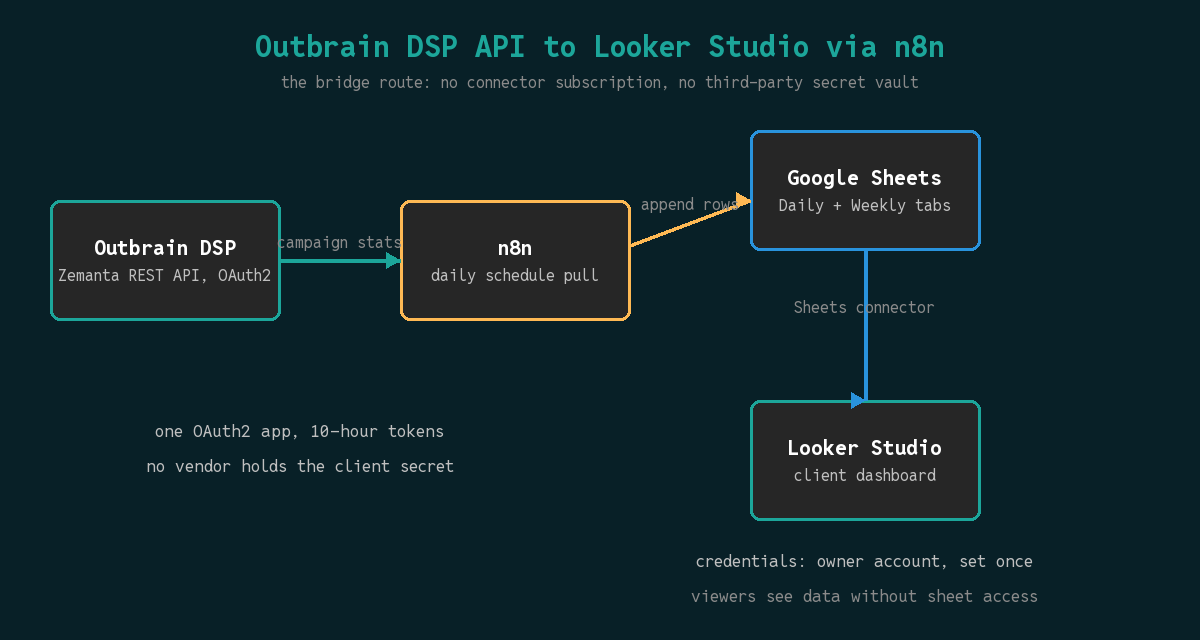
One warning worth reading before you touch anything. The official Teads DSP API documentation is the current home of the Zemanta API docs after the brand moved under Outbrain and then Teads. The same page links a Swagger UI with the note that it is a live production API and calls will affect your account. It is a great way to confirm an endpoint returns what you expect. It is a terrible way to learn, because a POST you meant as a test creates a real campaign.
Step 1: Register an Application and Get a Token
The DSP API uses two-legged OAuth2, not the username-and-password Basic auth of the Amplify side. This trips people who arrive here from Amplify tutorials, because the two Outbrain properties run completely different auth flows for reporting.
Register at dsp.outbrain.com/o/applications with the New Application button. The page shows a Client ID and Client Secret after saving, and those two strings are the entire credential set. Store them in n8n’s credential store, never in a node field.
Then exchange them for an access token:
curl -s -X POST "https://oneapi.zemanta.com/o/token/" \
  -u "$CLIENT_ID:$CLIENT_SECRET" \
  -d "grant_type=client_credentials"
The docs’ own example response carries expires_in: 36000, and the API documentation states that access tokens are valid for 10 hours. Every REST call after that carries the token as an Authorization: Bearer <access_token> header. The same page recommends caching and reusing the token for its validity window rather than re-authenticating on every call.
For a once-daily pull, caching is optional but the habit matters. A workflow that logs in fresh every run breaks the moment you wire it into something that fires per campaign. The chain above calls /o/token/ once at the top of a run and passes the token to every later node through a Set node.
How Do You Pull DSP Campaign Stats Into a Google Sheet?
The reporting shape of the DSP API is small and regular. Campaigns hang under accounts, and each campaign exposes a stats endpoint that the docs show as GET /rest/v1/campaigns/{campaignId}/stats/?from=YYYY-MM-DD&to=YYYY-MM-DD. The workflow pattern is identical to the Outbrain Sheets workflow on the Amplify side: resolve accounts, list campaigns, pull yesterday’s stats per campaign, append one row per campaign per day.
The n8n node chain:
- Schedule Trigger on a cron of
0 6 * * *, which fires before the client looks at anything. - HTTP Request to
/o/token/with Basic auth andgrant_type=client_credentials. - Set node extracting
access_tokeninto a variable every later node reads. - HTTP Request to
/rest/v1/campaigns/?includeArchived=false&accountId={{accountId}}with the Bearer header. - HTTP Request, looped per campaign, to the campaign’s stats endpoint for yesterday’s window.
- Google Sheets node appending Date, Account ID, Campaign ID, Campaign Name, Impressions, Clicks, Spend, and Conversions.
Two API behaviors from the Teads DSP docs shape steps 4 and 5. First, the same docs state a rate limit of 30 requests per second per user, and that crossing it returns HTTP status 429. A daily pull of a few dozen campaigns sits nowhere near that, but a loop that refactors itself into a per-ad-group crawl will find the ceiling, so add a small Wait node between campaign iterations the day you scale past a hundred campaigns. Second, list responses paginate by marker: the docs define marker as the primary key of the last element of the previous page and allow a limit up to 1000. Read the next URL from the response and loop until it disappears, rather than assuming page one is everything.
Keep the sheet’s column contract boring: one row per campaign per day, dates written as real dates, spend as a plain number. The multi-source reporting dashboard post covers the deduplication check that keeps a manual re-run from double-appending yesterday, and the same Metadata tab trick applies here.
Info: If one client account bills in EUR and another in USD, record the currency once per account in a lookup tab and join it in the dashboard, rather than letting one sheet silently mix currencies. Spend arrives as a bare number, and a blended total across mixed currencies is meaningless the moment anyone charts it.
How Do You Wire the Sheet Into Looker Studio?
Looker Studio’s Google Sheets connector reads one worksheet per data source, so structure the workbook for it before opening Looker. Create two tabs: Daily for the raw append stream and Weekly for a rollup that uses whole-column SUMIFS formulas. A 52-row weekly summary answers a trend chart far faster than making Looker scan every daily row of the year on every query, and it keeps a blend against your paid search spend tab at one row per day so totals never multiply across the join.
Then build the connections:
- Create, Data Source, Google Sheets connector. One data source for
Daily, a second forWeekly. Keep the first row as headers and leave the range empty so appended rows flow in without editing the connection. - Fix field types immediately. Date stays a Dimension with Date type. Impressions, Clicks, Spend and Conversions become Measures with Sum aggregation. Campaign ID stays a Dimension even though it looks numeric.
- Never sum a ratio. CTR and CPC should be calculated fields that divide summed clicks by summed impressions at the chart’s own grain. Averaging a percentage across campaigns weights a small test campaign the same as your biggest one.
The sharing setting is where DSP reports die quietly. A dashboard shared “anyone with the link” still fails for those viewers if the data source queries with end-user credentials, because the viewer cannot open your sheet. Set the data source credentials to the owner account so every viewer reads through one authorized pipe, and keep the option that lets viewers access data with their own credentials unticked in the report’s sharing dialog. The failure is silent in the worst way: the owner sees a fine dashboard while every external viewer sees a red error box.
Add scheduled email delivery on the report, addressed to the client, weekly. That one setting replaces the Monday export-and-attach routine this whole pipeline exists to kill.
What Do You Do When the Dashboard Disagrees With the DSP?
Work the checks in order. These are the mismatches this stack produces in practice, DSP edition.
- Wrong door, right name. The Teads DSP API docs return 401 when authentication fails, so a 401 on a “correct” password usually means the wrong API, not the wrong credentials. The DSP uses OAuth2 client credentials at
oneapi.zemanta.com; the Amplify advertiser platform uses Basic auth atapi.outbrain.com/amplify/v0/login. Catchr’s connector FAQ fielded this exact confusion enough to write its own warning about similar brand names not making connections interchangeable. - The window is not the window. The sheet shows all history and the chart shows the report’s date range control. Set both to the same seven days before believing a discrepancy exists.
- Stale cache. Looker caches query results. The sheet gained rows an hour ago and the chart has not asked since. Refresh the report data first, debug second.
- Types drifted on a schema change. Add a column to the sheet and the connection can re-read a number as text. Missing bars on a chart that worked last week is this bug most of the time.
- Marker pagination cut the account short. If the sheet has campaigns up to a marker cutoff and the DSP shows more, your loop stopped at page one. Follow the
nextURL until it is null. - 429s ate part of the run. A rate-limited run can write half the campaigns and call it success. Alarm on rows-per-account-per-day dropping, not just on workflow errors.
Do I need the Reporting endpoints instead of campaign stats? The stats endpoint answers client-level questions at campaign grain, which is what a weekly review consumes. The DSP’s API documentation points deeper endpoints at detailed reporting, so reach for those when you need publisher or creative breakdowns, not before.
Verify the Dashboard Before the Client Does
Verify the outcome once by eye before automating the client’s trust in it. Pick yesterday, pick one campaign, and open both the DSP’s own reporting view and the dashboard side by side. Impressions and spend should match to the row. Then open the shared link in a logged-out browser: if it renders, your credentials setting is right, and if it throws, fix the sharing dialog before sending anything.
After the first verified review, three upgrades earn their keep, in order:
- Blend Google Ads and native rows into the same weekly view so programmatic sits inside the full channel mix instead of beside it.
- Push the weekly summary row into Slack or email through n8n so the client sees the headline before the PDF arrives.
- Alert on CPC movement per account, since a delivery or bidding change shows there a full reporting cycle before it shows in conversions.
If you would rather someone else own the plumbing, this is exactly the kind of pipeline our AI marketing automation work is: reporting pipes that run unattended on infrastructure the client controls. The services page lists what we take on end to end.
A connector subscription per account, or one OAuth2 app, a workflow you already know, and a free dashboard that keeps working as long as the n8n box does. I know which one I put my name on.