How to Connect Adtraction to Looker Studio via n8n
Adtraction has no Looker Studio connector, so I built it with n8n: daily affiliate stats into Google Sheets, then a client-ready dashboard that refreshes

Edward Chalupa
Founder, Whtnxt · Dallas, TX
Adtraction ships no Looker Studio connector. You can pay a connector vendor to fill the gap, or you can reuse the Google Sheets pipeline you already run. I chose the second route for a Dallas ecommerce account, and the whole bridge turned out to be two data source clicks and one credential setting.
This guide extends the Adtraction to Google Sheets workflow into a client-facing Looker Studio dashboard: the data source wiring, the credentials trap that breaks every shared report, and the troubleshooting path when the dashboard disagrees with the sheet. The same bridge pattern covers the Outbrain DSP reporting side of a client’s stack, and teams that live in Microsoft can carry the identical sheet into Power BI on a scheduled refresh.
What You Need Before You Start
The bridge assumes the reporting pipe underneath it already runs. Gather these before opening Looker Studio.
| Component | Where it comes from | Time |
|---|---|---|
| Adtraction partner account + API token | Account > Settings > API tab > Create new API token | 3 minutes |
| n8n instance pulling daily stats into a Google Sheet | The Adtraction Sheets workflow builds this in one sitting | 40 minutes if not built |
| Google Sheet with daily affiliate rows | Created by the n8n workflow, service account has Editor access | Done already |
| Google account for Looker Studio | The account the sheet is shared with | 0 minutes |
Two of these deserve a note. The API token is a single static key sent as an X-Token header, which is why the pipeline survives unattended: no expiry, no refresh dance. And the n8n instance can be the smallest one you own. The job makes one or two API calls a day, so my n8n automation engine setup on a single cheap VPS is far more capacity than a reporting pipe needs.
If the Sheets workflow is not built yet, stop here and build it first. This post is the second half of a two-post pipeline, and the field mappings it depends on live in the first one.
Why Does Adtraction Need a Bridge to Looker Studio?
The Adtraction dashboard answers questions about one program at a time. A client report needs to answer a different question: is affiliate getting cheaper, and how does that compare to paid search and the rest of the spend? That comparison lives outside Adtraction, so the data has to leave the dashboard anyway.
Three ways out exist:
| Route | What you pay | What you give up |
|---|---|---|
| Third-party Looker Studio connector | Monthly subscription per account | Your affiliate API token sits with a vendor you don’t control |
| n8n to Sheets to Looker Studio | Nothing beyond the workflow you already run | Freshness equal to your n8n schedule, not real time |
| Connected Sheets into Looker proper | Looker license if you don’t have one | Row caps and BigQuery quota on every query |
The connector route is the one teams try first, and the vendors are honest about what they do: Catchr’s Adtraction connector lists 14 metrics and 51 dimensions it can pull. The problem is not the field coverage. A connector service holds a live API token against your commission ledger and moves every sale through its infrastructure. I won’t route a client’s affiliate revenue through a vendor I don’t control when the client’s own Google Cloud footprint already does the job for free. The same reasoning produced the read-only MCP server I run for Claude Code, which keeps the token on my machine and answers questions straight from the API.
The bridge route reuses everything already approved. The n8n workflow keeps writing its daily rows. Looker Studio reads the sheet on report load, which for affiliate reporting is fresh enough because the numbers land once a day anyway. The same sheet blends against ad spend tabs from the open source marketing stack behind the same account, so the client sees a single revenue picture instead of four dashboards.
Here is the shape of the whole pipeline:
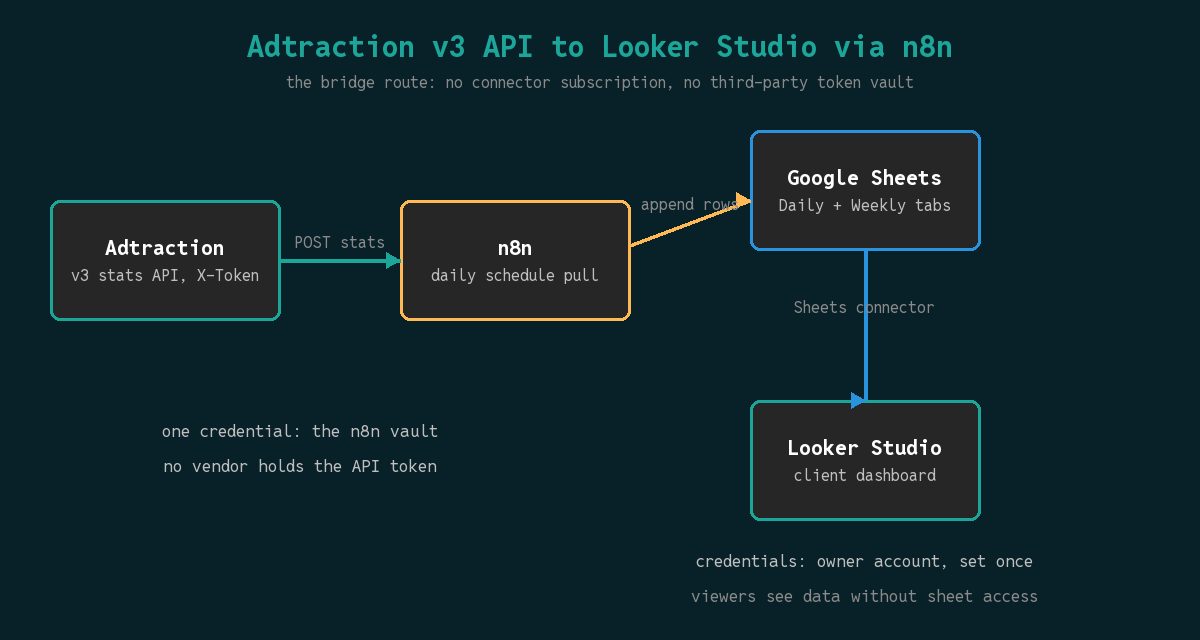
How to Extend the Google Sheets Pipeline in Two Steps
You change almost nothing in n8n. The existing daily job is already the ingest layer, which is the point of putting a sheet in the middle. Two small additions, and the sheet is dashboard-ready.
Step 1: Confirm the daily rows and add a rollup tab
Open the sheet and check the trailing week has one row per program per day, with the date column written as a date rather than a text string. Then add a second tab called Weekly that aggregates the daily tab. A plain formula tab beats a chart over raw daily rows because Looker Studio scans the whole connection on every query, and a 52-row weekly summary answers a trend chart far faster than scanning every daily row of the year.
Use whole-column references in the rollup so the formula keeps working as rows append:
=SUMIFS(daily!G:G, daily!A:A, ">="&DATE(2026,10,1), daily!A:A, "<"&DATE(2026,10,8))One SUMIFS per metric per week, one row per week. Commissions, order value, clicks, sales, and leads give the dashboard everything the client asks for in a Monday review.
Step 2: Leave the rate limit alone
A common temptation is to add an hourly refresh so the dashboard feels live. Resist it. The Adtraction API reference documents responses that carry an X-RateLimit-Limit: 30 header, and a daily stats pull spends one or two of those requests. The limit only bites when you loop per program and channel, and an hourly loop is how you build one. Affiliate commissions settle overnight in Stockholm time, so an hourly pull mostly refetches numbers that will be corrected by morning.
Info: If you already run the Outbrain reporting workflow or the multi-source reporting dashboard, point those at additional tabs in the same spreadsheet. One workbook, many tabs, one Looker Studio dataset family per client.
How Do You Wire the Sheets Data Source into Looker Studio?
Five clicks and two field settings. The trap is at the end, and it is a credentials setting rather than a data problem.
Step 3: Create the data source per tab
In Looker Studio, click Create, then Data Source, then the Google Sheets connector. The Sheets connector documentation is explicit that one data source connects to a single worksheet, so create one data source for Daily and a second for Weekly. Keep the first row as headers, and leave the range empty so appended rows flow in without editing the connection.
Step 4: Fix field types before building a single chart
The fields panel is where dashboards are won or lost. Set these before touching the report:
- Date stays a Dimension with Date and Day type. If the n8n workflow wrote dates as strings, Looker will read it as text and every time-series chart comes back empty. Fix it at the sheet.
- Commissions, order value, sales, leads become Measures with Sum aggregation.
- Program ID stays a Dimension even though it looks numeric. A number in a dimension bucket confuses every filter built later.
- EPC and conversion ratio should not be summed. Set aggregation to None or average, or rebuild them as calculated fields from commission over unique clicks so the ratio recomputes at whatever grain the chart uses.
That last point is the one that quietly ruins affiliate dashboards. A percentage averaged across programs weights a tiny program the same as your biggest one, so the client’s “average EPC” is mathematically meaningless. A calculated field divides the summed commission by the summed unique clicks at the chart’s own grain, which is the number you would defend in a review meeting.
Step 5: Set the credentials, then share like you mean it
Open the data source, click Manage add-on or Edit connection, and find the Data credentials option. It defaults to the connector’s own service account in many connectors; for Sheets you want it pointed at an identity that can open the workbook.
Now the part that breaks client reports. Looker Studio separates the report’s viewers from the data’s credentials. A dashboard shared “anyone with the link” still fails for those viewers if the report queries the data source with end-user credentials, because the viewer has no access to the sheet. The fix is two settings that must match:
- In the data source, credentials set to the owner account, so every viewer sees the same numbers through one authorized pipe.
- In the report’s sharing dialog, the option to make a copy view the data with the viewer’s own credentials must stay unticked, and the report is shared to viewers with the link.
Owner credentials mean one account authorizes every query. That is exactly right for a read-only client dashboard over a sheet you control, and wrong for a workspace where viewers should each see only their own slice. Pick deliberately instead of accepting the default, because the default fails silently: the owner sees a fine dashboard, and every external viewer sees a red “could not fetch data” box.
Then add the scheduled email delivery on the report itself, addressed to the client, weekly. That single setting replaces the Monday morning export-and-attach routine that this entire pipeline exists to kill.
What Do You Do When the Dashboard Disagrees With the Sheet?
Work the checks in order. Every mismatch I have chased came from the first three.
- Compare the same window. The sheet shows all history, the chart shows the report’s date range. Set both to the same seven days before believing a discrepancy exists.
- Refresh the report data. Looker caches query results. The sheet gained rows five minutes ago and the chart has not asked since.
- Check hidden and filtered cells. The connection option that excludes hidden and filtered rows is on by default in spirit and easy to flip. A filtered-out tab range in the connection silently drops the newest rows.
- Verify field types survived. Add a column to the sheet and the connection can re-read a number as text. Missing bars on a chart that worked last week is this bug two times out of three.
- Watch row scale before it hurts. Looker Studio scans the connection per query, and if you graduate to Connected Sheets instead, Google’s Connected Sheets documentation states a 100,000 row limit per query. A daily affiliate tab takes years to reach it; a transaction-level export will not take long at all, which is why the summary tab in Step 1 belongs in the design from day one.
How do you blend affiliate commission against ad spend in one chart? Add the spend sheet as a second data source, then insert a blended chart joined on the Date dimension. Blend on the summary tabs, never the raw daily tabs, so the join grain stays one row per day and totals do not multiply across the join.
Should the client get edit access to the sheet? No. Viewer access at most, and usually none at all. The dashboard is the client’s interface; the sheet is your working table and keeps its freedom to change shape without a conversation.
What to Do Next: Verify the Dashboard Before the Client Does
Verify the outcome once by eye before automating the client’s trust in it: click through the dashboard on a phone, on a logged-out browser, and at least once while the client is on a call with you looking at the same numbers. A dashboard nobody validates against the source becomes a rumor with charts.
After the first verified review, three upgrades earn their keep, in this order:
- Blend Google Ads and organic rows into the same weekly view so affiliate sits inside the full channel mix instead of beside it. The Fort Worth Google Ads strategies data and the lead scoring pipeline outputs land in the same workbook pattern.
- Push the weekly summary row into Slack or email through n8n so the client’s team sees the headline before the PDF arrives.
- Alert on EPC movement per program, since a commission schedule change shows up there a full reporting cycle before it shows up in revenue.
If you would rather someone else own the plumbing, this is exactly the kind of pipeline our AI marketing automation work is: reporting pipes that run unattended, on infrastructure the client controls. The services page lists what we take on end to end, and the pricing page says what it costs before a discovery call makes you guess.
One connector vendor, one subscription per account, one more API token in someone else’s vault. Or a workflow you already built, a sheet you already own, and a free dashboard that keeps working for as long as the n8n box does. I know which one I put my name on.