How to Connect TikTok Ads to Google Sheets With n8n (No Connector)
Pull TikTok Ads spend, clicks and conversions into Google Sheets with a self-hosted n8n workflow: the token trap, the report call, paging and the append.

Edward Chalupa
Founder, Whtnxt · Dallas, TX
TikTok Ads has no n8n reporting node and no free Sheets connector. This build calls the TikTok Marketing API straight from a self-hosted n8n workflow: authenticate once, pull a daily campaign report, and append one row per campaign per day into Google Sheets. Three TikTok-specific traps sit in the way, and all three are covered here.
The top results for this query are either paid connector pitches or scraper demos that read TikTok’s public ads library. Neither one pulls your own account’s spend into a sheet you own. The API itself is not hard. Its rules are just written down nowhere in the ecosystem around n8n.
This is the TikTok leg of the cross-channel reporting family we run for client accounts. It slots in beside the Google Ads to Sheets pull, the Meta Ads Insights build and the Microsoft Advertising report job, all of them appending into the same daily campaign sheet.
What do you need before you start?
Five prerequisites, and the developer app is the one that takes real time.
- A self-hosted n8n instance (the cloud version works too, but every credential stays on your own server here)
- A TikTok for Business ad account with a live campaign, plus its Advertiser ID from the URL in Ads Manager
- A developer app on the TikTok API for Business portal with Reporting scope enabled, plus its App ID and Secret
- A Google account connected in n8n with edit access to the destination spreadsheet
- The sheet itself, with a header row: date, campaign_id, campaign_name, spend, impressions, clicks, conversions, pulled_at
Budget one afternoon. The authorization step involves the ad account owner clicking through a consent email, which in our experience eats a business day of round-trips.
How does the data actually move?
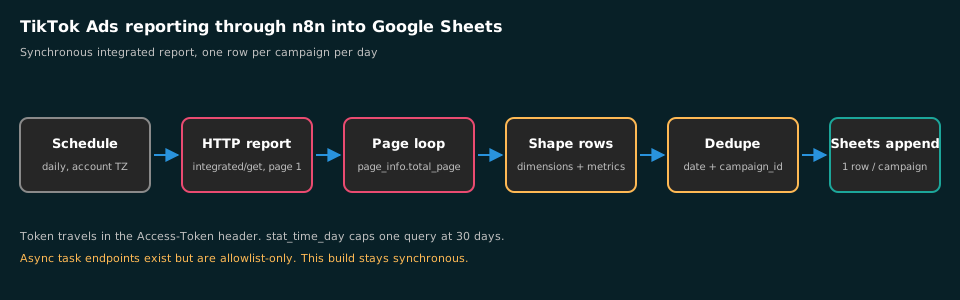
One scheduled workflow, five nodes: a Schedule Trigger wakes the flow, an HTTP Request node calls the TikTok reporting endpoint, a paging loop collects every page, a field-mapping step shapes each row, and the Google Sheets node appends.
TikTok offers two reporting paths, and only one of them is open to you today.
| Path | Endpoints | What it fits |
|---|---|---|
| Synchronous report | /report/integrated/get/ | Daily pulls: campaign, ad group or ad level, returned inline in the response |
| Asynchronous report task | /report/task/create/, /report/task/check/, /report/task/download/ | Large exports over any date range, delivered as a downloadable file |
The async path sounds like the right answer until you read the fine print. TikTok’s own async report reference marks it an allowlist-only feature: you have to apply for access before the task endpoints answer you. So this guide builds the synchronous path, which serves a daily campaign-level pull without any application. If your account genuinely needs multi-year ad-level exports, apply for the allowlist first and treat this post’s auth section as shared setup.
Step 1: How do you get a token that actually survives?
This is trap number one, and it costs people the whole evening. TikTok runs two different token systems under one brand, and people fetch the wrong rules.
The Marketing API flow works like this:
- Create the developer app on the API for Business portal and enable the Reporting permission scope.
- Send the advertiser authorization URL to the ad account owner. They approve the permission list and confirm a verification code sent by email.
- TikTok redirects back with an
auth_code. That code is valid for one hour and works exactly once. - Exchange it for a token by posting JSON to
https://business-api.tiktok.com/open_api/v1.3/oauth2/access_token/:
{
  "app_id": "YOUR_APP_ID",
  "secret": "YOUR_APP_SECRET",
  "auth_code": "YOUR_AUTH_CODE"
}- The response carries the
access_token, the list ofadvertiser_idsit reaches, and the grantedscope. If you manage several accounts, confirm the list with/oauth2/advertiser/get/.
Here is the part the connector blogs get wrong: a long-term advertiser token from this exchange does not expire on a timer and has no refresh token. A refresh call against it simply errors. TikTok’s authentication reference is explicit that the token stays valid until the advertiser cancels the authorization or you revoke it. The 24-hour token lifetimes floating around the internet belong to TikTok’s newer MCP server, a different system entirely. So you paste this token into an n8n Header Auth credential once and you are done, not nightly.
Trap number two sits in the next sentence. The token does not travel in an Authorization header. Every request sends it in a header literally named Access-Token. A Bearer-style request gets rejected no matter how fresh the token is.
Step 2: How do you request a report TikTok will return?
With the credential wired up, add the HTTP Request node. The call is a GET to https://business-api.tiktok.com/open_api/v1.3/report/integrated/get/ with query parameters, not the JSON POST body you might expect from other ad platforms:
advertiser_id: your account ID as a stringreport_type:BASICdata_level:AUCTION_CAMPAIGNfor campaign-level rowsdimensions:["campaign_id", "stat_time_day"]for one row per campaign per daymetrics:["spend", "impressions", "clicks", "conversions"]start_dateandend_date:YYYY-MM-DDpage_size: raise it well above the default ten rows
Two rules decide whether the API answers at all. The data level must match the dimensions: AUCTION_CAMPAIGN wants campaign_id in the grouping, or the request errors. And the date window has a ceiling tied to those dimensions: grouping by stat_time_day caps a single query at a 30-day window, so a backfill gets sliced into month-sized chunks in the paging loop rather than fired as one wide request.
Watch the clock, too. Start and end dates resolve in the ad account’s timezone, not UTC. A campaign that spent money at 11 pm Central lands on a different calendar day if your workflow computes dates in UTC. Set your n8n instance timezone to match the client account before you schedule anything.
The endpoint does have real limits at ad level. Adeli’s TikTok API guide records that a synchronous report returns data for up to 20,000 ads, and if you filter by ID you pass at most 100 IDs per request. Campaign-level daily pulls nowhere near those ceilings. Ad-level history does, and it is the reason agencies give up on this endpoint and start paying for connectors.
Step 3: How do you page through and shape the rows?
The response puts rows in data.list and the paging math in page_info: current page, page size, total pages. On the first page, read total_page. Then loop pages two through the end and stitch the lists together.
In n8n that is a Loop Over Items node around a second HTTP Request, with a Set node injecting the incrementing page parameter. After the loop:
- Split Out the collected
listarrays so every row is its own item. - Map each item to your sheet columns. The IDs and names come out of the
dimensionsobject, the numbers out ofmetrics. - Cast the metrics to numbers. TikTok returns spend as a numeric string, and a sheet full of left-aligned text sums to zero.
- Stamp each row with
pulled_atso you always know which run wrote it.
The metrics object also echoes back currency and timezone per advertiser. If you ever merge several accounts into one workbook, keep those values in columns.
Step 4: How do you append rows into Google Sheets?
Add the Google Sheets node, operation Append, and map the shaped rows to your header columns. One row per campaign per day, appended below whatever the other platform legs already wrote.
One trap left: re-runs. A manual retry on a Tuesday appends yesterday’s rows a second time. Two clean habits, pick one:
- Pull one day, always yesterday. The scheduled run covers
T-1only, and retries of that date are rare enough to delete by hand. - Pull a rolling three days and dedupe. Late-arriving conversion updates revise older days, so re-pulling
T-3toT-1keeps history honest, with a dedupe pass keyed on date plus campaign ID before the append.
We run the second habit on client workbooks. TikTok conversion counts settle for a few days after delivery, and a T-1-only pull quietly freezes numbers that were never final.
Step 5: How do you schedule the pull?
Swap the manual trigger for a Schedule Trigger, daily, at an hour that postdates your ad account’s day close: 07:00 in the account timezone usually clears it. Wire a failure notification to Slack or email so a dead run is not discovered at month-end.
That is the whole build. The same five nodes then repeat per ad account: one credential, one workflow per account, one tab per account in the workbook. Once TikTok joins the Google Ads and Meta pulls, the daily sheet covers the whole paid mix in one place.
How do you verify the pull is correct?
Before you trust a single row, run these three checks on day one:
- Yesterday’s spend in the sheet versus yesterday’s spend in Ads Manager, to the cent. A mismatch is nearly always a timezone boundary issue.
- Row count against campaign count: campaigns that spent something yesterday each get exactly one row.
- Sum the sheet’s spend column for last week and compare it to the Ads Manager trend line for the same seven days.
Common mistakes
- Sending the token as
Authorization: Bearerinstead of theAccess-Tokenheader - Reusing an
auth_codeafter its one-hour window, then debugging an “invalid token” error that is really an “invalid code” problem - Omitting
report_type, so the request dies on a missing-parameter error people misread as a permissions failure - Mismatching
data_levelanddimensions - Leaving spend as a string and wondering why the sheet totals are blank
- Wondering where deleted campaigns went: the status filters default to not-deleted, so rebuilds of history need the status filter widened
Should you run async reports or just pay a connector?
Our position, and we would defend it against any connector salesperson: for daily campaign reporting, the synchronous endpoint is the right tool, and the async task system is the wrong one for anyone who has not applied for the allowlist. A synchronous pull that pages cleanly has one moving part. The async path adds task creation, status polling and file download, then asks you to file an access application before any of it works. The added machinery only pays for exports too big to page, and at campaign grain that is a rare account.
On connectors: Supermetrics and its peers hide every trap in this post behind per-seat pricing. The arithmetic is simple. If the sheet is a deliverable you sell or a habit n8n already supports, this build is one afternoon and no monthly fee. If the spreadsheet is the product and nobody on the team maintains servers, pay the connector and skip this post. When you would rather hand the whole reporting stack to people who maintain these workflows for a living, our engagement pricing covers builds like this one.
What to do next
Build it against yesterday’s data first, verify against Ads Manager, and let it run for a full week before anyone makes budget calls from it. Then decide what the sheet should do beyond sitting there: the same n8n instance that pulls these numbers can watch them and act, which is where AI marketing automation earns its keep, and that is a build we take on through our services if you want it done for you.
If you want to see how much of your reporting stack could run itself, the Google Analytics to Sheets pull is the cheapest next win after the ad platforms, and the CallRail export closes the phone-lead gap behind it.