How to Connect Google Ads to BigQuery With n8n (No Connector)
Pipe Google Ads into BigQuery with n8n: the GAQL pull, CSV staging in Cloud Storage, and a partition-level load that makes reruns safe. No connector needed.

Edward Chalupa
Founder, Whtnxt · Dallas, TX

Connect Google Ads to BigQuery with a self-hosted n8n workflow. The pipe pulls GAQL reports, divides micros, stages a CSV in Cloud Storage, and loads with WRITE_TRUNCATE so a rerun replaces the day instead of duplicating it. Google’s managed transfer moves data once a day at best. This build runs on your schedule.
Why would you build this instead of using the transfer service?
Google’s managed route is the BigQuery Data Transfer Service, and its own documentation names the ceilings. The fastest schedule it offers is once every 24 hours. Its default refresh window re-pulls the past seven days on every run, adjustable between one and thirty. A manager account can feed at most 8,000 customer IDs into one transfer config.
None of that is bad for a nightly analytics dump. It is a problem the week you need three things: an intraday pull for budget pacing, spend sitting next to your own conversions at a grain you chose, and a rerun that cannot double-count yesterday. That is the same graduation path I described in the GA4-to-BigQuery guide: stay in Sheets while the weekly report is the job, move to the warehouse when you need joins.
There is one more reason I keep this build on the API instead of the transfer service. The transfer service copies Google’s report shape into dozens of tables. The API path lets me write exactly one table, at campaign-day grain, with a cost column already divided out of micros. My clients’ analysts query one flat table and never learn what a resource_name is.
Here is the honest trade. You own the workflow, so you also own its maintenance. If a once-a-day copy of Google’s schema is enough for your team, the transfer service is the lazier and better answer. Build this when the spreadsheet you already run has stopped answering questions.
What do you need before you start?
The first five items are credentials, and the developer token is the one that takes calendar time. The full setup takes an afternoon if you already run the Google Ads-to-Sheets pull, because every credential is shared between the two builds.
- A Google Ads account you can log into, plus its customer ID (10 digits, dashes stripped)
- A developer token from the API Center page of a Google Ads manager account
- Explorer API access on your Cloud project, since Test access cannot touch live accounts and Explorer reaches 2,880 operations per day, which is plenty for hourly pulls of one report
- A Google Cloud project with the BigQuery and Cloud Storage APIs enabled
- A service account with the BigQuery Job User role plus Storage Object Admin on one bucket, used only by n8n
- A self-hosted n8n instance at version 1.0 or newer (the credential pattern is identical on n8n Cloud)
- The OAuth refresh token for the Ads API, generated once via OAuth Playground exactly as the Sheets guide describes
Two warnings before the steps. First, the service account needs access granted inside the Google Ads UI (or via the manager account) with the login-customer-id header set on every call, or every request dies with a permission error that looks like a bad token. Second, create the Cloud Storage bucket in the same region as the dataset you are about to build. Cross-region copies are slow and quietly bill egress.
How does the pipeline move data?
Four moving parts, one workflow. The schedule trigger and the credential nodes are identical to the sibling pulls in this series, so the diagram below focuses on the load mechanics that are new here.
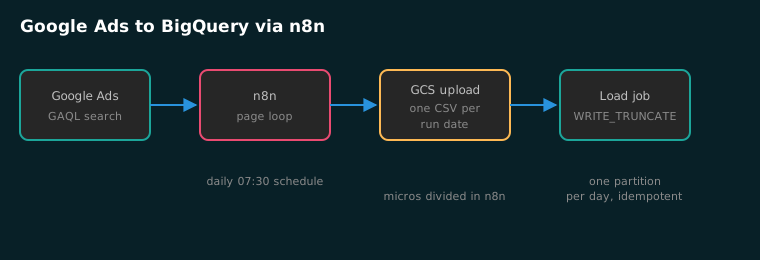
| Node | Job | Where beginners lose an hour |
|---|---|---|
| Schedule Trigger | Daily pull at 07:30 local | Running before Google finalizes yesterday’s figures |
| HTTP: page loop | POSTs GAQL, follows page tokens | Assuming one response returns everything |
| Code: flatten | Divides micros, emits CSV text | Forgetting the header row load jobs skip |
| GCS: upload | Writes one CSV per run date | Reusing one filename, so reruns race each other |
| HTTP: load job | Creates a BigQuery load job | WRITE_APPEND instead of WRITE_TRUNCATE |
Step 1: How do you create the dataset and destination table?
In the Cloud console, open BigQuery on your analytics project and create one dataset, say ads_reporting, located in us. Location choice is permanent for a dataset, and this table will join against the GA4 export from the GA4-to-BigQuery build, so match that dataset’s region.
Create the destination table now with a schema query rather than letting the first load invent it:
CREATE TABLE ads_reporting.campaign_day (
  report_date DATE,
  campaign_id INT64,
  campaign_name STRING,
  status STRING,
  impressions INT64,
  clicks FLOAT64,
  cost NUMERIC,
  conversions FLOAT64
)
PARTITION BY report_date;
One column deserves attention: cost NUMERIC. You will divide micros in n8n before the CSV is ever written, so the warehouse never stores a micros integer anyone has to remember to divide. The micros trap is documented in the Sheets guide, where the divide that turns API micros into money is explained; the fix here is the same divide, moved upstream.
Step 2: How do you pull the GAQL report?
One HTTP Request node runs the query. The node body is the same search call proven in the Sheets series, narrowed to yesterday because this table accumulates one day per run:
{
  "method": "POST",
  "url": "https://googleads.googleapis.com/v21/customers/{{customerId}}/googleAds:search",
  "headers": {
    "Authorization": "Bearer {{$json.access_token}}",
    "developer-token": "{{$credentials.developerToken}}",
    "login-customer-id": "{{$credentials.loginCustomerId}}",
    "Content-Type": "application/json"
  },
  "body": "{\"query\": \"SELECT campaign.id, campaign.name, campaign.status, segments.date, metrics.impressions, metrics.clicks, metrics.cost_micros, metrics.conversions FROM campaign WHERE segments.date = '{{today('yyyy-MM-dd', $now.minusDays(1))}}' AND campaign.status != 'REMOVED'\"}"
}
Then a Code node walks the pages, because since API v19 the search endpoint returns fixed pages of 10,000 rows and ignores any page size you request. A small account fits in one page; the loop still belongs in the workflow, because the day you add a big client it does not.
const rows = [];
let pageToken = $json.nextPageToken;
rows.push(...$json.results);
while (pageToken) {
  const resp = await this.helpers.httpRequest({
    method: 'POST',
    url: $node['GAQL Pull'].parameters.url,
    headers: $node['GAQL Pull'].parameters.headers,
    body: JSON.stringify({
      query: $node['GAQL Pull'].parameters.body.query,
      pageToken: pageToken
    }),
    json: true
  });
  rows.push(...(resp.results || []));
  pageToken = resp.nextPageToken;
}
const lines = ['report_date,campaign_id,campaign_name,status,impressions,clicks,cost,conversions'];
for (const r of rows) {
  lines.push([
    r.segments.date,
    r.campaign.id,
    '"' + String(r.campaign.name).replaceAll('"', '""') + '"',
    r.campaign.status,
    r.metrics.impressions,
    r.metrics.clicks,
    (Number(r.metrics.cost_micros) / 1e6).toFixed(4),
    r.metrics.conversions
  ].join(','));
}
return [{ json: { csv: lines.join('\n') } }];
The header row matters: the load job in step 4 is told to skip exactly one line. Quote campaign names, because someone named a campaign with a comma the same week you deploy this.
Step 3: How do you stage the CSV in Cloud Storage?
BigQuery loads from Cloud Storage, not from n8n’s memory, so the CSV gets one object per run date: ads-reports/campaign_day/report_{{ $now.format('yyyy-MM-dd') }}.csv. Use the Google Cloud Storage node with the same service account key, bucket set to your reports bucket, and the Code node’s csv field mapped to the file content.
Why a dated filename when a rerun will overwrite it anyway? Because a fixed name turns two runs on one morning into a race against whichever CSV the load job happened to read. A dated path plus a partition-level truncate (step 4) makes both runs land on the same data, which is the property you are actually buying.
If you already ship the CallRail-to-Sheets pull, this staging bucket is the same idea as that workflow’s temp files, just pointed at a warehouse instead of a spreadsheet.
Would I still recommend the transfer service sometimes?
Yes. A once-a-day copy of Google’s schema, loaded without anyone maintaining a workflow, is the right answer for most marketing teams, and the transfer service does it well inside its documented limits. My position after running both for clients: paying connector money to sit between Google Ads and BigQuery is the worst of the three options, renting at monthly rates a pipe Google gives away and one you already know how to build. Pick the managed transfer for a nightly copy, build this one when you need intraday freshness or a grain of your own, and skip the vendors entirely.
Step 4: How do you load with WRITE_TRUNCATE?
The last HTTP node POSTs a load job to https://bigquery.googleapis.com/bigquery/v2/projects/{{projectId}}/jobs, authenticated with a service account token:
{
  "configuration": {
    "load": {
      "sourceUris": ["gs://ads-reports/csv/report_{{today}}.csv"],
      "schema": {
        "fields": [
          { "name": "report_date", "type": "DATE" },
          { "name": "campaign_id", "type": "INT64" },
          { "name": "campaign_name", "type": "STRING" },
          { "name": "status", "type": "STRING" },
          { "name": "impressions", "type": "INT64" },
          { "name": "clicks", "type": "FLOAT64" },
          { "name": "cost", "type": "NUMERIC" },
          { "name": "conversions", "type": "FLOAT64" }
        ]
      },
      "sourceFormat": "CSV",
      "skipLeadingRows": 1,
      "fieldDelimiter": ",",
      "timePartitioning": { "type": "DAY", "field": "report_date" },
      "writeDisposition": "WRITE_TRUNCATE",
      "createDisposition": "CREATE_IF_NEEDED"
    }
  }
}
WRITE_TRUNCATE is the switch that makes this pipeline safe to rerun, and the load documentation defines it as replacing existing data instead of appending to it. On a partitioned table, a run rewrites the day it touches; yesterday’s partition keeps yesterday’s rows. Poll the job with a Wait plus HTTP loop until the response status reports DONE, then fail the workflow if the job carries errors. Silence is how empty tables ship.
How do you verify the warehouse is right?
Run these four checks the first morning. They take five minutes and they catch every failure mode above.
- Spot-check one campaign-day. The Google Ads UI report for yesterday shows identical clicks and impressions, and cost matching to the cent if micros divided correctly.
- Count the grain.
SELECT COUNT(*) FROM ads_reporting.campaign_day WHERE report_date = 'yesterday'equals your active campaign count, not a multiple of it. A multiple means the workflow ran twice with WRITE_APPEND. - Prove idempotency. Run the workflow again manually for the same date. The count must not change. If it grows, re-read the load job: you are appending.
- Check the bill. BigQuery’s free tier covers 1 TB of query bytes and 10 GB of active storage per month, and a campaign-day table stays inside it for years at agency scale. Set a custom quota cap on the project anyway, same habit as the per-query cap in the GA4 guide.
What breaks in the first week?
| Symptom | Cause | Fix |
|---|---|---|
| Load job DONE, zero rows | CSV mapped to the wrong GCS path | Log the uploaded mediaLink and copy it into sourceUris |
| Load job refused at jobs.insert | Service account lacks BigQuery Job User | Grant the role on the project, not just the dataset |
| Duplicated rows after rerun | writeDisposition left at WRITE_APPEND | Set WRITE_TRUNCATE and re-run once to collapse the day |
| GAQL RESOURCE_EXHAUSTED | Too many fields for one day of queries | Cut the field list or the pull frequency, both are cheap fixes |
| Permission error that looks like a bad token | Service account missing Ads UI access | Add it at manager-account level and send login-customer-id |
Frequently asked questions
Can I pull more often than daily? Yes, and that is the point of owning the pipe. An hourly intraday pull of campaign totals fits a live account’s pacing habit; Explorer’s daily operation limit is the number to schedule against. Keep the day-grain table daily and add a totals table for intraday if you need both.
Does this work across a manager account? Yes, with the login-customer-id header set to the MCC and the query pointed at each child customer in a loop. The Sheets guide in this series uses the same header for client accounts.
What about click-level or keyword-level data? Same pipeline, different GAQL query and table. Add segments.device or swap FROM campaign for FROM keyword_view and create the matching partitioned table. The warehouse pattern does not change.
Should this replace my Sheets reports? No. The GA4-to-Sheets and Outbrain-to-BigQuery posts show my split: spreadsheets for the humans who read Monday morning, BigQuery for the joins. The reporting dashboard workflow then pushes query results back to the people who never open a console.
Next steps
Three decisions carry this build: partition by report date so a rerun rewrites one day, divide micros before the CSV exists, and keep one dated object per run so nothing races. Pass all three and the pipeline is boring, which is the goal for reporting infrastructure.
From here the payoff is joins. Ad spend against the GA4 event log, call records from call tracking, CRM deal values, all in one queryable place. If you would rather have the warehouse built and queried for you, that is the marketing automation work I do for North Texas clients, usually alongside their paid search and lead generation programs.