How to Connect Meta Ads to Google Sheets With n8n (No Connector)
Pull Meta Ads spend, clicks and conversions into Google Sheets with a self-hosted n8n workflow: the Insights call, the system user token, and the reach trap.

Edward Chalupa
Founder, Whtnxt · Dallas, TX

Connect Meta Ads to Google Sheets with a self-hosted n8n workflow that calls the Marketing API directly. No paid connector, no Ads Manager exports. The pipe pulls campaign-level Insights daily, pages through the response, and appends one row per campaign per day. Three Meta-specific traps sit between you and a clean first run, and this guide covers all three.
This site already runs the Meta Graph API Insights pull as one of the three automations every marketing team needs; this guide expands that node into a complete build mirroring our Google Ads to Google Sheets pipeline. The Meta leg earns its own guide because the platform’s limits are nothing like Google’s, and the connector ads ranking for this search never mention them. Every result on page one is either a template marketplace listing or a video tour of the node graph. Nobody tells you that backfilling twelve months silently deletes your reach column, or that your token dies on schedule.
What do you need before you start?
Here is the full prerequisite list. The first three are Meta-side, and the system user token is the one that separates a durable pipeline from one that breaks every two months.
- A Meta business portfolio (what Business Manager is now called) with at least one ad account, and its
act_ID from Ads Manager settings - A Meta developer app of type Business, with the Marketing API product attached
- A system user inside the business portfolio with a long-lived token and
ads_readpermission - A self-hosted n8n instance at version 1.0 or newer (Cloud works too; the credential setup is identical)
- A Google Sheets OAuth credential in n8n and a blank spreadsheet with a header row
Do not shortcut the token by pasting one from Graph API Explorer logged in as yourself. Meta’s access token guide is plain that a long-lived user token expires after 60 days. A personal-token build stops the morning after expiry, and the workflow error it throws says “session,” which sends you debugging the wrong node. A system user token belongs to the business portfolio instead of to a person, so a staff departure or a password rotation does not take a client’s daily report down with it.
How does the data actually move?
Five nodes, and it is the same shape as our Outbrain reporting build: schedule, authenticate, query, flatten, append.
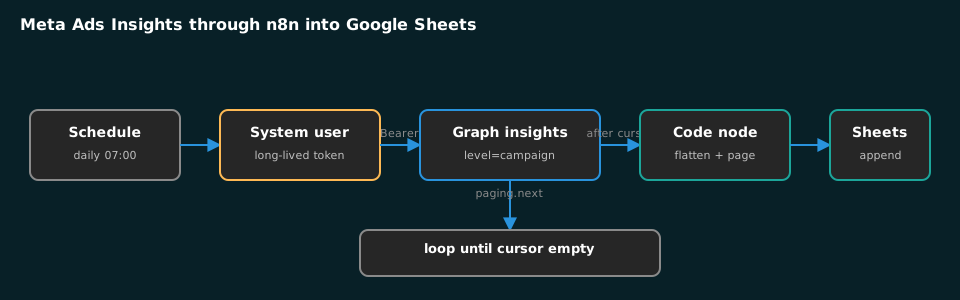
| Node | Job | Where beginners lose an hour |
|---|---|---|
| Schedule Trigger | Daily pull at 07:00 local | Pulling one day when conversions settle late |
| HTTP: Insights call | GETs the campaign-level insights edge | Using a personal token instead of a system user |
| Code: flatten + page | Splits the data array, follows the cursor | Assuming one response holds every row |
| Google Sheets: append | Writes one row per campaign per date | Column drift when metrics get added later |
| Schedule window | Re-pulls a rolling seven days | Trusting a yesterday row pulled at 07:00 today |
Step 1: How do you create the token without a personal login?
- On Meta’s app creation portal, create an app of type Business and add the Marketing API product to it.
- In Business Settings, open Users → System Users, add a system user with the Admin role, then assign the ad account to it with full control.
- Generate a token for that system user from the same screen, and grant it
ads_read. This permission is read-only reporting access; it cannot touch live campaigns, which is exactly what a reporting pipeline should hold. - In n8n, store the token as a Header Auth credential. Every HTTP node later pulls it from the credential, so the token never appears in a visible node field or in the workflow JSON.
Test the credential before building anything: hit the account’s own endpoint with the token and confirm the account name comes back. If it returns a permissions error, the system user was never assigned the ad account, which is the failure Meta’s error message does not spell out.
Step 2: Which Insights call do you make?
Meta’s reporting endpoint is the insights edge on the ad account. One HTTP Request node is the whole pull:
{
  "method": "GET",
  "url": "https://graph.facebook.com/v23.0/act_1234567890/insights",
  "options": {
    "queryParameters": {
      "parameters": [
        { "name": "date_preset", "value": "yesterday" },
        { "name": "level", "value": "campaign" },
        { "name": "fields", "value": "date_start,campaign_id,campaign_name,impressions,clicks,spend,reach,frequency" }
      ]
    }
  },
  "authentication": "genericCredentialType",
  "genericAuthType": "httpHeaderAuth"
}
Three details in that call decide whether the run is boring. level=campaign is the row grain; swap it to ad when you need creative-level rows, and keep the grain stable in one sheet. date_preset=yesterday pulls a single day; for a historical import, use time_range with a JSON pair of since and until dates instead. And the fields list is a whitelist: any metric you forget to name simply is not there, with no error to tell you.
One Meta quirk to plan around: spend comes back as a decimal string, not a number. Cast it in the next node with Number() rather than letting Google Sheets guess, because Sheets will happily right-align a string and then every downstream total silently skips it.
Step 3: How do you flatten the response and page through it?
The Insights call returns one item wrapping a data array of campaign rows. n8n would hand that whole envelope to Sheets as a single row, so a Code node splits it first. This is the same flatten-and-page pattern from our CallRail to Sheets guide, aimed at a different API:
const rows = [];
for (const item of items) {
  for (const row of item.json.data || []) {
    rows.push({ json: {
      date: row.date_start,
      campaign_id: row.campaign_id,
      campaign: row.campaign_name,
      impressions: Number(row.impressions),
      clicks: Number(row.clicks),
      spend: Number(row.spend),
      reach: row.reach === undefined ? '' : Number(row.reach),
      frequency: row.frequency === undefined ? '' : Number(row.frequency)
    }});
  }
}
return rows;
Note the undefined guard on reach and frequency. Those fields go missing on whole responses for reasons described in the verification section below, and a guard writes an empty cell where a bare Number() would write 0. Zero and empty tell very different stories in a report: one reads as “this campaign reached nobody,” the other reads as “the API withheld this,” and only one of those is true.
Paging works differently than you might expect. The response carries a paging.next field holding a fully-built URL for the next page. A loop node fed by an IF on paging.next being present handles it: each iteration calls that URL verbatim instead of rebuilding the query, feeds the result into the flatten node, and exits when the field disappears. Small accounts with a handful of campaigns never see a second page. Agencies pulling ad-level rows across a quarter page repeatedly, and the workflow that ignores the cursor reports a partial period with no warning sign.
Step 4: How do you append to Sheets and schedule the run?
Create one tab, say Meta_Daily_Data, with a header row matching the flatten node’s keys exactly. Then configure the Google Sheets node to Append row in the column-mapping mode, so a future schema change fails loudly instead of shifting data one column left.
Two rules keep the history clean:
- One row per campaign per date is the contract. Build the habit of checking for duplicates before trusting totals. My first week at Sheets scale, a mis-set trigger turned an idempotent daily job into a doubling job, and the month’s spend report came out exactly double. An IF that looks up the date plus campaign ID, or a re-pull that deletes the window before appending, makes reruns safe.
- Pull a rolling seven days, not just yesterday. As with the GA4 pull, attributed conversions settle in after the fact. A yesterday row pulled at 07:00 today will not match the same row pulled a week later. Re-appending a window with the delete-and-replace rule above gives you rows that agree with Ads Manager eventually, which is the honest promise.
Schedule it for 07:00 local and turn the workflow on. From there the sheet accumulates one block of rows per day, which is what the reporting sheet in our automation audit walkthrough looks like a month in.
What breaks in the first week?
Three failure modes are specific to Meta, and all three come straight from the platform’s own Ads Insights best-practices page.
Reach vanishes on historical pulls. A standard query that applies breakdowns with a start date older than 13 months omits reach and its relatives, frequency and cost per point. The documented way around it is asynchronous jobs, and Meta caps those at 10 requests per ad account per day, with an x-fb-ads-insights-reach-throttle response header that tells you how close you are to the cap. For a daily incremental sheet this never bites. It bites the day you decide to backfill two years of history and wonder why reach is empty on everything older than a year.
One fat call dies whole. Meta’s Ads Insights best-practices page states that when a single request needs too many rows or too many computed data points, the call returns error_code = 100 with CodeException subcode 1487534. The same page also warns an asynchronous request can take up to an hour to finish. The fix is structural rather than retry-shaped: narrow the date range, ask for fewer metrics per call, and never mix ad-level pulls with account-level breakdowns in one query.
The token expires on a calendar. If you skipped the system user step, the personal long-lived token from the setup section hits its 60-day expiry and every scheduled run starts failing with a session error. Recreating it takes four minutes and takes the pipeline down until someone notices. The system user route in Step 1 removes this entire failure mode.
How do you verify the sheet is right?
Run these four checks once, the day after the first scheduled run, and the pipeline earns your trust for good:
- Totals match Ads Manager. Set Ads Manager to the same date range at campaign level and compare spend and impressions against the sheet’s totals. Spend should agree to the cent.
- Row count equals campaigns times active days. Campaigns that spent nothing on a day produce no row, so shortfalls are normal; unexplained surplus means a duplicate.
- Missing reach reads empty, not zero. Older breakdown rows should show blank reach, holding the distinction the flatten node’s guard was built for.
- Rerun today’s job twice. The second run must change nothing. If the row count grows, your dedupe rule is not wired yet, and you want to learn that now rather than in a client report.
When these pass, the sheet is a trustworthy system of record for one channel’s daily performance.
When should you graduate from Sheets?
Here is the position I will defend against any connector sales call: if Google Sheets is where the report actually lands, a self-hosted n8n workflow calling the API directly is the better build than a paid connector, full stop. Stay in Sheets while the weekly client report is the whole job, the same call I made in the GA4 to BigQuery guide. Move to the warehouse the week you need Meta spend sitting next to Google spend, CRM conversions, and call recordings in one query. The append pattern above becomes a load job instead, and the Google Ads to BigQuery build shows the warehouse-side mechanics on the sibling platform.
Frequently asked questions
Does this work with Meta’s ad accounts under an agency manager? Yes. Query the ad account’s own act_ endpoint and authenticate with a system user that has been assigned that account. Manager access alone is not enough; the assignment in Step 1 is what grants the token.
Can I pull ad-set or ad level instead of campaign? Set level to adset or ad. Keep one grain per sheet tab, because mixing grains in one tab is how totals get double-counted.
Why don’t the numbers match Ads Manager exactly on today’s row? Attribution settles late. Compare against Ads Manager for a closed day inside your rolling window, not for today.
Next steps
The workflow above is the reporting leg of the paid social builds we run for DFW clients, documented end to end on our PPC management page. If ad reporting is a weekend project you would rather not own, that is a legitimate trade, and the full service list spells out what a managed stack covers. The pricing page lays out what those engagements cost against the DIY version. For the downloadable version of this pattern and the rest of the client-ready automation templates, the free resources library is the starting point.