How to Connect Google Ads to Google Sheets With n8n (No Connector)
Pull Google Ads spend and clicks into Google Sheets with a self-hosted n8n workflow: exact GAQL query, developer token setup, and the cost_micros trap.

Edward Chalupa
Founder, Whtnxt · Dallas, TX

Every guide ranking for “connect Google Ads to Google Sheets” is an advertisement for a paid connector. Google’s own free add-on for Google Sheets is limited to the English version of Sheets, only works in the United States, and selects one Google Ads account per spreadsheet. That last limit alone kills it for any multi-client setup.
I build Google Ads reporting for DFW home-service accounts on self-hosted n8n, the same pull pattern behind the call-tracking and bid-automation stacks documented on this site, and the CallRail, GA4 and Microsoft Ads builds. The Google Ads leg has three traps the connector ads never mention: cost comes back in micros, pages are fixed at 10,000 rows whether you asked for it or not, and a brand-new developer token cannot touch a live account. This guide covers all three so the first daily run lands clean.
What do you need before you start?
Here is the full prerequisite list. The first four are credentials, and the developer token is the one that takes calendar time, so start there.
- A Google Ads account you can log into, and its customer ID (the 10-digit number with dashes stripped)
- A Google Cloud project with the Google Ads API enabled, plus an OAuth client and refresh token
- A developer token, the 22-character alphanumeric string obtained from the API Center page of a Google Ads manager account
- API access level granted to your Cloud project (more on this below; it decides whether you can query live accounts)
- A self-hosted n8n instance at version 1.0 or newer (Cloud works too, but the credential storage below is identical)
- A Google Sheets OAuth credential in n8n and a blank spreadsheet to write into
About that access level. When you enable the Google Ads API your project starts at Test access, which only queries test accounts. Explorer access reaches production accounts at 2,880 operations per day, which is enough for a once-daily campaign report. Basic access lifts that to 15,000 operations per day and is the level I keep our client-reporting project at. Standard access is unlimited operations per day, and its review typically takes 10 business days, so plan the application around your reporting deadline rather than hoping for same-day approval.
The practical sequencing I use: build and test the whole workflow against a Google Ads test account while the Basic application is pending, then swap the customer ID. The workflow itself never changes between access levels.
How does the data actually move?
The pipeline is five nodes, and it is the same shape as our Outbrain DSP reporting build: schedule, authenticate, query, flatten, append.
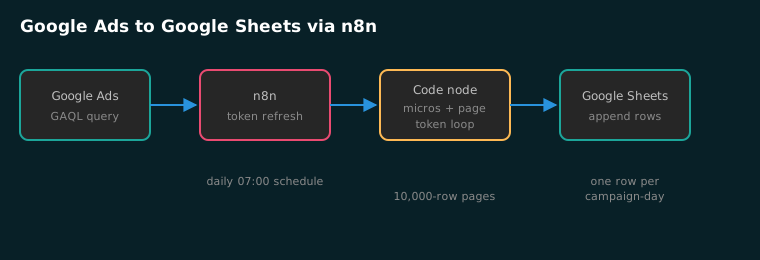
| Node | Job | Where beginners lose an hour |
|---|---|---|
| Schedule Trigger | Daily pull at 07:00 local | Pulling before Google finalizes yesterday’s figures |
| HTTP: refresh token | Exchanges refresh token for a 1-hour access token | Sending client_secret in the wrong field |
| HTTP: GAQL search | POSTs the query to the search endpoint | Forgetting the developer-token header |
| Code: flatten + page | Divides cost_micros, loops page_token | Assuming one request returns everything |
| Google Sheets: append | Writes one row per campaign per date | Column order drifting when you add metrics |
Step 1: How do you set up the credentials?
Two credential systems are involved and they confuse people because they live in different places. The OAuth client proves your n8n instance may act as you. The developer token identifies the application making the call.
- In your Google Cloud project, enable the Google Ads API and follow Google’s OAuth setup for a Cloud project to create an OAuth client ID of type Desktop app. Keep the client ID and client secret.
- Generate a refresh token for scope
https://www.googleapis.com/auth/adwords. I use OAuth Playground for the one-time token exchange, the same flow described in our GA4 BigQuery guide. - In the Google Ads UI, open Tools → API Center on the manager account and copy the developer token.
- Apply for Explorer or Basic access on the Google Ads API Overview page of your Cloud project.
In n8n, store the client ID, client secret, refresh token, developer token and login customer ID as a Credential (or environment variables behind an $json reference). None of those five ever appear in a node’s visible fields; the HTTP nodes pull them from the credential. If you are deciding whether your team should own these credentials at all, our marketing automation services page covers what a managed reporting build looks like end to end.
Step 2: How do you refresh the access token?
Access tokens expire roughly every hour, so the workflow refreshes on every run instead of caching one. One HTTP Request node pointed at Google’s token endpoint does it:
{
  "method": "POST",
  "url": "https://oauth2.googleapis.com/token",
  "body": "grant_type=refresh_token&client_id={{$credentials.clientId}}&client_secret={{$credentials.clientSecret}}&refresh_token={{$credentials.refreshToken}}",
  "options": { "bodyContentType": "url-encoded" }
}
The response’s access_token field feeds every later node as {{$json.access_token}}. If this node returns invalid_grant, your refresh token was issued under a different consent screen than the client you are exchanging it with. That mismatch is the single most common failure here; regenerate the token from Playground with the same client and it clears.
Step 3: Which GAQL query do you run?
Google Ads reporting uses GAQL, a SQL-like language you POST to the search endpoint. This is the query our client daily reports run on:
{
  "method": "POST",
  "url": "https://googleads.googleapis.com/v21/customers/{{customerId}}/googleAds:search",
  "headers": {
    "Authorization": "Bearer {{$json.access_token}}",
    "developer-token": "{{$credentials.developerToken}}",
    "login-customer-id": "{{$credentials.loginCustomerId}}",
    "Content-Type": "application/json"
  },
  "body": "{\"query\": \"SELECT campaign.id, campaign.name, campaign.status, segments.date, metrics.impressions, metrics.clicks, metrics.ctr, metrics.average_cpc, metrics.cost_micros, metrics.conversions FROM campaign WHERE segments.date DURING LAST_7_DAYS AND campaign.status != 'REMOVED'\"}"
}
Read the FROM campaign clause as the row grain: one row per campaign per day, because segments.date is selected. Remove it and you get one row per campaign for the whole window. That grain decision is the report. Most reporting pain I untangle at clients is a grain bug, not a data bug.
Three GAQL rules that save you a debugging evening:
metrics.cost_microsis the API’s native cost field; there is no plaincostin dollars. Everything else (ctr,average_cpc) comes back ready to read.login-customer-idis required whenever the account you query sits under a manager account. Omit it and you get a permission error that does not mention headers.metrics.conversionsis conversion-lag sensitive. A yesterday row pulled at 07:00 today will not match the same row pulled a week later.
Step 4: How do you flatten the response and page through it?
This is the step no connector advertisement explains because their tooling hides it. Since v19, the search endpoint returns fixed pages of 10,000 rows and the page_size field is removed: setting it now returns a RequestError.PAGE_SIZE_NOT_SUPPORTED error. When more rows exist, the response carries a next_page_token, and on REST you must explicitly request each new page with the identical query. A single SMB account with a few campaigns never notices this. A manager account pulling 90 days across dozens of clients pages repeatedly, and the workflow that ignores the token quietly reports a partial month.
Here is the Code node we run between the HTTP query and Sheets. It divides micros into dollars and loops pages until the token stops appearing:
const rows = [];
let pageToken = $json.nextPageToken;
rows.push(...$json.results);
while (pageToken) {
  const resp = await this.helpers.httpRequest({
    method: 'POST',
    url: 'https://googleads.googleapis.com/v21/customers/'
      + $env.GOOGLE_ADS_CUSTOMER_ID + '/googleAds:search',
    headers: {
      'Authorization': 'Bearer ' + $('Token').first().json.access_token,
      'developer-token': $env.ADS_DEV_TOKEN,
      'login-customer-id': $env.ADS_LOGIN_ID,
      'Content-Type': 'application/json'
    },
    body: JSON.stringify({
      query: $('Query').first().json.query,
      pageToken: pageToken
    }),
    json: true
  });
  rows.push(...(resp.results || []));
  pageToken = resp.nextPageToken;
}
return rows.map(r => ({ json: {
  date: r.segments?.date,
  campaign: r.campaign?.name,
  status: r.campaign?.status,
  impressions: Number(r.metrics?.impressions || 0),
  clicks: Number(r.metrics?.clicks || 0),
  cost: Number(r.metrics?.cost_micros || 0) / 1e6,
  conversions: Number(r.metrics?.conversions || 0)
}}));
cost_micros is a micros field: like every *_micros field in the Google Ads API reference, it stores the amount multiplied by 1,000,000, so the division must happen before the number looks like money. Every “my spend is a million times too high” forum post is this division missing.
One pagination trap inside the trap: next_page_token values have a limited time to live and expire, and Google caches the dataset server-side so later pages come back faster than the first. Loop promptly rather than stashing tokens for a later run.
The position I will defend after running this across a client roster: a campaign-grain Sheets tab is the right destination for daily paid-media reporting, and you should not reach for BigQuery until you need click-level data. The tab answers the Monday morning question without a data warehouse to babysit.
Step 5: How do you append to Sheets and schedule the run?
Point an n8n Google Sheets node (operation: Append) at the flattened items and map date, campaign, status, impressions, clicks, cost, conversions. Then the operational choices that keep it boring (the pricing page shows how we bill a managed reporting build when the in-house hour becomes a recurring week):
- Append, never overwrite. The sheet becomes history you can chart without re-pulling; our Looker Studio bridges read from exactly this kind of tab.
- Schedule after 06:00 in the account’s timezone. Same-day figures are still settling earlier than that, and a too-early pull bakes soft numbers into the tab permanently.
- Add an error workflow that posts failures to Slack or email. A silent failure means the tab looks “quiet this week” rather than broken.
- Filter REMOVED campaigns in the query, as above, so renamed-and-killed campaigns stop arriving.
How do you verify the report is correct?
Do not trust the first write until it reconciles against the source. Three checks, ten minutes:
- Spot-check one campaign-day. The Google Ads UI’s campaign report for the same date range must show identical clicks and impressions. Cost should match to the cent if you divided micros correctly.
- Check the grain.
=COUNTIFS(A:A,"2026-11-05")should equal your active campaign count, not some multiple of it. A multiple means you appended twice (the schedule fired on test and live), which the dedupe step below prevents. - Check pagination ran. Pull one client with a 90-day window across many campaigns and confirm row count equals campaigns × days. A short count is a page loop that exited early.
Common mistakes
AUTHORIZATION_DECISION_FOR_CURRENT_ACCOUNTor a permission error on the first call: your project still has Test access and you pointed it at a production account. Apply for Explorer or Basic.- Zero rows while the call itself succeeds: the query ran against the wrong customer ID, usually a manager account ID where a leaf account belongs.
- Cost one million times too large: the micro division never happened.
- Yesterday’s numbers keep changing: expected. Conversion lag revisits the last few days; treat the final three days as provisional in any chart you publish.
What else should you know before you build?
Can I do this without n8n? Yes, the same three calls work from Apps Script or Cloud Run; we chose n8n because the credential storage, error workflow and Sheets node are already the spine of our marketing automation engine.
Does this work for manager (MCC) accounts? Yes, with the login-customer-id header set to the manager, and one request per leaf account you want rows for.
Is it against Google’s rules? No. Read-only reporting is exactly what the API’s reporting permissible use covers; the access-level ladder exists precisely for this. And here is the position I will defend against any agency that disagrees: for spend under a few tens of thousands a month, connector subscriptions are the more expensive option, because you pay per seat forever for a pull you own in an hour of work. That is the calculation behind our lead generation engagements too, where reporting automation ships as part of the build rather than as a monthly tool line.
What about Google Ads Data Transfer Program exports to BigQuery? That is the right long-term home once you need click-level data; see our GA4-to-BigQuery walkthrough for the same “native export beats connector” reasoning, or the n8n Google Ads-to-BigQuery build for a warehouse pipeline you schedule yourself. Meanwhile the Sheets tab above answers the Monday morning question in one glance.
If paid search reporting is where your data team keeps bleeding hours, our paid search management page covers what we run for DFW accounts, including this exact pipeline as standard reporting. The build above takes about an hour of focused work and costs nothing beyond the n8n you already host. If you would rather see how much of your reporting stack could be automated before you commit engineering time, the free automation audit scores your workflows and hands you a ranked build list.