How to Connect Microsoft Ads to Google Sheets With n8n (No Connector)
Pull Microsoft Advertising spend, clicks and conversions into Google Sheets with a self-hosted n8n workflow: the SOAP submit, the poll loop and the token trap.

Edward Chalupa
Founder, Whtnxt · Dallas, TX

Microsoft Advertising has no n8n node, no free connector, and a reporting API the ranking guides never show. This build calls it from a self-hosted n8n workflow: submit, poll, unzip, and append one row per campaign per day into Google Sheets. Three Microsoft-specific traps sit in the way, and all three are covered here.
Page one is a wall of connector pricing pages: Supermetrics, Coefficient, CData, Adverity, OWOX. Each hides the same four things behind a point-and-click promise. There is no n8n Microsoft Ads node. The API speaks SOAP, not JSON REST. Consent must use the msads.manage scope or the API rejects your token outright. And the report file arrives gzipped, which their backends quietly handle for you.
This is the Microsoft leg of the reporting family this site already runs for client accounts. It mirrors our Google Ads to Google Sheets pipeline and our Meta Ads Insights build, and writes into the same workbook those two feed.
What do you need before you start?
Six prerequisites, and the first two are the ones people skip at a cost.
- A Microsoft Advertising account with a live campaign, plus its Account Id and Customer Id from the URL at ads.microsoft.com
- A developer token from Microsoft’s Developer Portal, requested by a Super Admin user
- An Azure app registration with a GUID client ID (not a legacy hexadecimal application ID)
- A refresh token granted through the
msads.managescope - A self-hosted n8n instance at version 1.0 or newer, because this build needs a shell step to unzip the report
- A Google Sheets OAuth credential in n8n plus a workbook whose first row is the header
There is no approval queue for a developer token, which is the one genuine convenience Google Ads readers will notice. Microsoft’s get started guide says a Super Admin requests it from the Developer Portal, and that a universal token works with any Microsoft Advertising user credentials. It also publishes a shared sandbox token, BBD37VB98, that anyone can use against the sandbox. Build against sandbox first: it costs nothing and keeps a typo out of a live client account.
One warning before you register the app. Microsoft’s multi-factor authentication requirement page states that an older hexadecimal application ID must be replaced with a newly registered application, and that valid Microsoft identity platform IDs are GUIDs with dashes. If you inherited an old Bing Ads client ID from an agency handover, register a fresh app instead of debugging it.
How does the data actually move?
Seven nodes, same shape as every other member of this family: schedule, authenticate, submit, poll, unzip, parse, append.
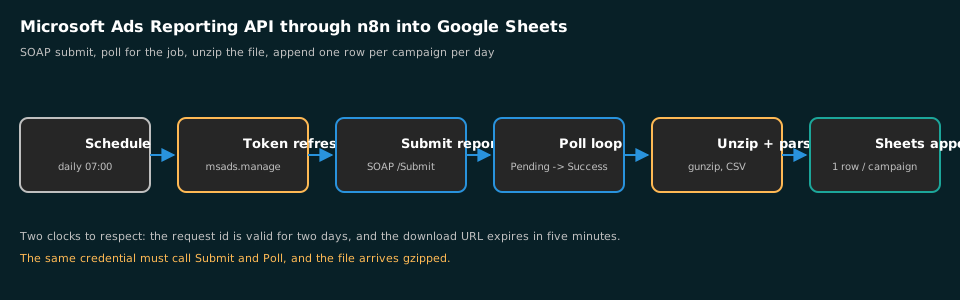
| Node | Job | Where beginners lose an hour |
|---|---|---|
| Schedule Trigger | Daily pull at 07:00 local | Polling once and treating Pending as failure |
| HTTP: token refresh | Exchanges the refresh token at the Microsoft token endpoint | Requesting consent with the legacy scope |
| HTTP: submit report | POSTs the SOAP envelope to GenerateReport/Submit | Sending a base ReportRequest object |
| Wait + HTTP: poll | Calls GenerateReport/Poll until Success | Polling with different user credentials |
| Execute Command: unzip | Gunzips the downloaded report file | Treating the download as CSV already |
| Extract From File: CSV | Turns the report file into items | Header row counting as a data row |
| Google Sheets: append | Writes one row per campaign per date | Column drift when metrics get added later |
The asymmetry worth naming: Google Ads hands you a paginated JSON response, Meta a cursor-paged Insights edge, and Microsoft a job. You never receive rows in the response that asked for them.
Step 1: How do you get tokens that the API accepts?
Two credential systems live in two different portals, and conflating them is the most common reason a first call fails. The Azure app registration proves your n8n instance may act as the user; the developer token identifies the application. The API checks both, plus the two account headers.
- Register an app in the Azure portal under App registrations, with a redirect URI of
https://login.microsoftonline.com/common/oauth2/nativeclient. - Sign in to Microsoft Advertising as a Super Admin and request the developer token from the Developer Portal.
- Drive the consent prompt with the scope
openid offline_access https://ads.microsoft.com/msads.manage, then redeem the returned code at theoauth2/v2.0/tokenendpoint withgrant_type=authorization_code. - Save
refresh_tokenas an n8n credential. Treat it like a password.
The scope is the trap, and it stays invisible because every connector on page one does this step for you. Microsoft’s documentation requires consent through msads.manage and states that tokens acquired through the older scopes will not be accepted. OAuth Playground, which we use in the Google Ads guide, has no Microsoft equivalent you can trust: its default scope list omits the ads resource. Build the consent URL by hand, once, and never paste a URL containing a code into a ticket.
Access tokens here are short lived, so the workflow refreshes on every run rather than caching one. That is what offline_access is for: without it no refresh token comes back and the pipeline dies within the hour.
Step 2: How do you submit a report job?
Microsoft’s reporting endpoint takes a SOAP envelope, not JSON. In the n8n HTTP Request node, choose Raw body, set Content Type to text/xml, and send these headers plus the envelope.
{
  "method": "POST",
  "url": "https://reporting.api.bingads.microsoft.com/Reporting/v13/GenerateReport/Submit",
  "headers": {
    "Content-Type": "text/xml",
    "SOAPAction": "SubmitGenerateReport",
    "Authorization": "Bearer {{$json.access_token}}",
    "DeveloperToken": "{{$credentials.devToken}}",
    "CustomerId": "{{$credentials.customerId}}",
    "CustomerAccountId": "{{$credentials.accountId}}"
  },
  "body": "<?= $json.soap ?>"
}
A campaign-level request looks like this, reduced to the elements that matter:
<?xml version="1.0" encoding="utf-8"?>
<s:Envelope xmlns:s="http://schemas.xmlsoap.org/soap/envelope/">
  <s:Body>
    <SubmitGenerateReportRequest xmlns="https://bingads.microsoft.com/Reporting/v13">
      <ReportRequest xmlns:i="http://www.w3.org/2001/XMLSchema-instance"
                     xmlns:a="https://bingads.microsoft.com/Reporting/v13">
        <a:AccountIds i:nil="false"><a:long>ACCOUNT_ID</a:long></a:AccountIds>
        <a:AdvertisingTimeZone i:nil="false">PacificStandardTime</a:AdvertisingTimeZone>
        <a:Columns>
          <a:ReportColumn>TimePeriod</a:ReportColumn>
          <a:ReportColumn>CampaignName</a:ReportColumn>
          <a:ReportColumn>Status</a:ReportColumn>
          <a:ReportColumn>Impressions</a:ReportColumn>
          <a:ReportColumn>Clicks</a:ReportColumn>
          <a:ReportColumn>Spend</a:ReportColumn>
          <a:ReportColumn>AverageCpc</a:ReportColumn>
          <a:ReportColumn>Conversions</a:ReportColumn>
        </a:Columns>
        <a:Format>Csv</a:Format>
        <a:ReportDateInterval>PreviousDay</a:ReportDateInterval>
        <a:ReportName>whtnxt-daily-campaign</a:ReportName>
        <a:ReportType>CampaignPerformanceReportRequest</a:ReportType>
        <a:ReturnOnlyCompleteData>false</a:ReturnOnlyCompleteData>
        <a:MergeStatisticCurrencies>false</a:MergeStatisticCurrencies>
      </ReportRequest>
    </SubmitGenerateReportRequest>
  </s:Body>
</s:Envelope>
Read the ReportType element as the row grain, exactly as you would read FROM campaign in the GAQL query of the Google Ads build. CampaignPerformanceReportRequest plus a TimePeriod column gives one row per campaign per day. Swap in KeywordPerformanceReportRequest for keyword grain, which is how you get the search-term-style tab our daily reporting dashboard reads.
Two rules from Microsoft’s docs decide whether the call works at all. The request and download guide states that you must create one of the objects derived from ReportRequest, and that passing the base object to SubmitGenerateReport makes the call fail. It also states the response is a ReportRequestId, not data. Point AdvertisingTimeZone at the account’s timezone, or your day boundary will not match the client’s UI.
Step 3: How do you poll without shooting yourself in the foot?
Polling has one rule that guarantees failure when missed: the same user credentials must be used for SubmitGenerateReport and PollGenerateReport. Microsoft’s PollGenerateReport reference says so explicitly, and it is the fault you get when a workflow refreshes the token between the two calls under a different user context. Refresh once at the top of the run and pass that one token to both nodes.
The endpoint is GenerateReport/Poll on the same host as Submit, with the same headers and SOAPAction: PollGenerateReport. Wrap the pacing in n8n’s loop rather than a sleep inside code: a Loop Over Items node, a Wait node between passes, the call, then an IF node on ReportRequestStatus.Status. Any status other than Pending or Success is a failure, so raise the error workflow instead of looping to a timeout.
Follow Microsoft’s pacing. The request and download guide recommends polling at two to 15-minute intervals and sets two clocks: the identifier is valid for two days, and you have five minutes to fetch the file once you hold its URL.
This Code node builds the envelope and returns a usable download URL:
const requestId = $('Submit report').first().json.requestId;
const body = '<?xml version="1.0" encoding="utf-8"?>' +
'<s:Envelope xmlns:s="http://schemas.xmlsoap.org/soap/envelope/"><s:Body>' +
'<PollGenerateReportRequest xmlns="https://bingads.microsoft.com/Reporting/v13">' +
'<ReportRequestId>' + requestId + '</ReportRequestId>' +
'</PollGenerateReportRequest></s:Body></s:Envelope>';
const resp = await this.helpers.httpRequest({
method: 'POST',
url: 'https://reporting.api.bingads.microsoft.com/Reporting/v13/GenerateReport/Poll',
headers: {
'Content-Type': 'text/xml',
'SOAPAction': 'PollGenerateReport',
'Authorization': 'Bearer ' + $('Token refresh').first().json.access_token,
'DeveloperToken': $env.MSA_DEV_TOKEN,
'CustomerId': $env.MSA_CUSTOMER_ID,
'CustomerAccountId': $env.MSA_ACCOUNT_ID
},
body
});
const status = (resp.match(/<Status>(\w+)<\/Status>/) || [])[1];
if (status !== 'Success') return [{ json: { status } }];
const raw = (resp.match(/<ReportDownloadUrl>(.*?)<\/ReportDownloadUrl>/) || [])[1];
// The URL arrives inside XML: entity-encoded separators must be decoded
return [{ json: { status, downloadUrl: raw.replace(/&/g, '&') } }];That & swap is not decoration. The URL arrives inside XML, so its query separators come back entity-encoded, and fetching the raw string returns a ResourceNotFound fault.
Step 4: How do you unzip the report and parse the CSV?
The report file is compressed, and Microsoft’s guide says you must unzip it before reading. This is why the build is self-hosted. Three nodes carry the file from URL to rows:
- HTTP Request with Response Format set to File, so the archive lands as binary on the item
- Execute Command on the VPS, which gunzips it:
gzip -dc /tmp/report.gz > /tmp/report.csv - Extract From File set to CSV with the header row enabled, reading the plain text back as items
The download node takes these options:
{
  "method": "GET",
  "url": "{{$json.downloadUrl}}",
  "options": {
    "response": { "response": { "responseFormat": "file" } }
  },
  "outputPropertyName": "report"
}
Then a Code node normalises the rows into the column order your workbook expects:
const num = (v) => Number(v || 0);
return $input.all().map(({ json: r }) => ({ json: {
  date: r.TimePeriod,
  engine: 'Microsoft Ads',
  campaign: r.CampaignName,
  status: r.Status,
  impressions: num(r.Impressions),
  clicks: num(r.Clicks),
  spend: num(r.Spend),
  avgCpc: num(r.AverageCpc),
  conversions: num(r.Conversions)
}}));
Two Microsoft quirks sit inside that mapping. Microsoft’s reporting column reference names the spend column Spend, not Cost, and the click cost column AverageCpc. Misspell a column in the submit request and the fault tells you nothing useful: the report still generates and the column you wanted simply is not there. And Spend can come back as an empty string for a campaign with impressions but no clicks, which is why every field above gets an explicit Number() with a fallback.
Step 5: How do you append to Sheets and schedule the run?
Point a Google Sheets node (operation: Append) at the flattened items and map date, engine, campaign, status, impressions, clicks, spend, avgCpc, conversions. Then the choices that keep the pipeline boring.
- Append, never overwrite. The tab becomes chartable history, which is what our Looker Studio bridge for Adtraction reads in exactly this way.
- Carry an engine column. One workbook holding Google, Meta and Microsoft rows is the entire point of the build. Filter on engine instead of maintaining three tabs.
- Schedule after 06:00 in the account’s timezone. Conversion lag revisits the trailing three days, and a too-early pull bakes soft numbers in permanently.
- Add an error workflow. A report stuck in Pending or an expired download URL both look like a quiet week in a sheet unless something shouts.
- Re-pull a rolling seven days. Microsoft’s docs expose
ReturnOnlyCompleteDataprecisely because partial data exists; treat trailing days as provisional in any chart you publish.
How do you verify the pull is correct?
Do not trust the first write until it reconciles against the source. Four checks, fifteen minutes.
- Spot-check one campaign-day. The Microsoft Advertising campaign report for the same date must show identical clicks, impressions and spend.
- Check the grain.
=COUNTIFS(A:A,"2026-11-15")should equal your active campaign count, not a multiple of it. A multiple means the run fired twice, which happens when a workflow is left live while you test it. - Check the day boundary. Compare one full week in the sheet with the UI’s weekly figure. A one-day offset is AdvertisingTimeZone disagreeing with the UI.
- Check the entity swap. Log the download URL on a run and confirm it holds bare
&characters before the GET.
Common mistakes
InvalidCredentialson every call: the consent was granted with the legacy scope, or the DeveloperToken, CustomerId and CustomerAccountId headers disagree about which customer owns the account.- A deserialization fault naming ReportRequest: you sent the base object instead of a derived request type such as
CampaignPerformanceReportRequest. ResourceNotFoundon the download URL: the&entities were never swapped for&, or more than five minutes passed after polling.- Rows stop mid-month: the identifier is valid for two days, so a workflow reusing an old request ID silently reports nothing.
- Empty file with a Success status: every column was valid but no data exists in that window. Normal for a paused account, not an error.
What else should you know before you build?
Is there an n8n Microsoft Ads node? No. A community node for the Microsoft Advertising API exists in the n8n registry, but it exposes Campaign Management operations rather than the asynchronous reporting flow. For daily reporting the HTTP build above is more honest than a wrapper you cannot debug when it changes.
Can this run on n8n Cloud? Not comfortably. The unzip step needs a shell, so Cloud builds should post the download URL to a self-hosted worker or move the workflow to a VPS. That constraint sits behind our n8n marketing automation engine too.
Does this work for agent accounts managing many clients? Yes, and AccountIds accepts several accounts in one request. That is the cheapest efficiency in the design: one job, one file, every client row, and a column to split them on. For warehouse scale, the n8n Google Ads-to-BigQuery build shows the load-job half.
Is it against Microsoft’s rules? No. Read-only reporting is the documented purpose of the Reporting API, and the sandbox exists so you can test without touching a live account.
Should you pay a connector for this?
For a small or mid-size DFW account, a per-seat connector subscription is the more expensive option even for Microsoft alone, because you pay forever for a pull you can own in an afternoon. That is the position I will defend against any agency that disagrees: Microsoft’s share of most local search budgets is small enough that no dashboard licence pays for itself.
It is still worth pulling, and that is where the DIY-versus-buy argument usually goes wrong. Teams skip the Bing and Edge column because it looks immaterial, then argue about budget allocation without the number that settles it. Our paid search management work and the free automation audit both start from that cross-engine comparison before anything gets built.
If you would rather not maintain SOAP plumbing yourself, our AI marketing automation engagements ship this reporting spine as part of the build, priced on the pricing page against the connector line item it replaces. If you need the call side of the funnel instead, the CallRail to Sheets build writes into the same tab, and the three automations list shows where this pipeline earns its place in a roadmap.