Lead Generation Automation: The Six-Step System I Run Live
A field-tested lead generation automation build: capture, enrich, score, route, nurture, track. Real stack costs and verified results from live client builds.

Edward Chalupa
Founder, Whtnxt · Dallas, TX

Lead generation automation is not a tool you buy. It is a chain of small decisions wired together so a stranger becomes a tracked opportunity without anyone remembering to follow up. Salesforce’s own research says reps spend only 30% of their time actually selling. The rest goes to hunting information, moving it between systems, and chasing follow-ups. This post is the exact chain I build for Texas small businesses: six steps, the checks each one has to pass, and what the whole stack costs in production.
What does this system need before you start?
Skip these prerequisites and the automation will not fail loudly. It will quietly drop the best leads you ever paid for. Before wiring anything, get these five things written down.
- A capture inventory. Every place a stranger can leave you their contact details: the contact form, quote request, live chat, service area pages, the phone number in Google Ads.
- One destination of truth. A single CRM record is the official version of every lead. Mine is a self-hosted Twenty CRM instance, and a lead routing build for it handles three different web forms without breaking.
- A scoring rubric on paper. Fit signals (who they are) and intent signals (what they did), each worth a stated number of points. No spreadsheet, no argument later about why a lead felt cold.
- Routing thresholds and owners. A score above what number pages a human, and which human gets paged.
- A response-time promise. A five-minute response target and a five-minute alert path are what turn automation into revenue.
One more thing you need: a workflow engine that self-hosts, so a lead spike does not become an invoice spike. The n8n cloud plans start at $24 a month, or $20 on annual billing, and the self-hosted Community Edition is free on a server you already pay for.
The pattern below assumes you have those items. If you do not, the honest first step is a process audit before any tooling. My free automation audit scorecard exists for exactly that reason, and you can do a cheap version yourself with a whiteboard and one week of lead history.
Step 1: Where do your leads actually enter?
Every form, chat transcript, and missed-call record should hit one webhook, on one engine, in one format. The failure mode I see constantly is two forms writing to two places. One is checked daily, and leads in the other are found in bulk months later, or never.
Here is the shape of the front door:
- The form posts to an n8n webhook.
- A Set node normalizes the payload: names, emails, phone numbers, source page, campaign parameters.
- The normalized record continues down the chain from step 2.
Do not build cleverness into the front door. Its only jobs are to never drop a submission and to always emit the same shape. Webhook delivery through a tunnel arrives well inside a second, which is irrelevant next to how slow humans are at follow-up. Whatever route your leads take, the point of a lead generation service page with a single form is that volume funnels through it and gets counted once.
Track the source at this step or lose it forever. A gclid parameter on a paid click and a landing-page URL on an organic click are the difference between knowing which keywords book jobs and guessing. The loud version of this lesson is documented in the HVAC system build, where the client’s best-paying and worst-paying keywords looked identical on a whiteboard.
Step 2: Does a raw lead belong in your CRM?
No. A raw form submission is a liability: a string that is only useful while it is still fresh. Enrichment at the webhook costs seconds. Backfilling it a week later costs a person with a spreadsheet and produces a worse result.
At minimum, before your CRM sees the lead:
- Trim and lowercase emails, then check for duplicates against existing contacts.
- Normalize phone numbers to one format so call-tracking records match form records.
- Append company, industry, and size from the email domain where the data exists.
- Stamp source and campaign IDs into fields the sales team will actually see.
One small-business reality: many of your best leads arrive from a free email domain with no corporate footprint. Enterprise enrichment tools return nothing on them, and a naive pipeline scores them as worthless. I add an explicit fallback so solo operators, a real segment in DFW, do not silently score zero. That production lesson is written up in the Twenty CRM post.
Step 3: Can your scoring rubric survive an argument?
Scoring is the step everyone improvises, and it is the one where automation earns its keep: a human rater applies judgment differently at 4pm than at 9am, and a workflow is consistent. The rubric itself is not exotic: dimensions of fit and intent, each weighted, summed into one number.
What makes a rubric defensible is that each point has a sentence behind it. Why does a quote request beat a newsletter signup? What does an after-hours call mean for urgency? The full model I deploy, tuned across live client pipelines, is documented in the lead scoring build in n8n, which also carries the calibration loop: after a month, compare conversion rates per score bucket and move the thresholds that lie.
Two rules that save you from the classic scoring failures:
- Start with two dimensions, not five. More dimensions on day one is noise with a decimal point.
- Never let a warm referral bypass qualification. A short forwarded message scores modestly until it shows intent.
Here is a position I will defend against any vendor: an automation that cannot tell a booked job from a tire-kicker is just a faster way to waste your week. Volume without triage is the most common expensive failure I audit.
Step 4: How should routing decide who gets paged?
Routing is where the latency of the system shows up in revenue. In client deployments, the lead routing workflow moves a form submission into an assigned CRM pipeline in under three seconds, end to end, and every timing in that build is itemized in the workflow post itself. Hot-tier leads also fire an instant alert to a phone, because a CRM record nobody opens is not a notification.
The routing logic that ships:
- Hot: above the threshold, page a named person now, with source and message in the alert.
- Warm: to the CRM with standard priority, into step 5’s nurture track.
- Cold: to a spreadsheet and the long nurture list, reviewed in batch.
- Any failure: to a dead-letter queue, checked weekly. A lead that errors out must not vanish.
That dead-letter queue is the least glamorous and most valuable node in the whole chain. Every pipeline I inherit from a previous contractor is missing it. If your automation has no failure path, it has a leak with your name on the revenue.
Step 5: What happens to leads sales will not touch?
Routing decides who talks to whom. Nurture decides what happens to everyone else, which in most small businesses is most of the list. Nurture is not spam with a schedule attached. It is one useful message at a time, triggered by behavior, with an obvious exit when the lead raises a hand.
The build I deploy in DFW is n8n orchestrating Listmonk campaigns with behavior triggers. Two properties matter more than copy polish:
- Every meaningful action (opened three, clicked pricing, requested a quote) re-routes the lead. A click on pricing should pull a lead out of the drip and into the hot path, same day.
- Replies are classified, and anything not explicitly negative pings a human. A positive reply sitting unread for days is a failure no dashboard metric will surface.
Keep the sequence short. Three useful touches beat a ten-email autoresponder nobody reads. The job of nurture is to be present when the buying window opens. The windows I see in local service businesses are measured in hours, not quarters.
Step 6: Are you tracking leads or booked jobs?
This is where most lead gen automations quietly deserve their bad reputation: they optimize form-fill volume, and nobody looks at booked jobs. The system I built for a Plano HVAC contractor is the proof that fixing the tracking is the automation. That account treated every call the same while pouring a fixed monthly Google Ads budget down the funnel, its exact monthly spend itemized in the opening of that build post. The rebuild added call recording, per-keyword attribution and intent scoring on $55.40 a month of software, both figures itemized in the HVAC system post. Cost per call fell from $87.50 to $54 without touching the ad budget, the result recorded in the same build post.
That result came from the boring layers, in this order:
- Attribute every lead to a keyword or campaign at the front door (step 1).
- Record calls and score intent automatically (steps 2 and 3).
- Feed booked-job outcomes back into the score and into the ad platform.
The reporting loop does not need a BI team. A weekly n8n job pulling scores, outcomes and sources into one sheet closes the loop, and that pattern is written up in the automated reporting build.
What does the stack actually cost?
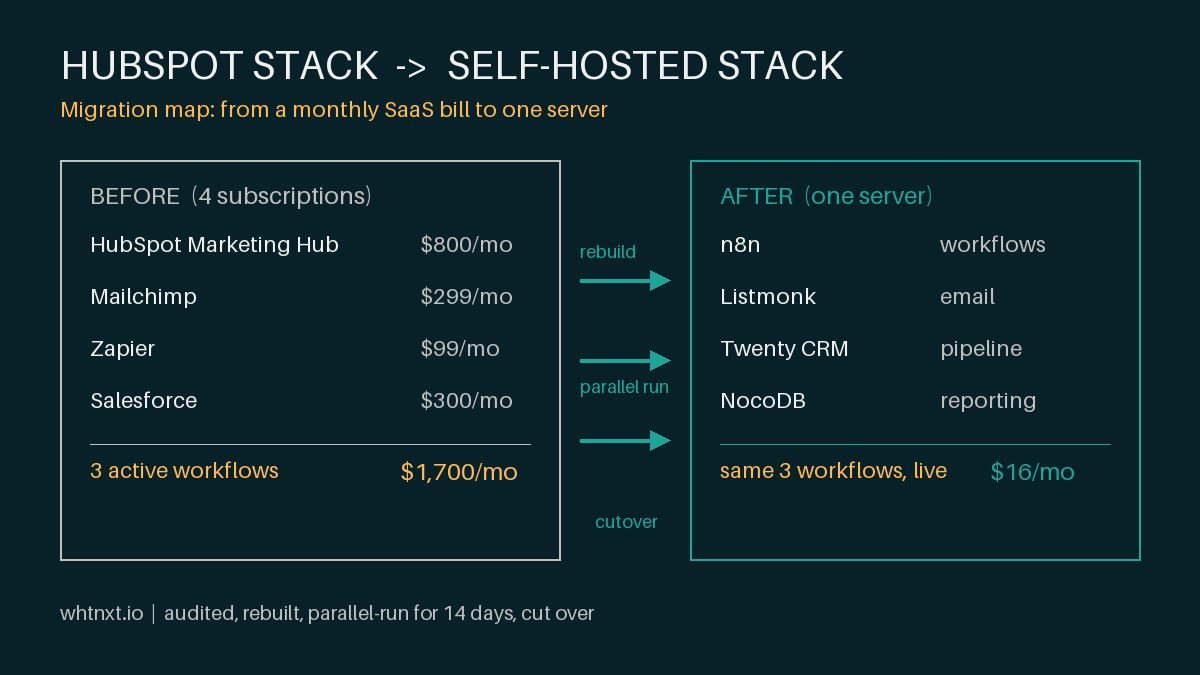
Marketing automation vendors price for enterprise sales teams. The same chain, self-hosted, is a rounding error, and I publish the real number: the managed stack runs at $68 per client across eight Texas businesses, replacing the SaaS bill that post itemizes line by line. For comparison, HubSpot Marketing Hub Professional starts at $890 a month for a single brand. The table is the honest comparison at the scale I work in.
| Layer | Production stack | Source of the figure | What it does |
|---|---|---|---|
| Capture + routing engine | n8n | $20 a month cloud, free self-hosted | Webhook front door, normalization, routing |
| CRM destination | Twenty CRM | ~$10 a month on a shared VPS | Single source of truth, pipeline view |
| Call tracking + recording | Twilio | ~$35 a month at service volume | Per-keyword attribution, intent from recordings |
| Nurture engine | Listmonk | Free self-hosted software | Behavior-triggered email, reply handling |
| Reporting | n8n + Google Sheets | No extra tool cost | Weekly score-to-outcome loop |
The cost that matters is the other kind: what you currently pay for the missed after-hours call, the reply nobody classified, and the keyword nobody attributed. No vendor table shows that number, which is why nobody prices it. If you are weighing a build against a retainer, the marketing automation service page states what an engagement covers, and the pricing page states what it costs before you ever book a call.
How do you verify the system works?
Do not call the automation live until it survives this test. Submit one fake lead per tier, on purpose:
- Hot-path test: submit a full quote request with a phone number. A named person should be alerted and a CRM record created in seconds, not minutes.
- Warm-path test: submit a partial form with a free-domain email. The fallback should score it, route it to nurture, and never drop it for missing data.
- Failure-path test: point the CRM leg at a bad endpoint and submit. The lead must land in the dead-letter queue. If it disappears, you just found the leak before your customers did.
Then watch the loop for a week: for each score bucket, what actually converted? Move any threshold the outcomes contradict. This is the same verification discipline I apply to ad accounts, and the Fort Worth PPC vetting guide has the provider-side version of the same checklist.
Common questions
Do I need a CRM before automating? No. A spreadsheet destination is fine while you validate volume. The routing chain is the same, and swapping the destination later is a one-node change. That is exactly how the NocoDB-backed routing client started.
What if I get too few leads to score meaningfully? Then skip scoring weights and use a simple intent split: quote requests to humans, everything else to nurture. Calibration earns its cost only when outcomes accumulate.
Does AI belong in this chain? In exactly two places, for now: classifying inbound replies and drafting nurture emails a human edits. Keep it away from deciding who gets contacted and who never is. An AI marketing automation engagement is where that line gets drawn professionally.
How long does the whole build take? The routing chain is a weekend job if the engine already runs. The HVAC system, with call tracking and the reporting loop, took three weeks of iteration, stated in the build post.
What to do next
If you have a form and maybe a CRM, your first real move is the capture inventory and the rubric on paper. Tools are the cheap part; the defensible rubric is the work. If you would rather have the chain built and verified against the test above, that is the scope of my lead generation work, from audit to a live routing pipeline with the money end tracked. Automate the follow-up before you automate the outreach. The leads you already pay for are the cheapest pipeline you will ever own.