Marketing Automation Tools: The 5-Step Process I Use to Pick a Stack
Marketing automation tools all demo the same. Here is the 5-step evaluation I run on every client stack, with the real costs vendors keep off the pricing page.

Edward Chalupa
Founder, Whtnxt · Dallas, TX

Every marketing automation tool demo looks identical: clean dashboards, instant workflows, one click to everything. Then a real lead lands at 9 pm and the bill starts counting tasks. I build automation stacks for Texas service businesses. This is the five-step evaluation I run before any tool enters a client stack, with the numbers vendors keep off the pricing page.
What do you need before you start evaluating?
The mistake I see most is opening a vendor page first. The tool then sets the frame for the entire evaluation. Before you read a single feature list, write down four things.
| Item | Why it decides the tool |
|---|---|
| Your lead volume per month | Contact and task pricing is where budgets die |
| Your three real workflows | Demo features beyond these are marketing |
| Your data owner | The CRM usually stays the source of truth |
| Your honest admin hours | A tool nobody maintains becomes a second inbox |
My lead generation automation guide covers the chain these tools have to carry: capture, qualify, route, follow up, report. If a candidate cannot run that chain unattended, stop reading its feature list. The same capture-to-close chain is what I build inside the lead generation service, which is why I evaluate candidates against that chain rather than a feature grid. Keep the table beside you for every vendor call. Its rows outrank any G2 badge.
Step 1: What workflows will you actually build?
List the automations you will actually build in the next 90 days. Not the ones the sales rep shows you. Most service businesses I audit run three chains and ignore the rest of the platform.
Write each chain in this format: trigger, decision, action, owner. A real example from a plumbing account: form submit, service-area check, text the on-call tech plus log to the CRM, office manager reviews. That one chain killed two candidate tools during pilots. One could not text a rotating on-call number. The other logged to its own database and left the CRM stale.
This step also kills the “we might need it someday” category. Broadcast SMS in six months is a real requirement. A native meeting scheduler for a business that books by phone is not. The seven questions I ask any platform vendor runs well here too, because the answers land in writing before a demo can color them.
Step 2: What does this stack cost at your volume?
Vendors price on tiers. You pay on behavior. Take your Step 1 chains and count what they actually consume: contacts touched, messages sent, and workflow runs per month. Then read three pricing pages with those numbers in hand.
The spread is enormous at the same feature set. HubSpot Marketing Hub Professional starts at $890 a month for one brand. Zapier’s professional plans start from $19.99 a month and count every task instead. And n8n’s documentation states the self-hosted edition is free to run on hardware you already own.
Now the trap. A per-task tool charging pennies per run looks cheap until a reporting workflow touches every contact nightly. Multiply leads by chains and the task count explodes past anything the pricing page made you imagine. A flat platform fee can beat it by an order of magnitude, and the reverse is also true at low volume. Price both curves on paper before you trust either pitch. I will defend one position here: for any business whose reporting touches the full contact list nightly, a flat server bill beats per-task billing, and I have the client invoices to argue it with.
| Pricing model | Watch this line item |
|---|---|
| Per contact | Contacts synced twice count twice |
| Per task or action | Loops and retries multiply silently |
| Per seat | Growth means hiring, and hiring means a new tier |
| Flat server cost | You pay in maintenance hours instead of invoices |
My own arithmetic on this came out ugly in the honest direction. Eight Texas businesses once paid separately for overlapping tools, and the stack audit post itemizes the combined bill line by line. One all-in-one platform in that tally could not even route leads by geography.
Step 3: Who owns your data when you leave?
Every tool promises easy import. Test the exit instead. Ask the vendor, in writing, what exports cleanly: contacts, activity history, workflow logic, and reporting data. Then ask what does not.
Two rules carry most of the weight here. The CRM stays the source of truth, so any tool that wants to become your CRM is asking for a merger you did not schedule. And workflow logic is the asset, not the data. Losing a list is annoying. Losing the only copy of how your follow-up works rebuilds tribal knowledge from scratch.
A tool that reads from your CRM and writes back to it can be swapped in an afternoon. A tool that becomes the mailbox, the pipeline, and the report is a moving project. When a self-hosted CRM replaced a paid one on a client account, the schema decision made before migration was worth more than the software choice. The same principle scores every candidate here.
Step 4: Can the chain survive real leads for two weeks?
A demo proves the tool works on the demo data. A pilot proves it survives your data. Pick the ugliest real workflow from Step 1, point it at live traffic, and touch nothing for two weeks.
During every pilot I check the same three failure modes:
- Silent skips. A branch with no match drops the lead and logs nothing. Push one deliberately weird lead through on purpose: out-of-area, empty phone, duplicate email.
- Duplicate storms. Test what happens when the same lead fills the form twice in five minutes. Vendor answers on this question are wildly inconsistent.
- Idle behavior. The chain that only fires on weekends is the one that breaks unnoticed for nine days.
Write down every minute you spend steering the tool around itself. Those minutes are part of the price. A platform that needs you daily is a hire, not a subscription, and the n8n engine post shows what genuinely unattended looks like: nine workflows, checked weekly, not daily.
Step 5: Buy, hybrid, or self-hosted: which does the pilot point to?
Three honest answers come out of a real pilot, and each maps to a different stack.
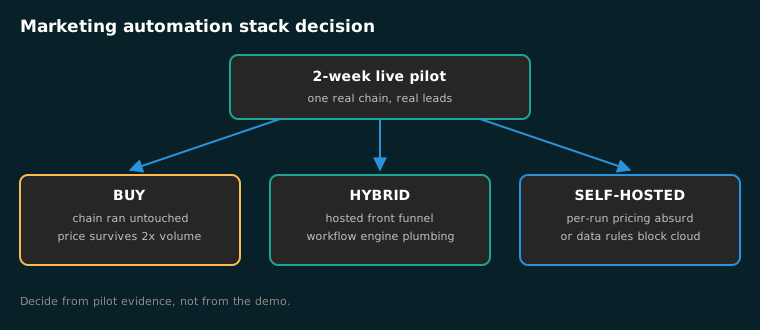
Buy when a mainstream tool ran your chain untouched and the price curve survives your volume math. This is the right answer more often than builders admit, and it should be your default: self-hosting is a last resort earned by pilot evidence, not an aspiration to plan around. My open-source marketing stack rundown recommends tool by tool rather than wholesale for exactly this reason.
Hybrid when a hosted tool handles the front of the funnel and a workflow engine owns the plumbing. This is where I live. Email and ads stay on their native platforms because deliverable rates and API access live there. Routing, logging, and reporting run on n8n where the per-task math used to punish it.
Self-hosted when volume makes per-run pricing absurd or when data rules block the cloud. My standard client build runs one self-hosted stack for $68 per client a month, and the marginal cost of a ninth client on the same server is one new database view plus a phone number. If the ops side sounds like more than you want to own, the marketing automation service page is where I take that over.
The comparison that decides it is never features. It is total cost at your volume, once, versus total cost every month after. That is also the line to bring into any vendor negotiation, and the pricing page reflects the same build-versus-buy logic in plain dollars.
How do you verify the choice worked after 30 days?
A correct selection reveals itself in the first month. Run this check at day 30 before you let anyone standardize on the tool.
- Every lead from the last 30 days exists in the CRM exactly once, with source attribution intact.
- The chain ran unattended through at least one weekend and one holiday.
- A weird lead (missing fields, duplicate, out of area) either processed correctly or alerted someone.
- You can export contacts and activity in a format a human can open, today.
- The invoice matches the Step 2 math with no surprise line items.
- The busiest person in your office can name the owner of every failed step.
If two boxes fail, fix the setup before blaming the tool. If four fail, the vendor failed the Step 4 pilot and the invoice is already spent. That is why the pilot came first.
Which selection mistakes show up most often?
Choosing on the reporting dashboard. Reports are the cheapest feature to fake in a demo and the most expensive to rebuild when the export is thin. My n8n reporting dashboard build exists because vendor reporting always loses to a sheet you own.
Buying the enterprise tier “to be safe.” The tier you need is the one that covers your Step 2 math plus double your current volume. Everything above that funds someone else’s roadmap.
Waiting for consensus. Tool selection is one of the few decisions where a written pilot outcome beats a committee. I have watched selection debates outlive three products. The pilot ends the argument with data, which is exactly what the HubSpot replacement playbook walks through migration-by-migration when the incumbent has already failed.
Which questions come up before you buy?
What is the best marketing automation tool for a small service business? The one that runs your three real chains unattended at a price that survives doubling your lead volume. For a solo shop that is often one email platform plus one form tool. The Step 2 pricing curve beats any generic ranking.
Should I use AI features as a buying criterion? Only where they save you a step you actually perform today. I test AI features the same way as everything else: one real chain, two weeks, live traffic. If it needs supervision, it is a cost, and the AI marketing automation service exists because supervised AI is just unpaid work.
Is self-hosting worth it for a small list? Usually not yet. At low volume, per-run pricing barely registers and your hours cost more than the invoice. The switch earns its keep when volume or data rules force it.
Picking tools is the easy half. Making the stack run unattended for a year is the contract I actually sign with clients. If you would rather skip the five steps, the automation audit scores your current stack against this exact process in one call.